HandlebarsPDF
Vertrauliche Gehaltsabrechnung mit Passwort
Zwei Post-Processing-Schritte in einer Anfrage: eine rote Markierung CONFIDENTIAL auf jeder Seite, danach AES-256-Verschlüsselung mit dem Passwort der Mitarbeiterin oder des Mitarbeiters; Drucken ist erlaubt, Kopieren und Bearbeiten nicht. Das Passwort landet nie im Render-Log. Der Download öffnet sich mit dem Passwort formfeed. Eine Einheit für die Seite plus je eine halbe Einheit pro Schritt.
Kostenloser Plan, keine Kreditkarte. Sie erhalten eine eigene Kopie im Editor, veröffentlicht und bereit für die API.
Gerendertes Ergebnis
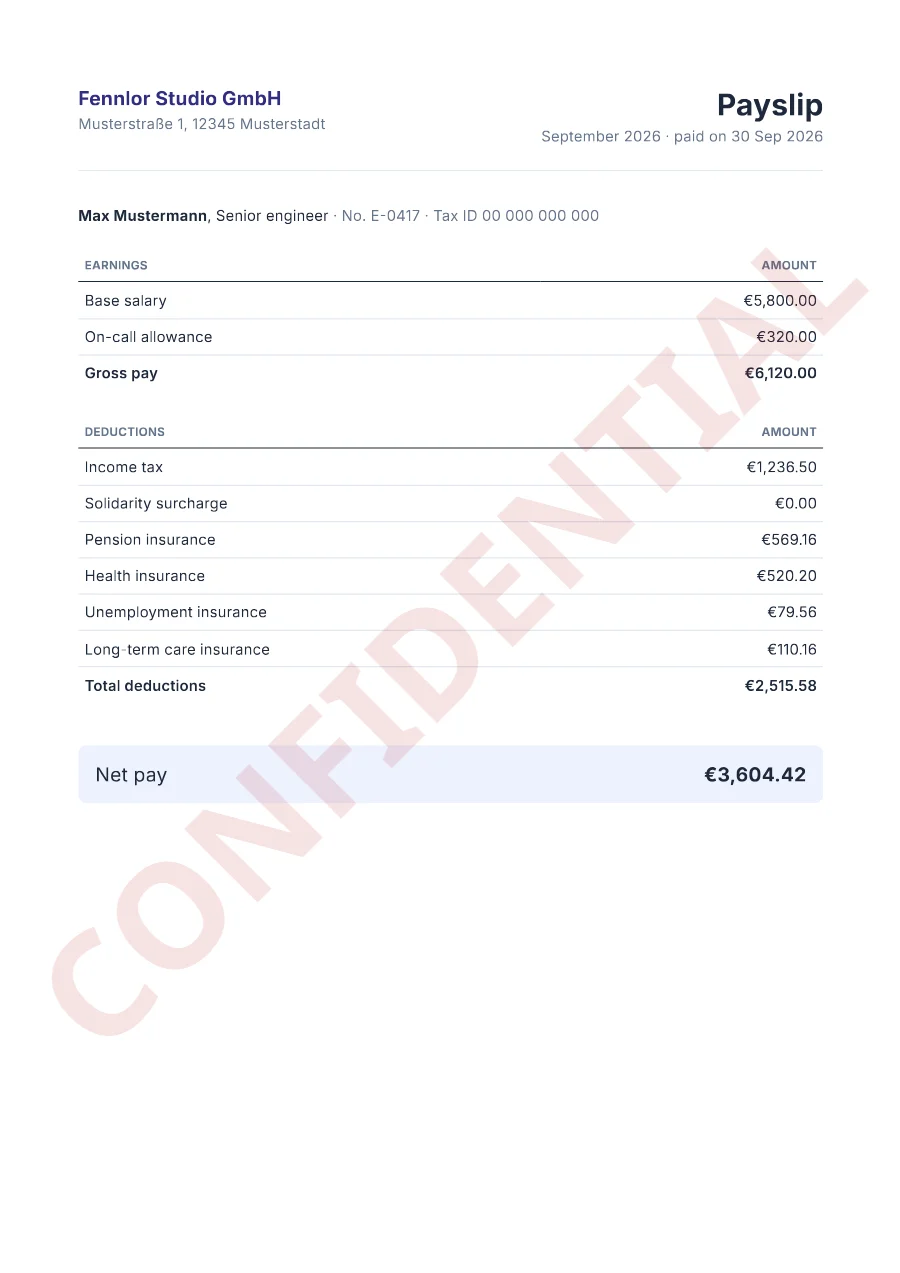
formfeedWas dieses Beispiel zeigt
- Zwei Post-Processing-Schritte in einer Anfrage, in fester Reihenfolge: erst das Wasserzeichen, zuletzt das Passwort, denn ein verschlüsseltes PDF lässt sich nicht mehr ändern.
password.useröffnet das Dokument, undpermissions: ["print"]erlaubt das Drucken, während Kopieren und Bearbeiten gesperrt bleiben. Die Beispieldatei öffnet sich mitformfeed; im Betrieb ist es das eigene Passwort der Person.- Das Passwort landet nie im Render-Log.
- Handlebars verschachtelt Helfer in Klammern:
{{money (sum earnings "amount")}}addiert die Bezüge und formatiert das Ergebnis. - Mit einem Live-Schlüssel eine Einheit für das PDF (bis fünf Seiten) plus je eine halbe Einheit pro Post-Processing-Schritt: zwei Einheiten für diese Anfrage. Post-Processing gehört zum Starter-Plan und darüber.
Verwendete Helfer
Vorlagenordner
<header>
  <div>
    <p class="brand">{{company.name}}</p>
    <p class="muted">{{company.street}}, {{company.city}}</p>
  </div>
  <div class="period">
    <h1>Payslip</h1>
    <p class="muted">{{date period.month "MMMM yyyy"}} · paid on {{date period.paid_on "d MMM yyyy"}}</p>
  </div>
</header>

<section class="employee">
  <strong>{{employee.name}}</strong>, {{employee.role}}
  <span class="muted">· No. {{employee.number}} · Tax ID {{employee.tax_id}}</span>
</section>

<table>
  <thead><tr><th>Earnings</th><th class="num">Amount</th></tr></thead>
  <tbody>
    {{#each earnings}}
    <tr><td>{{label}}</td><td class="num">{{money amount}}</td></tr>
    {{/each}}
  </tbody>
  <tfoot><tr><td>Gross pay</td><td class="num">{{money (sum earnings "amount")}}</td></tr></tfoot>
</table>

<table>
  <thead><tr><th>Deductions</th><th class="num">Amount</th></tr></thead>
  <tbody>
    {{#each deductions}}
    <tr><td>{{label}}</td><td class="num">{{money amount}}</td></tr>
    {{/each}}
  </tbody>
  <tfoot><tr><td>Total deductions</td><td class="num">{{money (sum deductions "amount")}}</td></tr></tfoot>
</table>

<p class="net">Net pay <strong>{{money net}}</strong></p>body { font-family: 'Inter', sans-serif; font-size: 10pt; color: #1e293b; }
header { display: flex; justify-content: space-between; align-items: flex-start; padding-bottom: 6mm; border-bottom: 1px solid #e2e8f0; }
.brand { margin: 0; font-size: 13pt; font-weight: 700; color: #312e81; }
.muted { margin: 1mm 0 0; color: #64748b; }
.period { text-align: right; }
h1 { margin: 0; font-size: 20pt; }
.employee { margin: 8mm 0 2mm; }
table { width: 100%; margin-top: 6mm; border-collapse: collapse; }
th { padding: 2mm 1.5mm; border-bottom: 1.5px solid #1e293b; text-align: left; font-size: 8pt; text-transform: uppercase; color: #64748b; }
td { padding: 2mm 1.5mm; border-bottom: 1px solid #e2e8f0; }
tfoot td { border-top: 1px solid #1e293b; border-bottom: 0; font-weight: 600; }
.num { text-align: right !important; white-space: nowrap; }
.net { display: flex; justify-content: space-between; margin-top: 10mm; padding: 4mm; border-radius: 2mm; background: #eef2ff; font-size: 13pt; }<link rel="stylesheet" href="https://fonts.googleapis.com/css2?family=Inter:wght@400;600;700&display=swap">{
"pdf": {
"metadata": {
"title": "Payslip"
}
},
"paper": {
"format": "A4"
},
"margin": {
"top": "20mm",
"right": "18mm",
"bottom": "20mm",
"left": "18mm"
},
"locale": "en-GB",
"currency": "EUR"
}{
"company": {
"name": "Fennlor Studio GmbH",
"street": "Musterstraße 1",
"city": "12345 Musterstadt"
},
"employee": {
"name": "Max Mustermann",
"number": "E-0417",
"role": "Senior engineer",
"tax_id": "00 000 000 000"
},
"period": {
"month": "2026-09-01",
"paid_on": "2026-09-30"
},
"earnings": [
{
"label": "Base salary",
"amount": 5800
},
{
"label": "On-call allowance",
"amount": 320
}
],
"deductions": [
{
"label": "Income tax",
"amount": 1236.5
},
{
"label": "Solidarity surcharge",
"amount": 0
},
{
"label": "Pension insurance",
"amount": 569.16
},
{
"label": "Health insurance",
"amount": 520.2
},
{
"label": "Unemployment insurance",
"amount": 79.56
},
{
"label": "Long-term care insurance",
"amount": 110.16
}
],
"net": 3604.42
}Über die API rendern
Speichern Sie die Beispieldaten als data.json und senden Sie sie mit dem Namen der Vorlage. TypeScript und Python nutzen die SDKs; jede andere Sprache schickt dasselbe JSON mit ihrer Standardbibliothek an die REST-API. Post-Processing setzt den Starter-Plan oder höher voraus: Der Free-Plan antwortet mit 403, auch bei einem Test-Schlüssel. Renderings mit einem Schlüssel, der mit ff_test_ beginnt, werden nicht gezählt.
jq '{template: "payslip", data: ., filename: "payslip-E-0417-2026-09.pdf", post: {watermark: {text: "CONFIDENTIAL", color: "#b91c1c", opacity: 0.12}, password: {user: "formfeed", permissions: ["print"]}}}' data.json \
  | curl https://api-eu.formfeed.dev/v1/renders \
      -H "Authorization: Bearer ff_live_..." \
      -H "Content-Type: application/json" \
--data-binary @-import { Formfeed } from '@formfeed/sdk';
import data from './data.json' with { type: 'json' };
const formfeed = new Formfeed({ apiKey: process.env.FORMFEED_API_KEY! });
const render = await formfeed.renders.create({
template: 'payslip',
data,
filename: 'payslip-E-0417-2026-09.pdf',
post: {
watermark: { text: 'CONFIDENTIAL', color: '#b91c1c', opacity: 0.12 },
password: { user: 'formfeed', permissions: ['print'] },
},
});
console.log(render.status, render.download_url);import json
import os
from formfeed import Formfeed
formfeed = Formfeed(api_key=os.environ["FORMFEED_API_KEY"])
with open("data.json", encoding="utf-8") as file:
data = json.load(file)
render = formfeed.renders.create(
template="payslip",
data=data,
filename="payslip-E-0417-2026-09.pdf",
post={
"watermark": {"text": "CONFIDENTIAL", "color": "#b91c1c", "opacity": 0.12},
"password": {"user": "formfeed", "permissions": ["print"]},
},
)
print(render.status, render.download_url)<?php
$body = [
'template' => 'payslip',
'data' => json_decode(file_get_contents('data.json'), true),
'filename' => 'payslip-E-0417-2026-09.pdf',
'post' => [
'watermark' => ['text' => 'CONFIDENTIAL', 'color' => '#b91c1c', 'opacity' => 0.12],
'password' => ['user' => 'formfeed', 'permissions' => ['print']],
],
];
$curl = curl_init('https://api-eu.formfeed.dev/v1/renders');
curl_setopt_array($curl, [
CURLOPT_POST => true,
CURLOPT_RETURNTRANSFER => true,
CURLOPT_HTTPHEADER => [
'Authorization: Bearer ' . getenv('FORMFEED_API_KEY'),
'Content-Type: application/json',
],
CURLOPT_POSTFIELDS => json_encode($body),
]);
$render = json_decode(curl_exec($curl), true);
echo $render['status'], ' ', $render['download_url'], PHP_EOL;package main
import (
"bytes"
"encoding/json"
"fmt"
"net/http"
"os"
)
func main() {
data, err := os.ReadFile("data.json")
if err != nil {
panic(err)
}
body, _ := json.Marshal(map[string]any{
"template": "payslip",
"data": json.RawMessage(data),
"filename": "payslip-E-0417-2026-09.pdf",
"post": map[string]any{
"watermark": map[string]any{"text": "CONFIDENTIAL", "color": "#b91c1c", "opacity": 0.12},
"password": map[string]any{"user": "formfeed", "permissions": []any{"print"}},
},
})
request, _ := http.NewRequest("POST", "https://api-eu.formfeed.dev/v1/renders", bytes.NewReader(body))
request.Header.Set("Authorization", "Bearer "+os.Getenv("FORMFEED_API_KEY"))
request.Header.Set("Content-Type", "application/json")
response, err := http.DefaultClient.Do(request)
if err != nil {
panic(err)
}
defer response.Body.Close()
var render struct {
Status string `json:"status"`
DownloadURL string `json:"download_url"`
}
json.NewDecoder(response.Body).Decode(&render)
fmt.Println(render.Status, render.DownloadURL)
}using System.Net.Http.Headers;
using System.Net.Http.Json;
using System.Text.Json;
var body = new
{
template = "payslip",
data = JsonDocument.Parse(File.ReadAllText("data.json")).RootElement,
filename = "payslip-E-0417-2026-09.pdf",
post = new {
watermark = new { text = "CONFIDENTIAL", color = "#b91c1c", opacity = 0.12 },
password = new { user = "formfeed", permissions = new[] { "print" } },
},
};
using var http = new HttpClient();
http.DefaultRequestHeaders.Authorization =
new AuthenticationHeaderValue("Bearer", Environment.GetEnvironmentVariable("FORMFEED_API_KEY"));
var response = await http.PostAsJsonAsync("https://api-eu.formfeed.dev/v1/renders", body);
var render = await response.Content.ReadFromJsonAsync<JsonElement>();
Console.WriteLine($"{render.GetProperty("status")} {render.GetProperty("download_url")}");import java.net.URI;
import java.net.http.HttpClient;
import java.net.http.HttpRequest;
import java.net.http.HttpResponse;
import java.nio.file.Files;
import java.nio.file.Path;
public class Render {
public static void main(String[] args) throws Exception {
String data = Files.readString(Path.of("data.json"));
String body = """
{
"template": "payslip",
"filename": "payslip-E-0417-2026-09.pdf",
"post": {"watermark":{"text":"CONFIDENTIAL","color":"#b91c1c","opacity":0.12},"password":{"user":"formfeed","permissions":["print"]}},
"data": %s
}
""".formatted(data);
HttpRequest request = HttpRequest.newBuilder(URI.create("https://api-eu.formfeed.dev/v1/renders"))
.header("Authorization", "Bearer " + System.getenv("FORMFEED_API_KEY"))
.header("Content-Type", "application/json")
.POST(HttpRequest.BodyPublishers.ofString(body))
.build();
HttpResponse<String> response = HttpClient.newHttpClient().send(request, HttpResponse.BodyHandlers.ofString());
System.out.println(response.body()); // status, download_url, page_count, units …
}
}require "json"
require "net/http"
body = {
template: "payslip",
data: JSON.parse(File.read("data.json")),
filename: "payslip-E-0417-2026-09.pdf",
post: {
watermark: { text: "CONFIDENTIAL", color: "#b91c1c", opacity: 0.12 },
password: { user: "formfeed", permissions: ["print"] },
},
}
response = Net::HTTP.post(
URI("https://api-eu.formfeed.dev/v1/renders"),
JSON.generate(body),
"Authorization" => "Bearer #{ENV.fetch("FORMFEED_API_KEY")}",
"Content-Type" => "application/json"
)
render = JSON.parse(response.body)
puts render["status"], render["download_url"]Heute mit dem Rendern beginnen
Der kostenlose Plan enthält 100 Einheiten im Monat und kostenlose Testrenderings. Wechseln Sie den Plan, wenn Sie mehr brauchen.