HandlebarsPDF
Lebenslauf mit Seitenleiste und Kompetenzbewertung
Ein einseitiger Lebenslauf in zwei Spalten bis an den Rand. Die Vorlage sortiert die Stationen nach Beginn, die Daten dürfen also in beliebiger Reihenfolge kommen, schreibt „present“ für eine Stelle ohne Enddatum und zeichnet jede Bewertung mit range und lt als fünf Punkte.
Kostenloser Plan, keine Kreditkarte. Sie erhalten eine eigene Kopie im Editor, veröffentlicht und bereit für die API.
Gerendertes Ergebnis
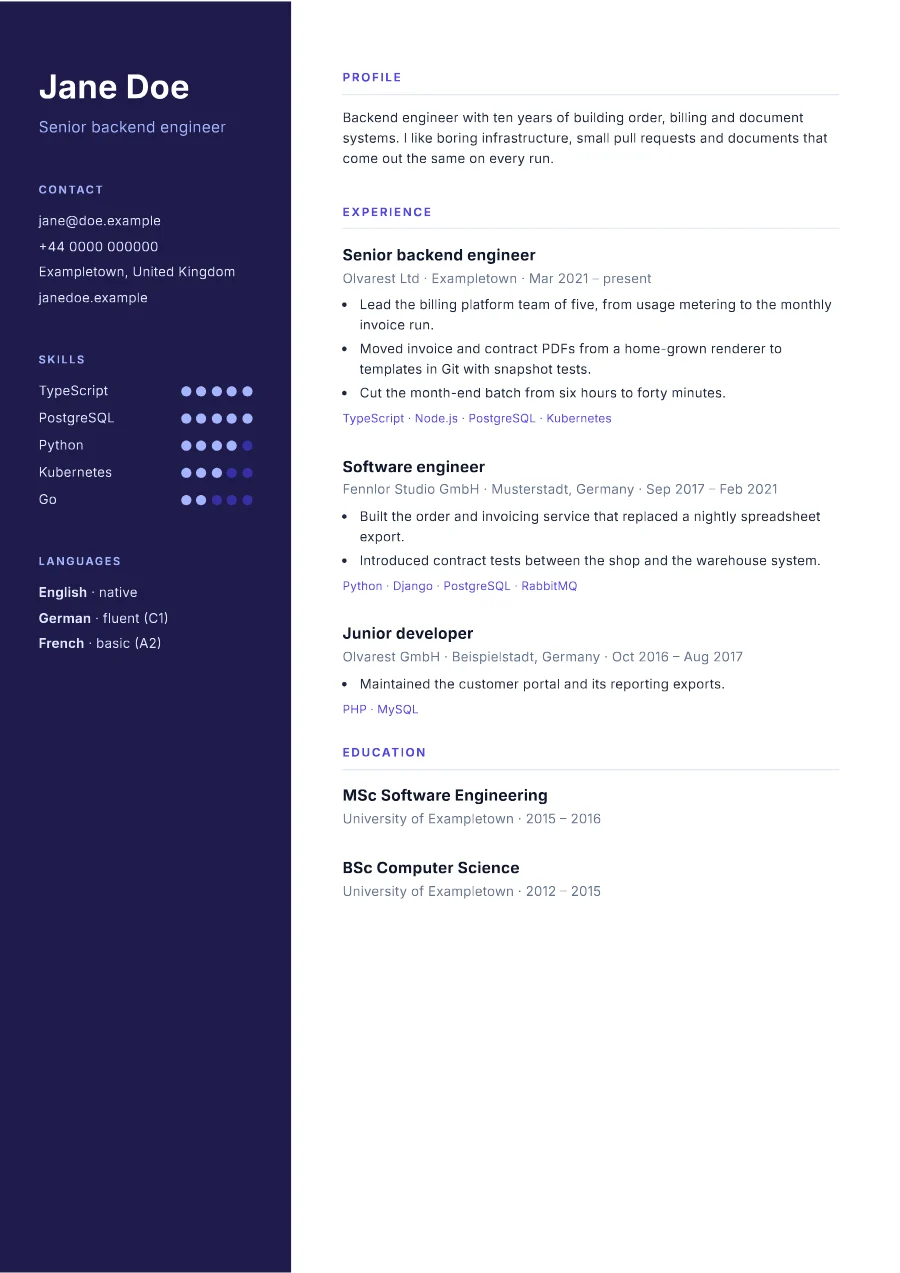
Was dieses Beispiel zeigt
- Die Daten führen die Stationen in beliebiger Reihenfolge;
sortBy experience "start" "desc"stellt die aktuelle nach vorn, und derselbe Helfer sortiert die Abschlüsse. - Eine Station ohne Enddatum zeigt „present“:
{{#if end}}wählt zwischen dem formatierten Datum und dem Wort. {{#each (range 0 5)}}zeichnet fünf Punkte je Kompetenz, und(lt this ../level)füllt so viele, wie die Stufe angibt;../erreicht die Kompetenz aus der inneren Schleife heraus.join stack " · "macht aus der Liste der Technologien jeder Station eine Zeile.- Ohne Ränder reicht die Seitenleiste bis an die Papierkante, und
min-height: 297mmstreckt sie über die ganze Seite.
Verwendete Helfer
Vorlagenordner
<main class="cv">
  <aside>
    <h1>{{person.name}}</h1>
    <p class="headline">{{person.headline}}</p>

    <h2>Contact</h2>
    <ul class="plain">
      <li>{{person.email}}</li>
      <li>{{person.phone}}</li>
      <li>{{person.location}}</li>
      <li>{{person.web}}</li>
    </ul>

    <h2>Skills</h2>
    <ul class="skills">
      {{#each skills}}
      <li>
        <span>{{name}}</span>
        <span class="dots">{{#each (range 0 5)}}<i class="{{#if (lt this ../level)}}on{{/if}}"></i>{{/each}}</span>
      </li>
      {{/each}}
    </ul>

    <h2>Languages</h2>
    <ul class="plain">
      {{#each languages}}
      <li><strong>{{name}}</strong> · {{level}}</li>
      {{/each}}
    </ul>
  </aside>

  <div class="content">
    <h2>Profile</h2>
    <p>{{person.summary}}</p>

    <h2>Experience</h2>
    {{#each (sortBy experience "start" "desc")}}
    <article>
      <h3>{{role}}</h3>
      <p class="where">{{company}} · {{location}} · {{date start "MMM yyyy"}} – {{#if end}}{{date end "MMM yyyy"}}{{else}}present{{/if}}</p>
      <ul>
        {{#each highlights}}
        <li>{{this}}</li>
        {{/each}}
      </ul>
      <p class="stack">{{join stack " · "}}</p>
    </article>
    {{/each}}

    <h2>Education</h2>
    {{#each (sortBy education "start" "desc")}}
    <article>
      <h3>{{degree}}</h3>
      <p class="where">{{school}} · {{date start "yyyy"}} – {{date end "yyyy"}}</p>
    </article>
    {{/each}}
  </div>
</main>body { margin: 0; font-family: 'Inter', sans-serif; font-size: 9pt; line-height: 1.5; color: #1e293b; }
.cv { display: grid; grid-template-columns: 68mm 1fr; min-height: 297mm; }
aside { padding: 16mm 9mm; background: #1e1b4b; color: #e0e7ff; }
aside h1 { margin: 0; font-size: 22pt; line-height: 1.1; color: #fff; }
.headline { margin: 2mm 0 0; font-size: 10.5pt; color: #a5b4fc; }
aside h2 { margin: 10mm 0 3mm; font-size: 7.5pt; letter-spacing: 0.12em; text-transform: uppercase; color: #a5b4fc; }
ul { margin: 0; padding: 0; list-style: none; }
.plain li { margin-bottom: 1.2mm; overflow-wrap: anywhere; }
.skills li { display: flex; justify-content: space-between; align-items: center; margin-bottom: 1.6mm; }
.dots { display: flex; gap: 1.2mm; }
.dots i { width: 2.4mm; height: 2.4mm; border-radius: 50%; background: #3730a3; }
.dots i.on { background: #a5b4fc; }
.content { padding: 16mm 14mm 16mm 12mm; }
.content h2 { margin: 0 0 3mm; padding-bottom: 1.5mm; border-bottom: 1px solid #e2e8f0; font-size: 8pt; letter-spacing: 0.12em; text-transform: uppercase; color: #4f46e5; }
.content > p { margin: 0 0 8mm; }
article { margin-bottom: 6mm; break-inside: avoid; }
h3 { margin: 0; font-size: 10.5pt; color: #0f172a; }
.where { margin: 0.5mm 0 1.5mm; color: #64748b; }
article ul { padding-left: 4mm; list-style: disc; }
article li { margin-bottom: 0.8mm; }
.stack { margin: 1.5mm 0 0; font-size: 8pt; color: #4f46e5; }<link rel="stylesheet" href="https://fonts.googleapis.com/css2?family=Inter:wght@400;600;700&display=swap">{
"pdf": {
"metadata": {
"title": "{{person.name}}"
}
},
"paper": {
"format": "A4"
},
"margin": {
"top": "0",
"right": "0",
"bottom": "0",
"left": "0"
},
"locale": "en-GB"
}{
"person": {
"name": "Jane Doe",
"headline": "Senior backend engineer",
"email": "jane@doe.example",
"phone": "+44 0000 000000",
"location": "Exampletown, United Kingdom",
"web": "janedoe.example",
"summary": "Backend engineer with ten years of building order, billing and document systems. I like boring infrastructure, small pull requests and documents that come out the same on every run."
},
"experience": [
{
"role": "Software engineer",
"company": "Fennlor Studio GmbH",
"location": "Musterstadt, Germany",
"start": "2017-09-01",
"end": "2021-02-28",
"highlights": [
"Built the order and invoicing service that replaced a nightly spreadsheet export.",
"Introduced contract tests between the shop and the warehouse system."
],
"stack": [
"Python",
"Django",
"PostgreSQL",
"RabbitMQ"
]
},
{
"role": "Senior backend engineer",
"company": "Olvarest Ltd",
"location": "Exampletown",
"start": "2021-03-01",
"end": null,
"highlights": [
"Lead the billing platform team of five, from usage metering to the monthly invoice run.",
"Moved invoice and contract PDFs from a home-grown renderer to templates in Git with snapshot tests.",
"Cut the month-end batch from six hours to forty minutes."
],
"stack": [
"TypeScript",
"Node.js",
"PostgreSQL",
"Kubernetes"
]
},
{
"role": "Junior developer",
"company": "Olvarest GmbH",
"location": "Beispielstadt, Germany",
"start": "2016-10-01",
"end": "2017-08-31",
"highlights": [
"Maintained the customer portal and its reporting exports."
],
"stack": [
"PHP",
"MySQL"
]
}
],
"education": [
{
"degree": "BSc Computer Science",
"school": "University of Exampletown",
"start": "2012-10-01",
"end": "2015-07-31"
},
{
"degree": "MSc Software Engineering",
"school": "University of Exampletown",
"start": "2015-10-01",
"end": "2016-09-30"
}
],
"skills": [
{
"name": "TypeScript",
"level": 5
},
{
"name": "PostgreSQL",
"level": 5
},
{
"name": "Python",
"level": 4
},
{
"name": "Kubernetes",
"level": 3
},
{
"name": "Go",
"level": 2
}
],
"languages": [
{
"name": "English",
"level": "native"
},
{
"name": "German",
"level": "fluent (C1)"
},
{
"name": "French",
"level": "basic (A2)"
}
]
}Über die API rendern
Speichern Sie die Beispieldaten als data.json und senden Sie sie mit dem Namen der Vorlage. TypeScript und Python nutzen die SDKs; jede andere Sprache schickt dasselbe JSON mit ihrer Standardbibliothek an die REST-API. Renderings mit einem Schlüssel, der mit ff_test_ beginnt, werden nicht gezählt; im Free-Tarif tragen sie ein kleines Wasserzeichen.
jq '{template: "resume", data: ., filename: "cv-jane-doe.pdf"}' data.json \
  | curl https://api-eu.formfeed.dev/v1/renders \
      -H "Authorization: Bearer ff_test_..." \
      -H "Content-Type: application/json" \
--data-binary @-import { Formfeed } from '@formfeed/sdk';
import data from './data.json' with { type: 'json' };
const formfeed = new Formfeed({ apiKey: process.env.FORMFEED_API_KEY! });
const render = await formfeed.renders.create({
template: 'resume',
data,
filename: 'cv-jane-doe.pdf',
});
console.log(render.status, render.download_url);import json
import os
from formfeed import Formfeed
formfeed = Formfeed(api_key=os.environ["FORMFEED_API_KEY"])
with open("data.json", encoding="utf-8") as file:
data = json.load(file)
render = formfeed.renders.create(
template="resume",
data=data,
filename="cv-jane-doe.pdf",
)
print(render.status, render.download_url)<?php
$body = [
'template' => 'resume',
'data' => json_decode(file_get_contents('data.json'), true),
'filename' => 'cv-jane-doe.pdf',
];
$curl = curl_init('https://api-eu.formfeed.dev/v1/renders');
curl_setopt_array($curl, [
CURLOPT_POST => true,
CURLOPT_RETURNTRANSFER => true,
CURLOPT_HTTPHEADER => [
'Authorization: Bearer ' . getenv('FORMFEED_API_KEY'),
'Content-Type: application/json',
],
CURLOPT_POSTFIELDS => json_encode($body),
]);
$render = json_decode(curl_exec($curl), true);
echo $render['status'], ' ', $render['download_url'], PHP_EOL;package main
import (
"bytes"
"encoding/json"
"fmt"
"net/http"
"os"
)
func main() {
data, err := os.ReadFile("data.json")
if err != nil {
panic(err)
}
body, _ := json.Marshal(map[string]any{
"template": "resume",
"data": json.RawMessage(data),
"filename": "cv-jane-doe.pdf",
})
request, _ := http.NewRequest("POST", "https://api-eu.formfeed.dev/v1/renders", bytes.NewReader(body))
request.Header.Set("Authorization", "Bearer "+os.Getenv("FORMFEED_API_KEY"))
request.Header.Set("Content-Type", "application/json")
response, err := http.DefaultClient.Do(request)
if err != nil {
panic(err)
}
defer response.Body.Close()
var render struct {
Status string `json:"status"`
DownloadURL string `json:"download_url"`
}
json.NewDecoder(response.Body).Decode(&render)
fmt.Println(render.Status, render.DownloadURL)
}using System.Net.Http.Headers;
using System.Net.Http.Json;
using System.Text.Json;
var body = new
{
template = "resume",
data = JsonDocument.Parse(File.ReadAllText("data.json")).RootElement,
filename = "cv-jane-doe.pdf",
};
using var http = new HttpClient();
http.DefaultRequestHeaders.Authorization =
new AuthenticationHeaderValue("Bearer", Environment.GetEnvironmentVariable("FORMFEED_API_KEY"));
var response = await http.PostAsJsonAsync("https://api-eu.formfeed.dev/v1/renders", body);
var render = await response.Content.ReadFromJsonAsync<JsonElement>();
Console.WriteLine($"{render.GetProperty("status")} {render.GetProperty("download_url")}");import java.net.URI;
import java.net.http.HttpClient;
import java.net.http.HttpRequest;
import java.net.http.HttpResponse;
import java.nio.file.Files;
import java.nio.file.Path;
public class Render {
public static void main(String[] args) throws Exception {
String data = Files.readString(Path.of("data.json"));
String body = """
{
"template": "resume",
"filename": "cv-jane-doe.pdf",
"data": %s
}
""".formatted(data);
HttpRequest request = HttpRequest.newBuilder(URI.create("https://api-eu.formfeed.dev/v1/renders"))
.header("Authorization", "Bearer " + System.getenv("FORMFEED_API_KEY"))
.header("Content-Type", "application/json")
.POST(HttpRequest.BodyPublishers.ofString(body))
.build();
HttpResponse<String> response = HttpClient.newHttpClient().send(request, HttpResponse.BodyHandlers.ofString());
System.out.println(response.body()); // status, download_url, page_count, units …
}
}require "json"
require "net/http"
body = {
template: "resume",
data: JSON.parse(File.read("data.json")),
filename: "cv-jane-doe.pdf",
}
response = Net::HTTP.post(
URI("https://api-eu.formfeed.dev/v1/renders"),
JSON.generate(body),
"Authorization" => "Bearer #{ENV.fetch("FORMFEED_API_KEY")}",
"Content-Type" => "application/json"
)
render = JSON.parse(response.body)
puts render["status"], render["download_url"]Heute mit dem Rendern beginnen
Der kostenlose Plan enthält 100 Einheiten im Monat und kostenlose Testrenderings. Wechseln Sie den Plan, wenn Sie mehr brauchen.