Every document editor has a preview, and the PDF is always made somewhere else. The question worth
asking of any preview is not whether it looks right, but whether page 1 ends where the PDF’s page 1
ends. A browser window has no pages at all. Switching it to print styles (@media print) changes
the styles and still has no pages. The browser’s print dialog does paginate, but with its own
margins and, unless you untick them, its own header and footer — not the ones your API renders.
Our editor has a flow preview for writing and a paged preview for layout. The paged one uses Paged.js, which paginates HTML in the browser following the CSS paged-media rules; the PDF comes from headless Chromium on our render servers. So we measured whether the two agree.
The test
One short report: a heading, a banner, and 24 cards. Each card is height: 22mm with
padding: 5mm and a border, the way a template sets a box to a height — and each is kept whole with
break-inside: avoid. A4 with margins of 20 mm at the top and bottom and 18 mm at the sides, and a
page-number footer. We printed it with our render worker, laid it out in Chromium with Paged.js as it
ships and with our paged preview, and counted the cards on every page.
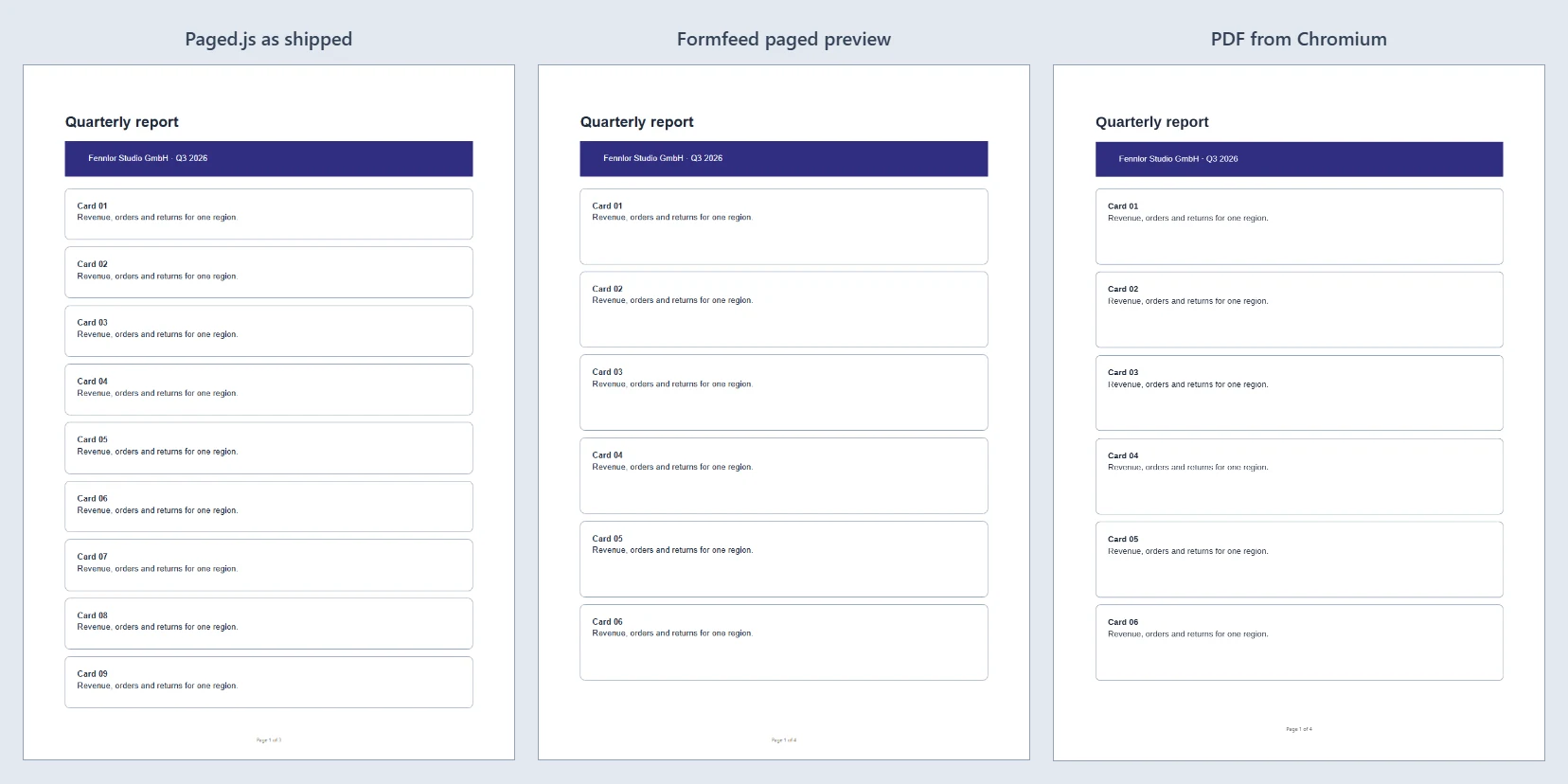
| Cards per page | Pages | |
|---|---|---|
| Paged.js as it ships (left) | 9 · 10 · 5 | 3 |
| Our paged preview (middle) | 6 · 7 · 7 · 4 | 4 |
| The PDF (right) | 6 · 7 · 7 · 4 | 4 |
The preview and the PDF agree card for card. Paged.js as it ships gets every page wrong and the page count too.
The rule that made the difference
The two previews differ in one thing. Paged.js’s own stylesheet contains
.pagedjs_pagebox * { box-sizing: border-box }. It is meant for the boxes Paged.js builds around
each page, but the selector reaches everything inside a page, your template included. Under
border-box, a height includes the padding and the border; under the browser’s default
content-box, which Chromium uses when it prints, they come on top. So each card is 22 mm tall in
Paged.js as it ships and a little over 32 mm in the PDF, and Paged.js fits nine where the PDF fits six.
Our preview rewrites that one rule as the stylesheet arrives, before anything is laid out, so that it
applies only to Paged.js’s own boxes ([class*="pagedjs_"]). Your elements keep the box model they
will have in the PDF. The same thinking applies to our print reset: the preview’s header and footer
boxes are left out of it, because Chromium’s header and footer templates get none of it either.
The case no preview can show
Now make the banner “full width” the usual way: width: 100% plus its padding: 5mm 10mm. Under
content-box that is 20 mm wider than the space between the margins.
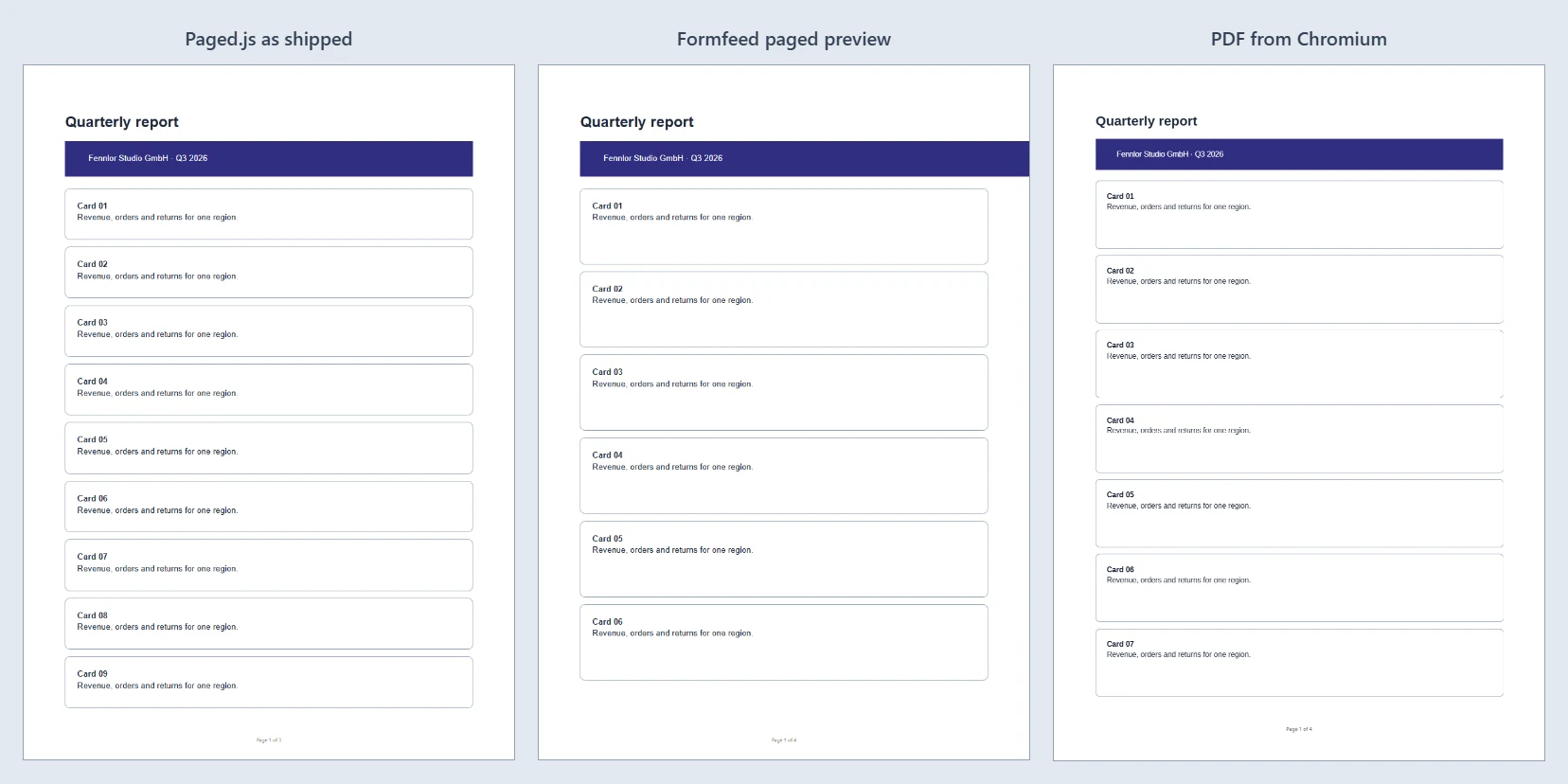
Each picture in this post is page 1 of the same document, from three sources — not three pages.
Paged.js as it ships does not even show the problem: under its border-box rule the padding counts
inside the 100 %, and the banner fits. Our preview shows what the document asks for: the banner runs
past the right margin. The
PDF does something else. Chromium scales the
whole document down until its widest element fits the page — here to 89.7 %, so the 10 pt card
titles come out at 8.97 pt — and does it on every page, not only the one with the banner. Smaller
pages hold more: 7 · 8 · 8 · 1 cards instead of 6 · 7 · 7 · 4.
No preview that lays out at 100 % can reproduce that, ours included. What it can do is find the
cause, and ours now says it in words: the preview measures the widest element after every layout,
and when one reaches past the margin, the editor lists it under Problems — how many millimetres too
wide, and to what size the PDF will shrink (here 20 mm and 89.7 %) — with a link to the tag in the
template. Give such an element box-sizing: border-box, or leave its width alone — a block is as
wide as its container without being told.
What we take from it
A preview earns trust by breaking where the PDF breaks, and that is a property you can measure: same document, same page size, count what lands on each page. Ours does, until a template asks Chromium to shrink. For the last word, the editor’s True render sends the draft through the same worker that printed the PDFs above, and costs nothing.
The editor tour shows the preview modes and True render, and the invoice example is a document to try them on.
Measured on 21 September 2026 with Chromium 153.0.8010.12 on the render worker and Paged.js 0.4.3.