Feature
E-invoices: ZUGFeRD and Factur-X
An e-invoice is the PDF a person reads and the same invoice as data a program reads. Formfeed makes both from one template and one request: the PDF as your template renders it, with the invoice inside it as XML, checked against the rules of the standard before you get it back.
Free plan with 100 units a month, no credit card
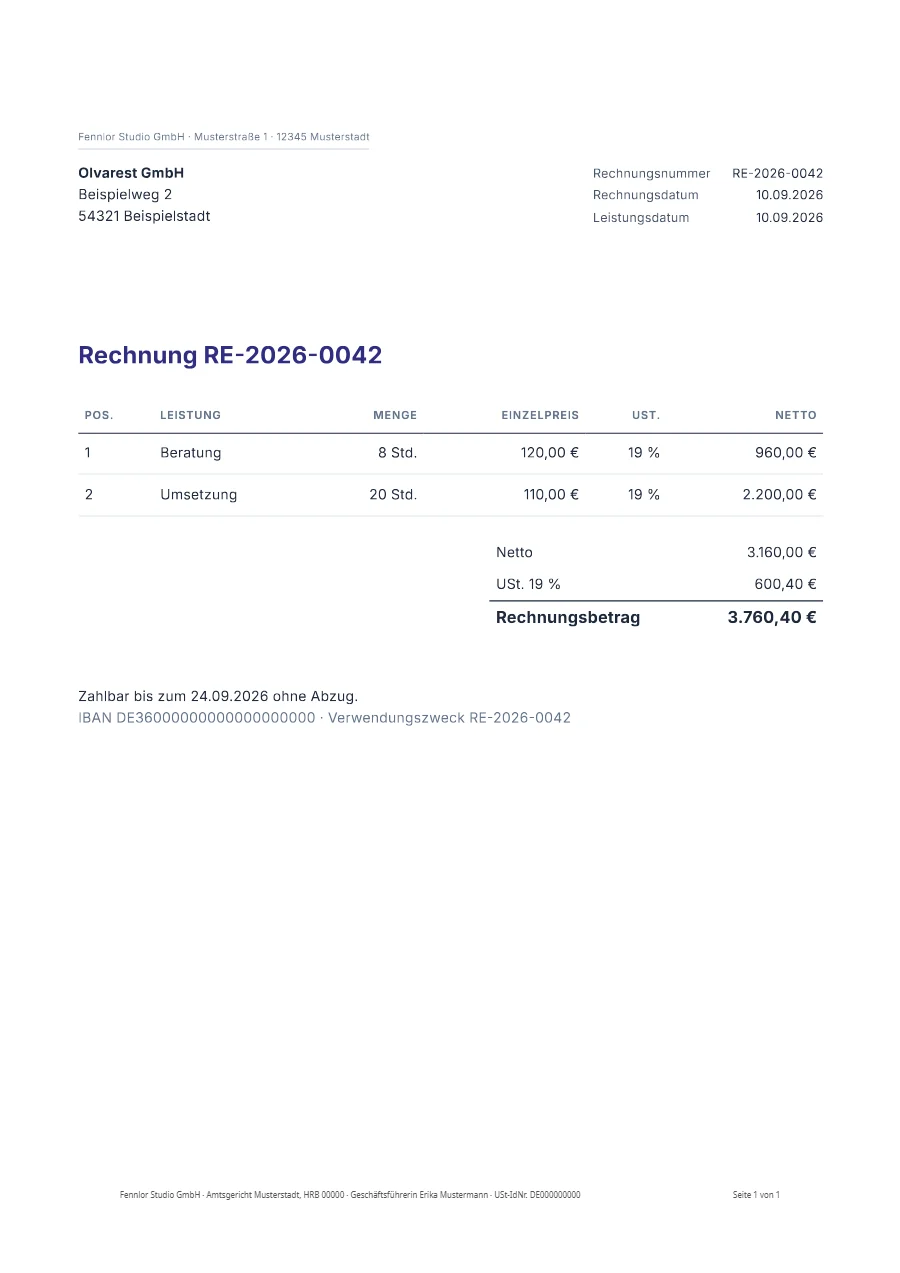
One file for the reader and for the software
Declare the e-invoice in the template, or ask for it per request with post.einvoice. The answer is the PDF your template renders, converted to PDF/A-3b, with the invoice attached as factur-x.xml. A person opens it like any PDF; accounting software reads the XML.
- ZUGFeRD and Factur-X. One specification under two names, and the file is the same. Formfeed writes ZUGFeRD 2.5, which is Factur-X 1.09, in the profiles EN 16931 and Basic.
- A setting of the template. Switched on in the template, every PDF it renders is an e-invoice, and the request stays the one you already send.
- HTML and Word templates. It works for the PDF of an HTML template, of a Word or PowerPoint template, of HTML you send with the request and of a page you name by its URL.
- In your language. A complete program with error handling, run against a stand-in for the API: Node.js, Python, PHP, Go, C#, Java, Ruby and curl.
{
  "template": "invoice",
  "data": { "_invoice": { "number": "RE-2026-0042", … } },
  "post": { "einvoice": { "profile": "en16931", "flavour": "zugferd" } }
}
The invoice is one block of your data
The XML is built from _invoice in the render data and never read out of the PDF. The block states the parties, the lines, the VAT breakdown and the totals in the terms of EN 16931, and your template prints from the same block, so the page and the XML come from one source. Formfeed calculates nothing for you: a total that does not add up is refused with the rule it breaks, never rounded. This is the data of the e-invoice example, shortened.
{
  "_invoice": {
    "number": "RE-2026-0042",
    "issue_date": "2026-09-10",
    "currency": "EUR",
    "seller": { "name": "Fennlor Studio GmbH", "vat_id": "DE000000000", "address": { … } },
    "buyer": { "name": "Olvarest GmbH", "address": { … } },
    "lines": [
      { "id": "1", "name": "Beratung", "quantity": 8, "unit_code": "HUR",
        "net_price": 120, "net_amount": 960, "tax": { "category": "S", "rate": 19 } },
      …
    ],
    "tax": { "breakdown": [{ "category": "S", "rate": 19, "basis": 3160, "amount": 600.4 }] },
    "totals": { "line_net": 3160, "tax_basis": 3160, "tax_total": 600.4, "grand": 3760.4, "due": 3760.4 },
    "payment": { "terms": "Zahlbar bis zum 24.09.2026 ohne Abzug.", "due_date": "2026-09-24", … }
  }
}
Validated before it is delivered
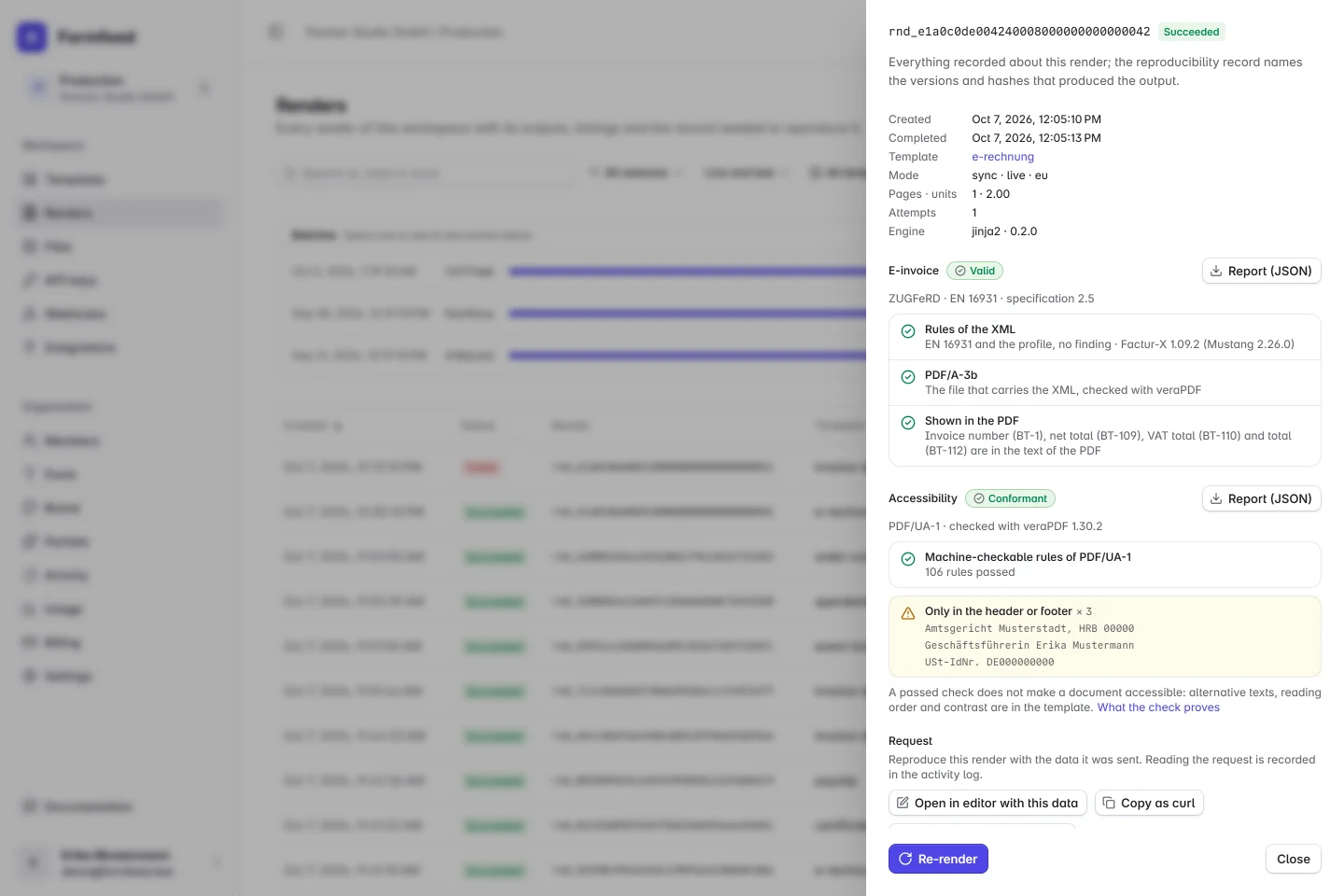
Every file is checked twice before you get it: the XML against its schema and the rules of the profile, which include the business rules of EN 16931, and the finished PDF against PDF/A-3b. A file that fails is not delivered, and no plain PDF is delivered in its place: the render fails and names the rule. A render that succeeds carries the report.
- Before anything renders. The block is held to the rules when the request arrives. What is wrong comes back at once, each finding with its field and its rule, such as
BR-CO-15for a total that does not add up, and costs nothing. - A report to keep. The report names the rule set the file was held to and says that it passed. It stays on the render, comes with the webhook and downloads from the render log as a file to keep beside the invoice.
- Invoices between French businesses. When seller and buyer are both in France, the block must also state what France’s rules make mandatory: both SIRENs, the kind of sale, the three statutory payment notes and both electronic addresses. The profile Basic is refused for such an invoice, and the validator adds France’s own
BR-FRrules, whose findings come back as warnings. French domestic invoices lists the fields. - What it proves. Validation proves the format and the business rules, not the content. An invoice with the wrong VAT rate passes.
{
  "id": "rnd_7da09ab6cd9946b798c187c2a9350852",
  "status": "succeeded",
  "page_count": 1,
  "units": 2,
  "einvoice": {
    "profile": "en16931",
    "flavour": "zugferd",
    "spec_version": "2.5",
    "validation": {
      "valid": true,
      "schematron": "Factur-X 1.09.2 (Mustang 2.26.0)",
      "pdfa": "PDF/A-3b",
      "messages": []
    },
    "display": { "checked": ["BT-1", "BT-109", "BT-110", "BT-112"], "missing": [] }
  }
}
The page says what the XML says
In an e-invoice the XML is the invoice, so the PDF beside it must not show other amounts. Formfeed reads the text of the finished PDF and looks for the invoice number and the totals the XML states. A value the page does not show is listed in einvoice.display.missing; with display_check: "strict" the render fails instead.
A PDF/UA-1 file too, when the template says so
An e-invoice can carry the structure a screen reader reads by. Declare PDF/UA-1 in the same template, and the file you receive is the e-invoice and a PDF/UA-1 document: the PDF/A-3 keeps its tags, veraPDF holds the finished file to both standards, and the render carries the second report as accessibility. A file that fails PDF/UA-1 fails the render, or with { "check": "report" } comes back as the valid e-invoice without the PDF/UA label. This is for HTML templates; the PDF of a Word template is not tagged this way yet.
In the editor
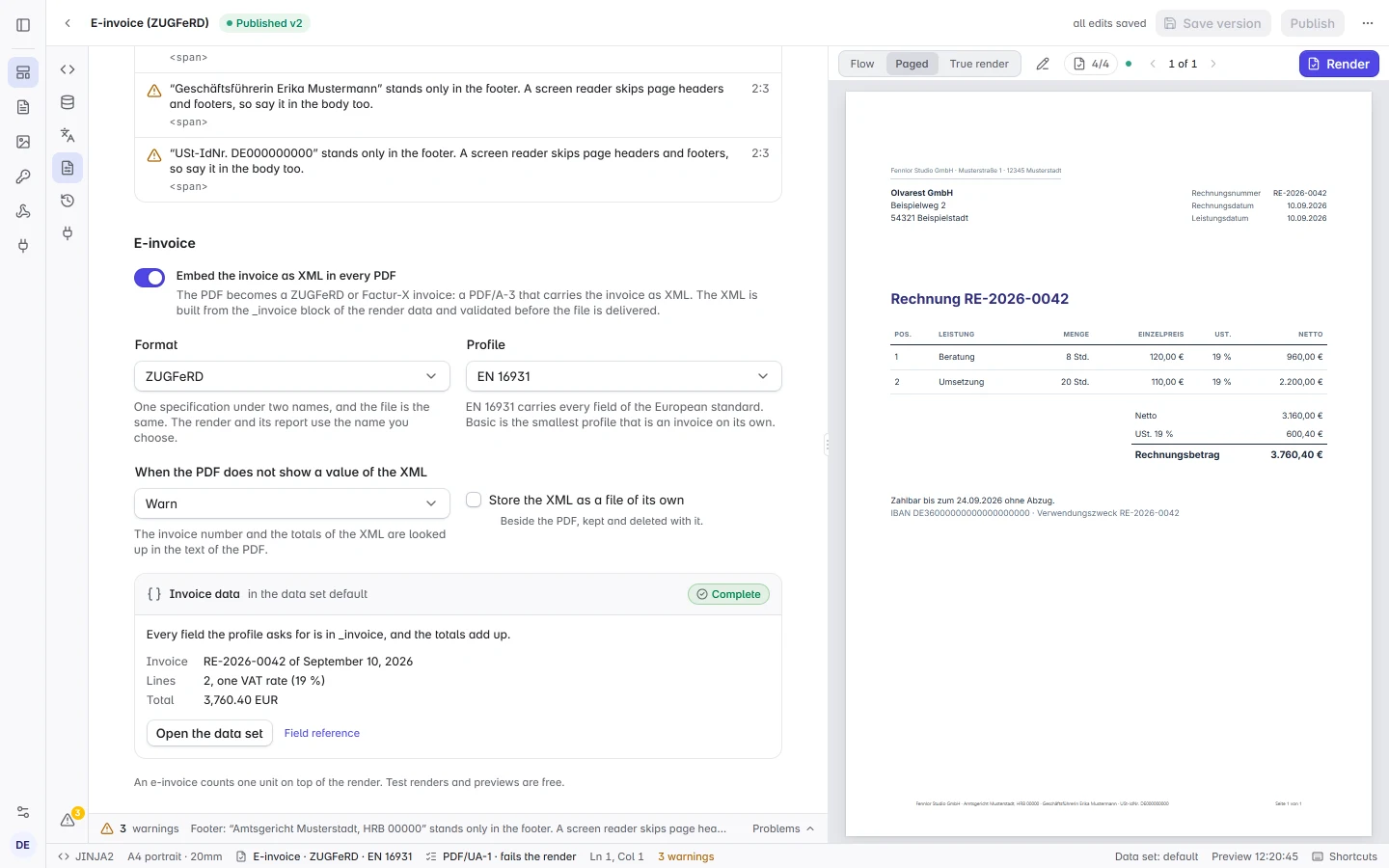
The page setup has an E-invoice section with the switch, the format and the profile. Under it, a card says what the data set on screen lacks, each finding with the rule it breaks, and a click opens the field. The preview counts the values of the XML it shows, and a true render returns the validator’s verdict on the real file.
When an e-invoice is required
E-invoices between businesses become mandatory in stages. The dates were checked on 17 October 2026 against the FAQ of the German Federal Ministry of Finance and the French tax authority.
- Formats. Germany names XRechnung and ZUGFeRD from version 2.0.1, in every profile but Minimum and Basic WL. In France the invoice travels through an approved platform: Formfeed makes the file, the platform transmits it.
- Exceptions. Many tax-exempt turnovers, invoices for small amounts up to 250 € gross, tickets that count as invoices and invoices of small businesses under the Kleinunternehmer rule stay outside the German duty. Whether and from when a rule applies to you is a question for your tax adviser.
| Country | Who | From |
|---|---|---|
| Germany: receiving | every domestic business | 1 January 2025 |
| Germany: issuing | turnover above 800,000 € in the year before | 1 January 2027 |
| Germany: issuing | every domestic business | 1 January 2028 |
| France: receiving | every business | 1 September 2026 |
| France: issuing | large and intermediate-sized businesses (ETI) | 1 September 2026 |
| France: issuing | small and medium-sized businesses (SMEs) and micro-enterprises | 1 September 2027 |
What Formfeed does not do
Formfeed creates the file and validates it. You issue the invoice and answer for its content and its VAT treatment; Formfeed answers for the format, as section 4 of the terms of service sets out. The rest stays with you or your platform:
- Sending. Formfeed is neither a Peppol access point nor an approved platform in France. You, your platform or your access point deliver the invoice.
- Archiving. Outputs are deleted when the workspace’s retention ends, long before the period the law sets for invoices. Archive the delivered file and its report yourself; with your own storage connected, a copy of every file goes into your bucket as it is rendered.
- The VAT treatment. Which category, rate and exemption reason apply is yours or your tax adviser’s to decide. Formfeed checks that the block is consistent with what you state and gives no tax advice.
- XRechnung and UBL. Not available, and neither are the profiles Minimum, Basic WL and Extended.
FAQ
- Which plans have it, and what does it cost?
- E-invoices are on Starter and above and add one unit to the render: a two-page invoice costs two units. Renders with a test key and previews in the editor are free. On Free you can try it before you pay: test renders and the editor’s true render make up to 20 e-invoices a day, each a valid file with the test mark on its pages. A live request for one is refused there. On the paid plans test e-invoices carry the mark too and are counted per day, a thirtieth of the plan’s monthly units: 100 on Starter, 500 on Pro, 2,000 on Business. Live ones are neither counted nor marked.
- Is Formfeed certified?
- No. Neither Germany nor France approves or certifies software for creating e-invoices; their rules describe the file. What France registers are the platforms that transmit invoices, and Formfeed is not one of them.
- ZUGFeRD or Factur-X: which do I need?
- They are the same file. Choose the name your customer knows:
flavouronly decides what the render and its report call it. - Can I see one?
- The e-invoice example is a complete invoice template with its data, and its download is a real ZUGFeRD file. One click copies it into your workspace.
- Where are the details?
- The guide to e-invoices lists every field of
_invoice, the options, the report and the errors.