Feature
Tagged PDFs in PDF/UA-1, checked by veraPDF
A screen reader does not read the page. It reads the structure inside the file: headings, lists, tables, the text that stands for a picture. PDF/UA-1 is the standard for that structure. Switch it on in a template, and Formfeed writes the tags from your HTML, repairs what the browser’s output gets wrong and holds every file against the rules of the standard a machine can check, before you get it back and with the report.
Free plan with 100 units a month, no credit card
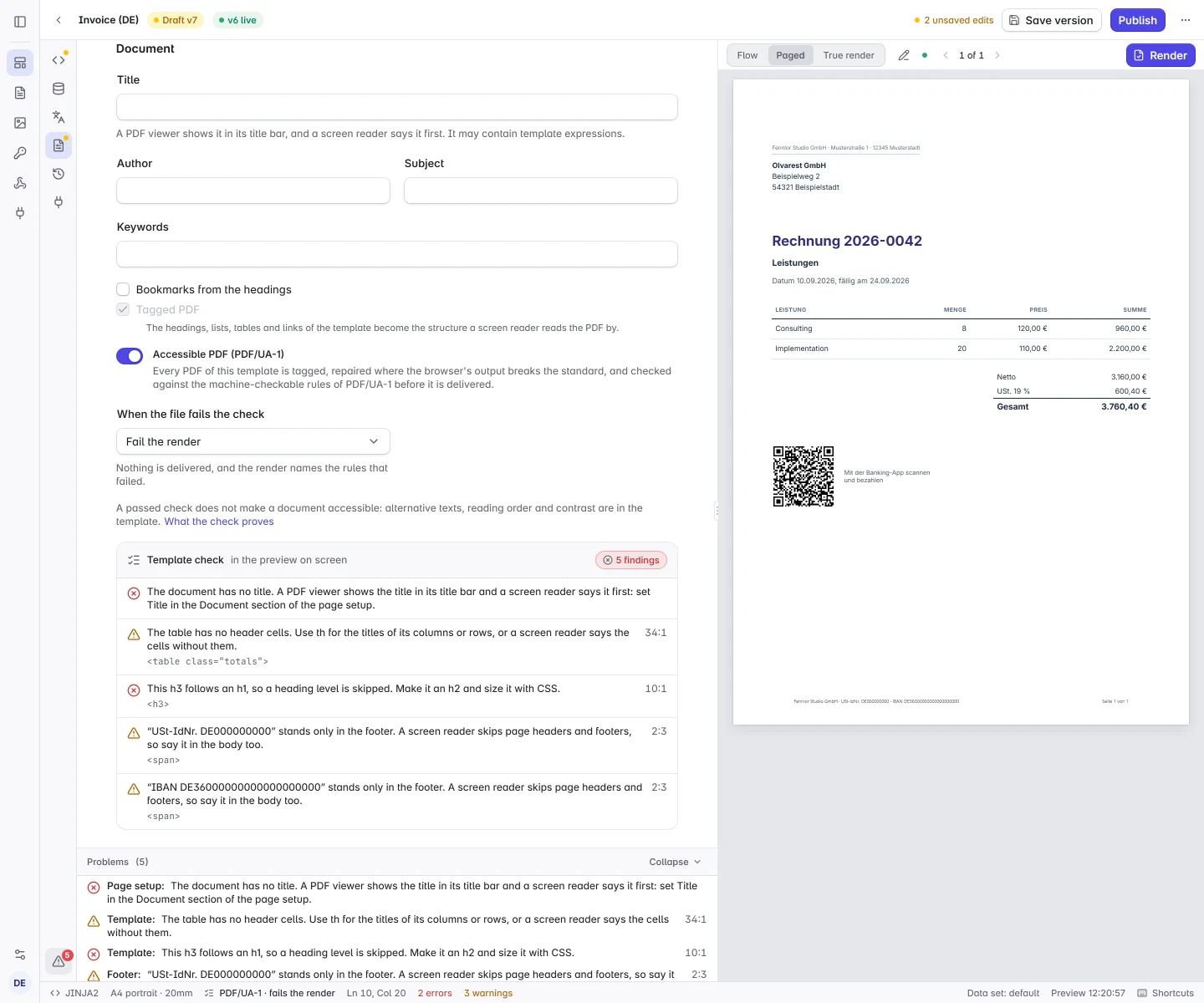
One setting, and the claim only with the proof
Turn it on in the template’s page setup, or ask for it per request with pdf.ua. The answer is the PDF your template renders, tagged, repaired and checked before it is delivered. A file names itself PDF/UA-1 in its metadata only when it passed the check. One that failed is never labelled as conforming.
- Strict by default.
truefails a render whose file does not pass and delivers nothing. Whoever asked for a conforming file should not learn from their own customer that they got another. - Or report only.
{ "check": "report" }delivers the file either way, without the PDF/UA label where it failed, and says what the check found. That is the mode for bringing a template into shape. - Every plan, no extra unit. The check is part of every plan, Free included, and a render costs what it costs without it.
{
  "template": "invoice",
  "data": { "invoice": { "number": "RE-2026-0042", … } },
  "settings": { "pdf": { "ua": true } }
}
What Formfeed repairs
A browser tags most of a document correctly and stops short in the same places every time, in ways no template can fix. Formfeed fixes them in the finished file, on every tagged PDF. Every PDF example on this site passes all 106 rules with nothing but the setting added, and a test renders each of them through the validator whenever an example, a repair or the browser changes.
- Page furniture. Page headers and footers, borders, backgrounds and rules are drawn without a tag. They are marked as artifacts, which a screen reader passes over, where the file would otherwise fail for them.
- Links. Every link gets a description: its text, as a screen reader would say it.
- Lists, figures and emphasis. List items get the body element the standard asks for, a
figurethat only groups content stops demanding an alternative text of its own, and the browser’s own tag types are mapped to standard ones. - Tables over several pages. The header row the browser repeats on each page is read once.
- Metadata and stamps. The file gets its title and the metadata the standard requires. A text watermark and the mark on a test render are set in an embedded font and marked as artifacts.
The editor says what only you can fix
Some faults are in the template, and only its author can mend them: an image without a text, a heading level that is skipped, a table without header cells, bank details that stand only in the page footer. With the switch on, the preview checks the page it shows, and the Problems list names each finding at its line in the template, before anything is rendered. A validator answers with object numbers inside the PDF. The editor answers with the tag you wrote.
- Errors and warnings. An error is a fault the check fails the file for. A warning is one no rule catches and a reader hears all the same: a screen reader skips the page footer, so what stands only there is not read.
- Outside the editor too.
formfeed validateand the validation endpoint report a missing title and an image withoutaltfrom the source alone, andformfeed devchecks the page it previews.
Checked in the request, and the report stays
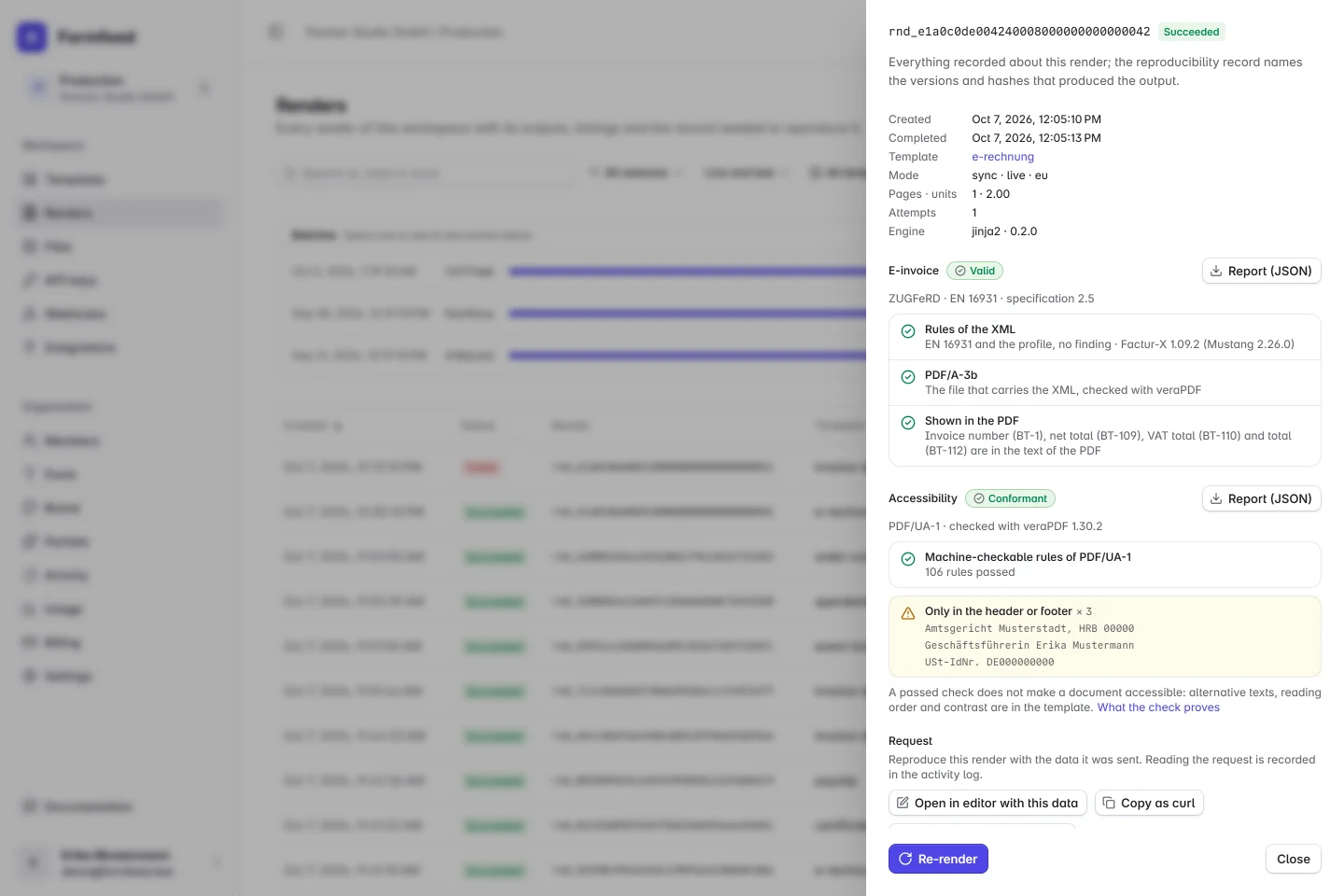
The finished file is held against the PDF/UA-1 rules of veraPDF, the open-source validator of the PDF Association and the Open Preservation Foundation: 106 rules in the release Formfeed runs. The verdict is the render’s accessibility field, comes with the webhook and downloads from the render log. This is the report for this site’s invoice example with the setting added. It passes, and the warnings name what a reader would miss.
- A report to keep. It names the validator and its version, because rule sets move between releases, and records which rules the file was held to on the day it was made.
- Never an unchecked file. When the validator does not answer, the render answers
503and can be retried. A file that asked for the check is never delivered without it.
{
  "id": "rnd_7da09ab6cd9946b798c187c2a9350852",
  "status": "succeeded",
  "accessibility": {
    "standard": "PDF/UA-1",
    "check": "strict",
    "conformant": true,
    "validator": "veraPDF 1.30.2",
    "rules": { "passed": 106, "failed": 0 },
    "failures": [],
    "warnings": [
      { "code": "table-headers", "count": 1, "elements": ["<table class=\"totals\">"] },
      { "code": "running-text", "count": 2,
        "elements": ["USt-IdNr. DE000000000", "IBAN DE36000000000000000000"] }
    ]
  }
}
When a file fails
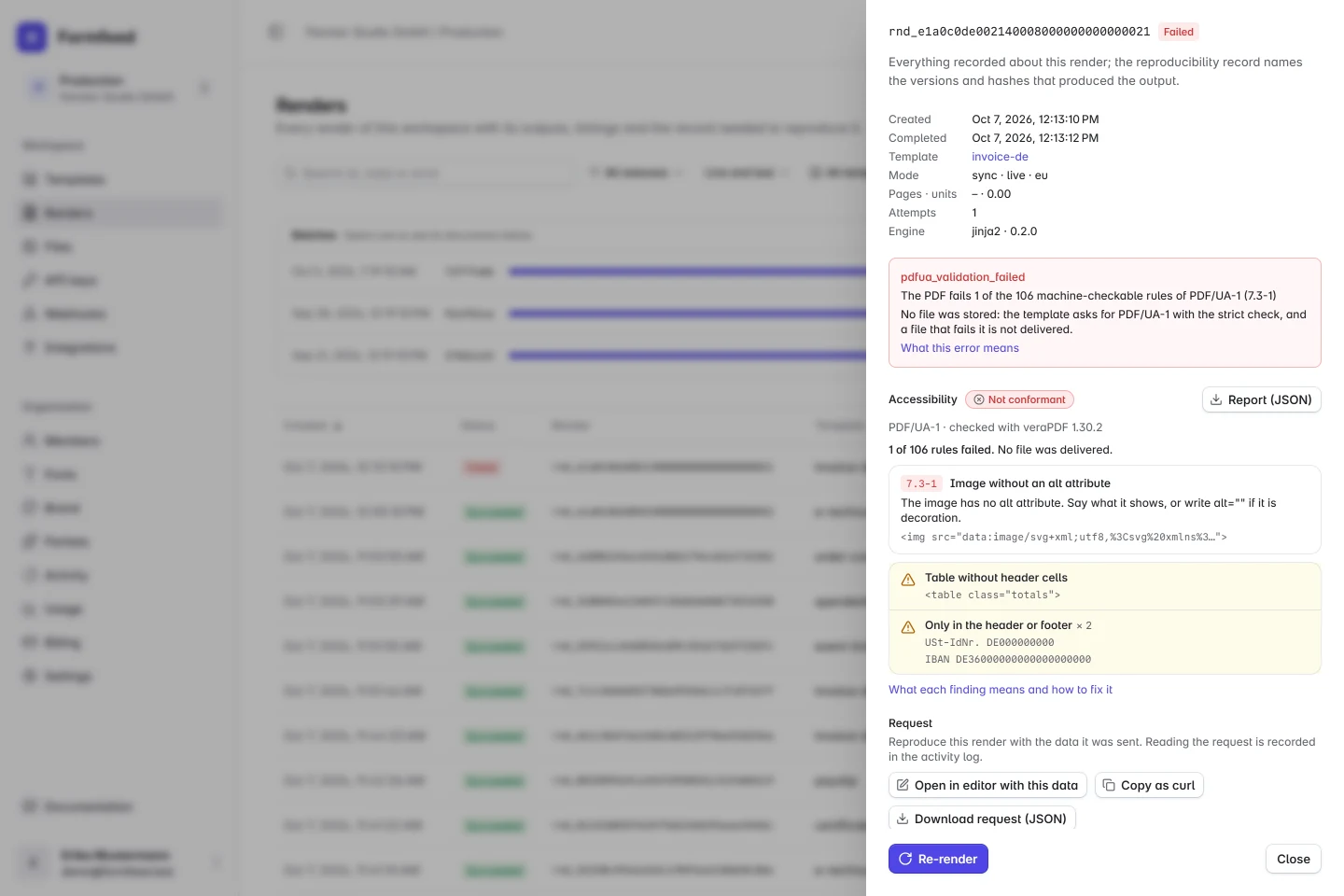
A strict render that fails answers 422 with the rule, what to change and the elements concerned, and delivers nothing. The render is kept as failed with the same report, so the render log shows it later. This is the same invoice with the alt of its payment code taken out.
{
  "status": 422,
  "code": "pdfua_validation_failed",
  "detail": "The PDF fails 1 of the 106 machine-checkable rules of PDF/UA-1 (7.3-1)",
  "accessibility": {
    "conformant": false,
    "rules": { "passed": 105, "failed": 1 },
    "failures": [
      { "rule": "7.3-1", "code": "image-alt", "count": 1,
        "message": "The image has no alt attribute. Say what it shows, or write alt=\"\" if it is decoration.",
        "elements": ["<img src=\"data:image/svg+xml;…\">"] }
    ],
    …
  }
}
With an e-invoice: PDF/A-3 and PDF/UA-1 in one file
An e-invoice is a PDF/A-3 that carries the invoice as XML. A template that declares both renders one file that is the e-invoice and a PDF/UA-1 document. The conversion to PDF/A-3 keeps the tags, and the finished e-invoice, which is the file you receive, is held to both standards by veraPDF in the same request. The render carries both reports, einvoice and accessibility. This site’s e-invoice example is rendered this way.
- The claim only with the proof, here too. An e-invoice whose file fails PDF/UA-1 fails a strict render and delivers nothing. With
{ "check": "report" }you get the valid e-invoice, and it does not name itself PDF/UA-1. - One answer, both reports.
einvoice.validationsays what the rules of EN 16931 and of PDF/A-3b found,accessibilitywhat the rules of PDF/UA-1 found. A render that fails PDF/UA-1 still carries the e-invoice’s report. Invoice data that breaks a rule, or a file that cannot become a PDF/A-3b, fails the render first, before there is a file to hold to PDF/UA-1. - What it costs. What the e-invoice costs: one unit on top of the render, on the Starter plan and above. The second check adds nothing.
What a passed check does not prove
A passed check is a statement about the format: every piece of content is tagged or marked as decoration, headings do not skip levels, figures carry an alternative text, tables are regular, the document has a title and a language, fonts are embedded. It does not make a document accessible. Part of the standard cannot be decided by a machine, and some of what readers need lies outside it:
- Alternative texts. The check sees that a picture has a text, not whether the text says what the picture shows.
- Reading order. Content is read in the order of your HTML, whatever CSS shows on the page. Whether that order makes sense is heard, not computed.
- Contrast and wording. Colour contrast, type size and plain language are not part of PDF/UA.
- Other checkers. Checkers differ in what they test and how strictly. Of PAC, a widely used one, the German federal accessibility office writes that passing its test alone does not mean a document is accessible (Bundesfachstelle Barrierefreiheit). Formfeed’s report speaks for veraPDF’s rules only, not for what another checker finds.
Who has to send accessible PDFs
Not every sender, and for some documents the question is open. What follows is what two German sources say, read on 17 October 2026: the accessibility act (Barrierefreiheitsstärkungsgesetz, BFSG), which carries out the European Accessibility Act in Germany, and the federal accessibility office on the rules for PDFs.
- Public bodies. Federal bodies follow the Behindertengleichstellungsgesetz and the BITV 2.0, which refers to EN 301 549. Its section 10 holds the requirements for documents such as PDFs. The German states have rules of their own.
- Services for consumers. Since 28 June 2025 the act covers telecommunications, passenger transport by air, bus, rail and ship apart from urban, suburban and regional services, banking services, e-books and contracts concluded online, where they serve consumers. The office: when such a service generates documents, an electronic ticket as a PDF for example, these have to be accessible too.
- Not settled. Neither the act nor the office’s page names an invoice, a statement or an order confirmation. Whether the invoice after an online purchase is covered is not settled.
- Exempt. A micro-enterprise that provides services is exempt: fewer than ten employees, and a turnover or a balance sheet total of at most 2 million euros. Office-format files that a website published before 28 June 2025 are outside the act as well.
- No file format is named. Neither source names PDF/UA. PDF/UA-1 is the ISO standard for the structure of an accessible PDF, and the part of the work a machine can check. Whether a rule applies to your documents is a question for your lawyer. Formfeed gives no legal advice.
| Who sends | Since | Status |
|---|---|---|
| Public bodies of the German federation | in force | covered |
| Passenger transport: electronic tickets for consumers | 28 June 2025 | named in the act |
| Banks, telecoms and online shops: documents a service for consumers generates | 28 June 2025 | covered, says the office |
| Invoices and confirmations after an online purchase | — | not settled |
| Documents sent to businesses | — | outside the act |
| Micro-enterprises that provide services | — | exempt |
What Formfeed does not do
Formfeed writes the format and checks it. It certifies nothing and answers no legal question. And some things do not work yet:
- Word and PowerPoint templates. Their PDF comes from another converter, whose tags have not been measured. A PDF render of such a template with
pdf.uais refused. - Merged documents.
pdf.uadoes not combine withpost.merge_after: a merge drops the tags of what it appends, and a validator would pass the file all the same. - Files you send. The repairs are for the PDFs Formfeed renders. The PDF tools neither check nor repair a file you send, and PDF/UA-2 is not written.
FAQ
- Which plans have it, and what does it cost?
- Every plan, Free included, and no extra unit: a render costs what it costs without the check. A render that fails costs nothing, and test renders and the editor’s true render are checked like any other.
- Does a passed check make my document accessible?
- No. It says that the file passed the rules of PDF/UA-1 a machine can check, by the validator and version the report names. Alternative texts, reading order and contrast stay with the template.
- Does this settle the accessibility act for us?
- No software can say that. The act names no file format, and whether a document of yours falls under it is a legal question. What you get is the structure the PDF format has for accessibility, checked by a validator, and the report that says so.
- Which validator, and what about PAC?
- veraPDF, in the version every report names. PAC is a checker of its own with tests of its own, and the report says what veraPDF found, not what PAC would find.
- Does it work together with e-invoices?
- Yes. A template that declares an e-invoice and
pdf.uarenders one file that is a ZUGFeRD / Factur-X invoice, a PDF/A-3b, and a PDF/UA-1 document. Both are checked in the file that is delivered, and the render carries both reports. E-invoices need the Starter plan or above. - Can I try it?
- Copy any PDF example into a workspace, turn on Accessible PDF (PDF/UA-1) in the Document section of the page setup and render it. Every one of them passes.
- Where are the details?
- The guide to accessible PDFs lists every finding of the template check, the repairs, the report and the errors.