LiquidPDF
Till receipt on an 80 mm roll
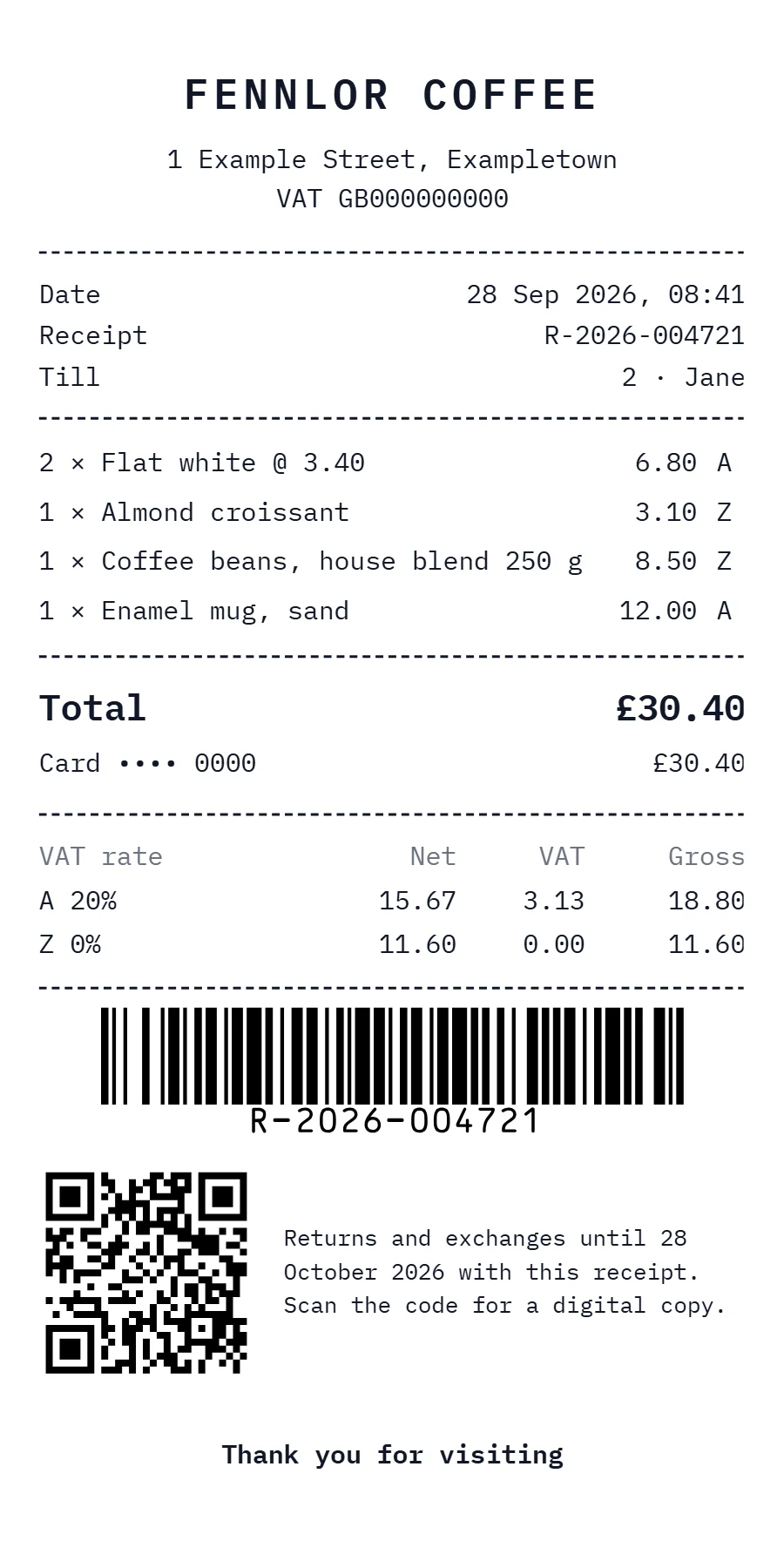
A receipt for thermal printers whose page is exactly as long as the receipt: the template writes its own @page size from the number of items and VAT rates. Prices include VAT, and the VAT analysis per rate is worked out in the template with where and sum.
Free plan, no card. You get your own copy in the editor, published and ready for the API.
Rendered result
What this example shows
- The paper is 80 mm wide and as long as the receipt: the template writes
@page { size: 80mm {{ length }}mm; }from the number of items and VAT rates, andpreferCssPageSize: truelets that rule decide. Four items and two rates give 160 mm on one page. - Every row has a fixed height, and an item name too long for its line ends in an ellipsis instead of wrapping, which is what makes the length computable.
- Prices include VAT, so the analysis works backwards:
where: 'vat', rate.code | sum: 'total'collects the gross amount of a rate, andtimes: rate.rate | divided_by: divisortakes the VAT out of it,3.13of18.80at 20%. barcode: type: 'code128'prints the receipt number for the returns desk,qrcodelinks to the digital copy, anddateAdd: 30, 'days'gives the last day for returns.- Times are shown in the template’s time zone
Europe/London:07:41:00Zin the data prints as08:41.
Helpers used
Template folder
{% comment %} The roll is as long as the receipt: fixed blocks plus 5 mm per item and 4.5 mm per VAT rate. {% endcomment %}
{% assign items = receipt.lines | size %}
{% assign rates = vat_rates | size | times: 4.5 %}
{% assign length = items | times: 5 | plus: 131 | plus: rates %}
<style>@page { size: 80mm {{ length }}mm; }</style>

<header class="shop">
  <h1>{{ shop.name }}</h1>
  <p>{{ shop.street }}, {{ shop.city }}</p>
  <p>VAT {{ shop.vat_id }}</p>
</header>

<dl class="meta">
  <div><dt>Date</dt><dd>{{ receipt.issued | date: 'd MMM yyyy, HH:mm' }}</dd></div>
  <div><dt>Receipt</dt><dd>{{ receipt.number }}</dd></div>
  <div><dt>Till</dt><dd>{{ receipt.till }} · {{ receipt.served_by }}</dd></div>
</dl>

<ul class="items">
  {% for line in receipt.lines %}
  <li>
    <span class="name">{{ line.qty }} × {{ line.name }}{% if line.qty > 1 %} @ {{ line.price | number: 2 }}{% endif %}</span>
    <span>{{ line.total | number: 2 }}</span>
    <span class="code">{{ line.vat }}</span>
  </li>
  {% endfor %}
</ul>

<div class="totals">
  <p class="grand"><span>Total</span><span>{{ receipt.lines | sum: 'total' | money }}</span></p>
  <p><span>{{ receipt.payment.method }} {{ receipt.payment.card }}</span><span>{{ receipt.payment.amount | money }}</span></p>
</div>

<table class="vat">
  <tr><th>VAT rate</th><th>Net</th><th>VAT</th><th>Gross</th></tr>
  {% for rate in vat_rates %}
  {% assign gross = receipt.lines | where: 'vat', rate.code | sum: 'total' %}
  {% assign divisor = rate.rate | plus: 100 %}
  {% assign vat = gross | times: rate.rate | divided_by: divisor %}
  <tr>
    <td>{{ rate.code }} {{ rate.rate }}%</td>
    <td>{{ gross | minus: vat | number: 2 }}</td>
    <td>{{ vat | number: 2 }}</td>
    <td>{{ gross | number: 2 }}</td>
  </tr>
  {% endfor %}
</table>

<div class="codes">
  <img class="barcode" src="{{ receipt.number | barcode: type: 'code128', height: 9 }}" alt="Receipt number">
  <div class="returns">
    <img src="{{ receipt.url | qrcode: size: 80 }}" alt="Digital receipt">
    <p>Returns and exchanges until {{ receipt.issued | dateAdd: 30, 'days' | date: 'd MMMM yyyy' }} with this receipt. Scan the code for a digital copy.</p>
  </div>
</div>
<p class="thanks">Thank you for visiting</p>body { margin: 0; font-family: 'IBM Plex Mono', monospace; font-size: 7.5pt; color: #111827; }
.shop { height: 22mm; box-sizing: border-box; padding-top: 3mm; border-bottom: 1px dashed #111827; text-align: center; }
.shop h1 { margin: 0 0 2mm; font-size: 12pt; font-weight: 600; letter-spacing: 0.12em; text-transform: uppercase; }
.shop p { margin: 0; line-height: 4mm; }
.meta { height: 17mm; box-sizing: border-box; margin: 0; padding: 2mm 0; border-bottom: 1px dashed #111827; }
.meta div { display: flex; justify-content: space-between; line-height: 4.3mm; }
.meta dt, .meta dd { margin: 0; }
.items { margin: 0; padding: 2mm 0; list-style: none; border-bottom: 1px dashed #111827; }
.items li { display: flex; gap: 2mm; height: 5mm; line-height: 5mm; }
.items .name { flex: 1; overflow: hidden; white-space: nowrap; text-overflow: ellipsis; }
.items .code { width: 3mm; }
.totals { height: 16mm; box-sizing: border-box; padding: 1.5mm 0; border-bottom: 1px dashed #111827; }
.totals p { display: flex; justify-content: space-between; margin: 0; line-height: 5mm; }
.totals .grand { font-size: 10.5pt; font-weight: 600; line-height: 7mm; }
.vat { width: 100%; margin: 2mm 0; border-collapse: collapse; }
.vat th, .vat td { height: 4.5mm; padding: 0; text-align: right; font-weight: 400; }
.vat th:first-child, .vat td:first-child { text-align: left; }
.vat th { color: #6b7280; }
.codes { height: 44mm; box-sizing: border-box; padding-top: 2mm; border-top: 1px dashed #111827; }
.barcode { display: block; height: 13mm; margin: 0 auto 3mm; }
.returns { display: flex; align-items: center; gap: 3mm; }
.returns img { width: 22mm; height: 22mm; }
.returns p { margin: 0; font-size: 6.5pt; line-height: 3.4mm; }
.thanks { height: 8mm; margin: 0; line-height: 8mm; text-align: center; font-weight: 600; }<link rel="stylesheet" href="https://fonts.googleapis.com/css2?family=IBM+Plex+Mono:wght@400;600&display=swap">{
"pdf": {
"metadata": {
"title": "Receipt · {{ shop.name }}"
}
},
"paper": {
"width": "80mm",
"height": "200mm"
},
"preferCssPageSize": true,
"margin": {
"top": "4mm",
"right": "4mm",
"bottom": "4mm",
"left": "4mm"
},
"locale": "en-GB",
"timezone": "Europe/London",
"currency": "GBP"
}{
"shop": {
"name": "Fennlor Coffee",
"street": "1 Example Street",
"city": "Exampletown",
"vat_id": "GB000000000"
},
"receipt": {
"number": "R-2026-004721",
"issued": "2026-09-28T07:41:00Z",
"till": 2,
"served_by": "Jane",
"url": "https://fennlor.example/r/R-2026-004721",
"lines": [
{
"name": "Flat white",
"qty": 2,
"price": 3.4,
"total": 6.8,
"vat": "A"
},
{
"name": "Almond croissant",
"qty": 1,
"price": 3.1,
"total": 3.1,
"vat": "Z"
},
{
"name": "Coffee beans, house blend 250 g",
"qty": 1,
"price": 8.5,
"total": 8.5,
"vat": "Z"
},
{
"name": "Enamel mug, sand",
"qty": 1,
"price": 12,
"total": 12,
"vat": "A"
}
],
"payment": {
"method": "Card",
"card": "•••• 0000",
"amount": 30.4
}
},
"vat_rates": [
{
"code": "A",
"rate": 20
},
{
"code": "Z",
"rate": 0
}
]
}Render it through the API
Save the sample data as data.json and send it with the template’s name. TypeScript and Python use the SDKs; every other language posts the same JSON to the REST API with its standard library. Renders with a key that starts with ff_test_ are not metered; on the Free plan they carry a small watermark.
jq '{template: "receipt", data: ., filename: "receipt-R-2026-004721.pdf"}' data.json \
  | curl https://api-eu.formfeed.dev/v1/renders \
      -H "Authorization: Bearer ff_test_..." \
      -H "Content-Type: application/json" \
--data-binary @-import { Formfeed } from '@formfeed/sdk';
import data from './data.json' with { type: 'json' };
const formfeed = new Formfeed({ apiKey: process.env.FORMFEED_API_KEY! });
const render = await formfeed.renders.create({
template: 'receipt',
data,
filename: 'receipt-R-2026-004721.pdf',
});
console.log(render.status, render.download_url);import json
import os
from formfeed import Formfeed
formfeed = Formfeed(api_key=os.environ["FORMFEED_API_KEY"])
with open("data.json", encoding="utf-8") as file:
data = json.load(file)
render = formfeed.renders.create(
template="receipt",
data=data,
filename="receipt-R-2026-004721.pdf",
)
print(render.status, render.download_url)<?php
$body = [
'template' => 'receipt',
'data' => json_decode(file_get_contents('data.json'), true),
'filename' => 'receipt-R-2026-004721.pdf',
];
$curl = curl_init('https://api-eu.formfeed.dev/v1/renders');
curl_setopt_array($curl, [
CURLOPT_POST => true,
CURLOPT_RETURNTRANSFER => true,
CURLOPT_HTTPHEADER => [
'Authorization: Bearer ' . getenv('FORMFEED_API_KEY'),
'Content-Type: application/json',
],
CURLOPT_POSTFIELDS => json_encode($body),
]);
$render = json_decode(curl_exec($curl), true);
echo $render['status'], ' ', $render['download_url'], PHP_EOL;package main
import (
"bytes"
"encoding/json"
"fmt"
"net/http"
"os"
)
func main() {
data, err := os.ReadFile("data.json")
if err != nil {
panic(err)
}
body, _ := json.Marshal(map[string]any{
"template": "receipt",
"data": json.RawMessage(data),
"filename": "receipt-R-2026-004721.pdf",
})
request, _ := http.NewRequest("POST", "https://api-eu.formfeed.dev/v1/renders", bytes.NewReader(body))
request.Header.Set("Authorization", "Bearer "+os.Getenv("FORMFEED_API_KEY"))
request.Header.Set("Content-Type", "application/json")
response, err := http.DefaultClient.Do(request)
if err != nil {
panic(err)
}
defer response.Body.Close()
var render struct {
Status string `json:"status"`
DownloadURL string `json:"download_url"`
}
json.NewDecoder(response.Body).Decode(&render)
fmt.Println(render.Status, render.DownloadURL)
}using System.Net.Http.Headers;
using System.Net.Http.Json;
using System.Text.Json;
var body = new
{
template = "receipt",
data = JsonDocument.Parse(File.ReadAllText("data.json")).RootElement,
filename = "receipt-R-2026-004721.pdf",
};
using var http = new HttpClient();
http.DefaultRequestHeaders.Authorization =
new AuthenticationHeaderValue("Bearer", Environment.GetEnvironmentVariable("FORMFEED_API_KEY"));
var response = await http.PostAsJsonAsync("https://api-eu.formfeed.dev/v1/renders", body);
var render = await response.Content.ReadFromJsonAsync<JsonElement>();
Console.WriteLine($"{render.GetProperty("status")} {render.GetProperty("download_url")}");import java.net.URI;
import java.net.http.HttpClient;
import java.net.http.HttpRequest;
import java.net.http.HttpResponse;
import java.nio.file.Files;
import java.nio.file.Path;
public class Render {
public static void main(String[] args) throws Exception {
String data = Files.readString(Path.of("data.json"));
String body = """
{
"template": "receipt",
"filename": "receipt-R-2026-004721.pdf",
"data": %s
}
""".formatted(data);
HttpRequest request = HttpRequest.newBuilder(URI.create("https://api-eu.formfeed.dev/v1/renders"))
.header("Authorization", "Bearer " + System.getenv("FORMFEED_API_KEY"))
.header("Content-Type", "application/json")
.POST(HttpRequest.BodyPublishers.ofString(body))
.build();
HttpResponse<String> response = HttpClient.newHttpClient().send(request, HttpResponse.BodyHandlers.ofString());
System.out.println(response.body()); // status, download_url, page_count, units …
}
}require "json"
require "net/http"
body = {
template: "receipt",
data: JSON.parse(File.read("data.json")),
filename: "receipt-R-2026-004721.pdf",
}
response = Net::HTTP.post(
URI("https://api-eu.formfeed.dev/v1/renders"),
JSON.generate(body),
"Authorization" => "Bearer #{ENV.fetch("FORMFEED_API_KEY")}",
"Content-Type" => "application/json"
)
render = JSON.parse(response.body)
puts render["status"], render["download_url"]Start rendering today
The free plan includes 100 units a month and free test renders. Change plans when you need more.