Jinja2PDF
Event ticket with QR code and PDF417
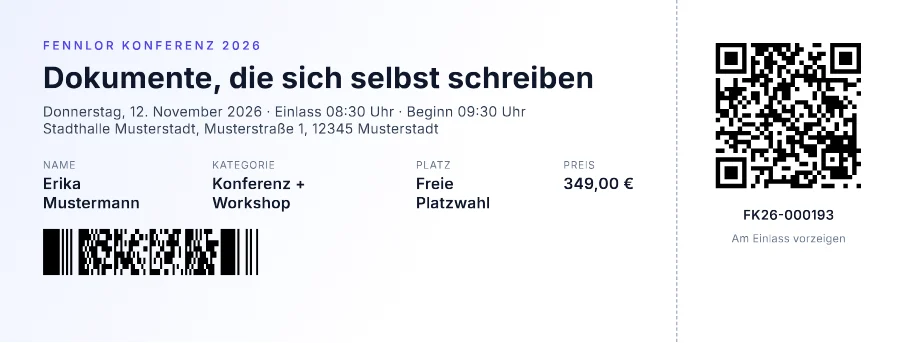
A print-at-home ticket on its own paper size, 210 × 80 mm without margins: a QR code for the check-in app on the stub, the ticket number again as a PDF417 strip for hand scanners, and the start time, doors and weekday formatted in German from two timestamps.
Free plan, no card. You get your own copy in the editor, published and ready for the API.
Rendered result
What this example shows
- The paper is
210mm×80mmwith zero margins, so the PDF is the ticket and nothing around it. barcode(ticket.id, { type: 'pdf417', height: 8 })andqrcode(ticket.check_in_url, { size: 120 })encode the same ticket for two kinds of scanner.date('EEEE, d. MMMM yyyy')anddate('HH:mm')turn two ISO timestamps intoDonnerstag, 12. November 2026, doors08:30and start09:30, in the template’s time zoneEurope/Berlin.- The stub is a 52 mm column beside the ticket, set off by a dashed line: plain CSS, no image of a ticket.
- Render it right after the purchase and attach the download to the confirmation mail.
Helpers used
Template folder
<main class="ticket">
  <section class="main">
    <p class="eyebrow">{{ event.series | upper }}</p>
    <h1>{{ event.title }}</h1>
    <p class="when">{{ event.starts | date('EEEE, d. MMMM yyyy') }} · Einlass {{ event.doors | date('HH:mm') }} Uhr · Beginn {{ event.starts | date('HH:mm') }} Uhr</p>
    <p class="where">{{ event.venue }}, {{ event.address }}</p>
    <dl>
      <div><dt>Name</dt><dd>{{ holder.name }}</dd></div>
      <div><dt>Kategorie</dt><dd>{{ ticket.category }}</dd></div>
      <div><dt>Platz</dt><dd>{{ ticket.seat }}</dd></div>
      <div><dt>Preis</dt><dd>{{ ticket.price | money }}</dd></div>
    </dl>
    <img class="strip" src="{{ barcode(ticket.id, { type: 'pdf417', height: 8 }) }}" alt="Ticketnummer">
  </section>
  <aside class="stub">
    <img src="{{ qrcode(ticket.check_in_url, { size: 120 }) }}" alt="Check-in-Code">
    <p>{{ ticket.id }}</p>
    <p class="muted">Am Einlass vorzeigen</p>
  </aside>
</main>body { margin: 0; font-family: 'Inter', sans-serif; color: #0f172a; }
.ticket { display: flex; height: 80mm; box-sizing: border-box; }
.main { flex: 1; padding: 9mm 10mm; background: linear-gradient(120deg, #eef2ff, #ffffff 60%); }
.eyebrow { margin: 0; font-size: 8pt; font-weight: 600; letter-spacing: 0.2em; color: #4f46e5; }
h1 { margin: 1.5mm 0 2mm; font-size: 20pt; line-height: 1.15; }
.when, .where { margin: 0; font-size: 9.5pt; color: #334155; }
dl { display: flex; gap: 9mm; margin: 5mm 0 4mm; }
dt { font-size: 7pt; letter-spacing: 0.05em; text-transform: uppercase; color: #64748b; }
dd { margin: 0.5mm 0 0; font-size: 10.5pt; font-weight: 600; }
.strip { display: block; height: 11mm; }
.stub { width: 52mm; padding: 9mm 6mm; box-sizing: border-box; border-left: 1.5px dashed #94a3b8; text-align: center; }
.stub img { width: 36mm; height: 36mm; }
.stub p { margin: 2mm 0 0; font-size: 9pt; font-weight: 600; }
.stub .muted { font-size: 7.5pt; font-weight: 400; color: #64748b; }<link rel="stylesheet" href="https://fonts.googleapis.com/css2?family=Inter:wght@400;600;700&display=swap">{
"pdf": {
"metadata": {
"title": "{{ event.title }}"
}
},
"paper": {
"width": "210mm",
"height": "80mm"
},
"margin": {
"top": "0",
"right": "0",
"bottom": "0",
"left": "0"
},
"locale": "de-DE",
"timezone": "Europe/Berlin",
"currency": "EUR"
}{
"event": {
"series": "Fennlor Konferenz 2026",
"title": "Dokumente, die sich selbst schreiben",
"starts": "2026-11-12T09:30:00+01:00",
"doors": "2026-11-12T08:30:00+01:00",
"venue": "Stadthalle Musterstadt",
"address": "Musterstraße 1, 12345 Musterstadt"
},
"holder": {
"name": "Erika Mustermann"
},
"ticket": {
"id": "FK26-000193",
"category": "Konferenz + Workshop",
"seat": "Freie Platzwahl",
"price": 349,
"check_in_url": "https://konferenz.example/checkin/FK26-000193"
}
}Render it through the API
Save the sample data as data.json and send it with the template’s name. TypeScript and Python use the SDKs; every other language posts the same JSON to the REST API with its standard library. Renders with a key that starts with ff_test_ are not metered; on the Free plan they carry a small watermark.
jq '{template: "ticket", data: ., filename: "ticket-FK26-000193.pdf"}' data.json \
  | curl https://api-eu.formfeed.dev/v1/renders \
      -H "Authorization: Bearer ff_test_..." \
      -H "Content-Type: application/json" \
--data-binary @-import { Formfeed } from '@formfeed/sdk';
import data from './data.json' with { type: 'json' };
const formfeed = new Formfeed({ apiKey: process.env.FORMFEED_API_KEY! });
const render = await formfeed.renders.create({
template: 'ticket',
data,
filename: 'ticket-FK26-000193.pdf',
});
console.log(render.status, render.download_url);import json
import os
from formfeed import Formfeed
formfeed = Formfeed(api_key=os.environ["FORMFEED_API_KEY"])
with open("data.json", encoding="utf-8") as file:
data = json.load(file)
render = formfeed.renders.create(
template="ticket",
data=data,
filename="ticket-FK26-000193.pdf",
)
print(render.status, render.download_url)<?php
$body = [
'template' => 'ticket',
'data' => json_decode(file_get_contents('data.json'), true),
'filename' => 'ticket-FK26-000193.pdf',
];
$curl = curl_init('https://api-eu.formfeed.dev/v1/renders');
curl_setopt_array($curl, [
CURLOPT_POST => true,
CURLOPT_RETURNTRANSFER => true,
CURLOPT_HTTPHEADER => [
'Authorization: Bearer ' . getenv('FORMFEED_API_KEY'),
'Content-Type: application/json',
],
CURLOPT_POSTFIELDS => json_encode($body),
]);
$render = json_decode(curl_exec($curl), true);
echo $render['status'], ' ', $render['download_url'], PHP_EOL;package main
import (
"bytes"
"encoding/json"
"fmt"
"net/http"
"os"
)
func main() {
data, err := os.ReadFile("data.json")
if err != nil {
panic(err)
}
body, _ := json.Marshal(map[string]any{
"template": "ticket",
"data": json.RawMessage(data),
"filename": "ticket-FK26-000193.pdf",
})
request, _ := http.NewRequest("POST", "https://api-eu.formfeed.dev/v1/renders", bytes.NewReader(body))
request.Header.Set("Authorization", "Bearer "+os.Getenv("FORMFEED_API_KEY"))
request.Header.Set("Content-Type", "application/json")
response, err := http.DefaultClient.Do(request)
if err != nil {
panic(err)
}
defer response.Body.Close()
var render struct {
Status string `json:"status"`
DownloadURL string `json:"download_url"`
}
json.NewDecoder(response.Body).Decode(&render)
fmt.Println(render.Status, render.DownloadURL)
}using System.Net.Http.Headers;
using System.Net.Http.Json;
using System.Text.Json;
var body = new
{
template = "ticket",
data = JsonDocument.Parse(File.ReadAllText("data.json")).RootElement,
filename = "ticket-FK26-000193.pdf",
};
using var http = new HttpClient();
http.DefaultRequestHeaders.Authorization =
new AuthenticationHeaderValue("Bearer", Environment.GetEnvironmentVariable("FORMFEED_API_KEY"));
var response = await http.PostAsJsonAsync("https://api-eu.formfeed.dev/v1/renders", body);
var render = await response.Content.ReadFromJsonAsync<JsonElement>();
Console.WriteLine($"{render.GetProperty("status")} {render.GetProperty("download_url")}");import java.net.URI;
import java.net.http.HttpClient;
import java.net.http.HttpRequest;
import java.net.http.HttpResponse;
import java.nio.file.Files;
import java.nio.file.Path;
public class Render {
public static void main(String[] args) throws Exception {
String data = Files.readString(Path.of("data.json"));
String body = """
{
"template": "ticket",
"filename": "ticket-FK26-000193.pdf",
"data": %s
}
""".formatted(data);
HttpRequest request = HttpRequest.newBuilder(URI.create("https://api-eu.formfeed.dev/v1/renders"))
.header("Authorization", "Bearer " + System.getenv("FORMFEED_API_KEY"))
.header("Content-Type", "application/json")
.POST(HttpRequest.BodyPublishers.ofString(body))
.build();
HttpResponse<String> response = HttpClient.newHttpClient().send(request, HttpResponse.BodyHandlers.ofString());
System.out.println(response.body()); // status, download_url, page_count, units …
}
}require "json"
require "net/http"
body = {
template: "ticket",
data: JSON.parse(File.read("data.json")),
filename: "ticket-FK26-000193.pdf",
}
response = Net::HTTP.post(
URI("https://api-eu.formfeed.dev/v1/renders"),
JSON.generate(body),
"Authorization" => "Bearer #{ENV.fetch("FORMFEED_API_KEY")}",
"Content-Type" => "application/json"
)
render = JSON.parse(response.body)
puts render["status"], render["download_url"]Start rendering today
The free plan includes 100 units a month and free test renders. Change plans when you need more.