Jinja2PDF
Annual report with contents and bookmarks
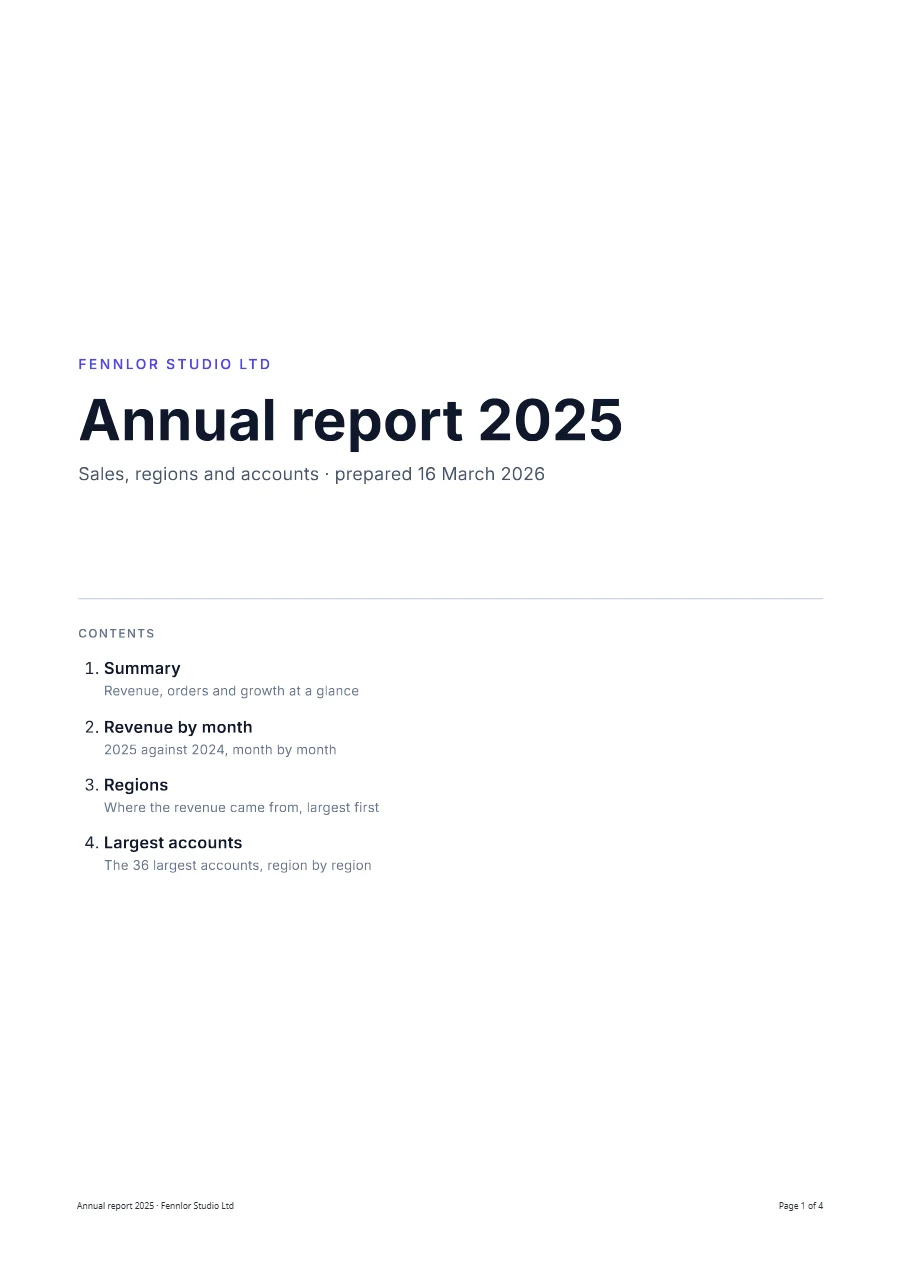
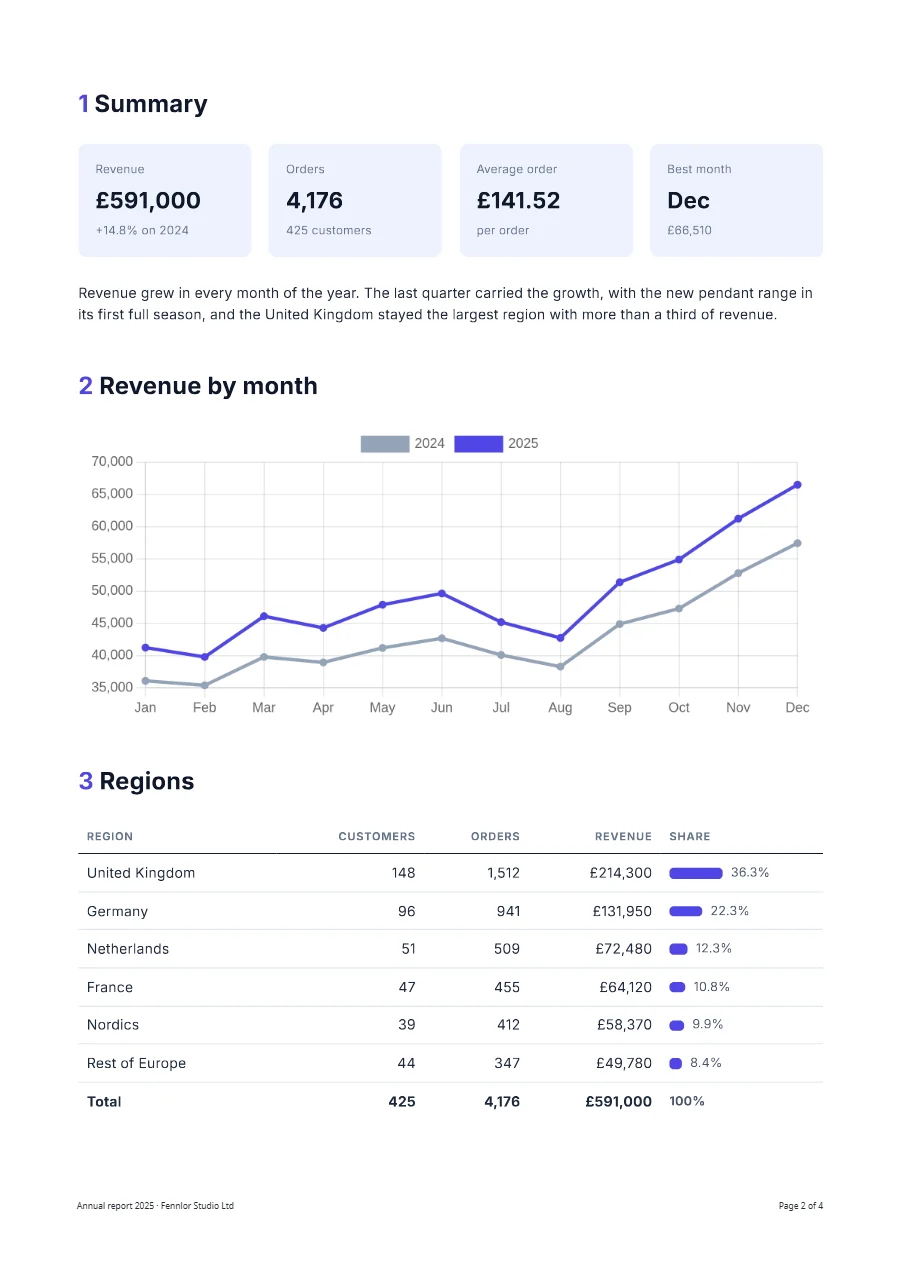
A four-page report: a cover with a linked table of contents, KPI cards, a line chart comparing two years, regions sorted by revenue and an appendix of accounts grouped by region. pdf.outline turns the headings into bookmarks, and no region is split across a page.
Free plan, no card. You get your own copy in the editor, published and ready for the API.
Rendered result
What this example shows
- The contents on the cover link to the chapters, and
pdf.outlineturns the headings into PDF bookmarks. Chromium 153 does not supporttarget-counter(), so the contents give no page numbers; links and bookmarks do the navigating. regions | sortBy('revenue', 'desc')puts the largest region first, and each share is computed in its row: the United Kingdom is36.3%of£591,000.- One line chart compares two years from the same rows:
pluck('previous')andpluck('revenue')become two series, anddevicePixelRatio: 3in the Chart.js options keeps it sharp when the PDF is zoomed. - In the appendix each region is its own
tbodywithbreak-inside: avoid, so a region never splits across pages and the column headings repeat. The page-break measurements show why that works. - The footer prints the document title from
pdf.metadata.titlethrough Chromium’stitleclass, beside the page number. access: "public"in the request returns a plain CDN link to put on a website, which works for as long as the file is kept: the retention of your plan decides how long that is.
Helpers used
Template folder
{% set revenue = months | sum('revenue') %}
{% set previous = months | sum('previous') %}
{% set orders = months | sum('orders') %}
{% set best = months | sortBy('revenue', 'desc') | first %}

<section class="cover">
  <p class="eyebrow">{{ report.company }}</p>
  <h1>{{ report.title }}</h1>
  <p class="lead">{{ report.subtitle }} · prepared {{ report.prepared | date('d MMMM yyyy') }}</p>

  <nav class="contents" aria-label="Contents">
    <p class="label">Contents</p>
    <ol>
      <li><a href="#summary">Summary</a><span>Revenue, orders and growth at a glance</span></li>
      <li><a href="#months">Revenue by month</a><span>{{ report.year }} against {{ report.year - 1 }}, month by month</span></li>
      <li><a href="#regions">Regions</a><span>Where the revenue came from, largest first</span></li>
      <li><a href="#accounts">Largest accounts</a><span>The {{ accounts | length }} largest accounts, region by region</span></li>
    </ol>
  </nav>
</section>

<section class="chapter" id="summary">
  <h2>Summary</h2>
  <div class="kpis">
    <div><span>Revenue</span><strong>£{{ revenue | number(0) }}</strong><em>+{{ ((revenue - previous) / previous * 100) | round(1) }}% on {{ report.year - 1 }}</em></div>
    <div><span>Orders</span><strong>{{ orders | number(0) }}</strong><em>{{ customers }} customers</em></div>
    <div><span>Average order</span><strong>{{ (revenue / orders) | money }}</strong><em>per order</em></div>
    <div><span>Best month</span><strong>{{ best.label }}</strong><em>£{{ best.revenue | number(0) }}</em></div>
  </div>
  <p>{{ report.summary }}</p>
</section>

<section class="chapter" id="months">
  <h2>Revenue by month</h2>
  {{ chart({
    type: 'line',
    labels: months | pluck('label'),
    series: [
      { label: report.year - 1, values: months | pluck('previous'), color: '#94a3b8' },
      { label: report.year, values: months | pluck('revenue'), color: '#4f46e5' }
    ],
    options: { devicePixelRatio: 3 },
    width: 640,
    height: 260,
    alt: 'Line chart of the revenue by month, ' ~ report.year ~ ' against ' ~ (report.year - 1)
  }) }}
</section>

<section class="chapter" id="regions">
  <h2>Regions</h2>
  <table class="figures">
    <thead><tr><th>Region</th><th class="num">Customers</th><th class="num">Orders</th><th class="num">Revenue</th><th>Share</th></tr></thead>
    <tbody>
      {% for region in regions | sortBy('revenue', 'desc') %}
      {% set share = (region.revenue / revenue * 100) | round(1) %}
      <tr>
        <td>{{ region.name }}</td>
        <td class="num">{{ region.customers }}</td>
        <td class="num">{{ region.orders | number(0) }}</td>
        <td class="num">£{{ region.revenue | number(0) }}</td>
        <td class="share"><span class="bar" style="width: {{ share }}%"></span>{{ share }}%</td>
      </tr>
      {% endfor %}
    </tbody>
    <tbody class="total">
      <tr><td>Total</td><td class="num">{{ regions | sum('customers') }}</td><td class="num">{{ regions | sum('orders') | number(0) }}</td><td class="num">£{{ regions | sum('revenue') | number(0) }}</td><td class="share">100%</td></tr>
    </tbody>
  </table>
</section>

<section class="chapter" id="accounts">
  <h2>Largest accounts</h2>
  <table class="figures accounts">
    <thead><tr><th>Account</th><th class="num">Orders</th><th class="num">Revenue</th><th class="num">Average order</th></tr></thead>
    {% for group in accounts | groupBy('region') %}
    <tbody>
      <tr class="group"><th colspan="4">{{ group.key }}</th></tr>
      {% for account in group.items | sortBy('revenue', 'desc') %}
      <tr>
        <td>{{ account.account }}</td>
        <td class="num">{{ account.orders }}</td>
        <td class="num">£{{ account.revenue | number(0) }}</td>
        <td class="num">{{ (account.revenue / account.orders) | money }}</td>
      </tr>
      {% endfor %}
      <tr class="subtotal"><td>{{ group.items | length }} accounts</td><td class="num">{{ group.items | sum('orders') }}</td><td class="num">£{{ group.items | sum('revenue') | number(0) }}</td><td class="num">{{ ((group.items | sum('revenue')) / (group.items | sum('orders'))) | money }}</td></tr>
    </tbody>
    {% endfor %}
    <tbody class="total">
      <tr><td>All {{ accounts | length }} accounts</td><td class="num">{{ accounts | sum('orders') | number(0) }}</td><td class="num">£{{ accounts | sum('revenue') | number(0) }}</td><td class="num">{{ ((accounts | sum('revenue')) / (accounts | sum('orders'))) | money }}</td></tr>
    </tbody>
  </table>
</section>body { font-family: 'Inter', sans-serif; font-size: 9.5pt; line-height: 1.5; color: #1e293b; }
.cover { height: 250mm; display: flex; flex-direction: column; justify-content: center; }
.eyebrow { margin: 0; color: #4f46e5; font-weight: 600; letter-spacing: 0.15em; text-transform: uppercase; }
h1 { margin: 3mm 0 2mm; font-size: 38pt; line-height: 1.1; color: #0f172a; }
.lead { margin: 0; font-size: 12pt; color: #475569; }
.contents { margin-top: 26mm; padding-top: 6mm; border-top: 1px solid #cbd5e1; }
.contents .label { margin: 0 0 3mm; font-size: 8pt; font-weight: 600; letter-spacing: 0.1em; text-transform: uppercase; color: #64748b; }
.contents ol { margin: 0; padding-left: 6mm; }
.contents li { margin-bottom: 3mm; font-size: 11pt; }
.contents a { color: #0f172a; font-weight: 600; text-decoration: none; }
.contents span { display: block; font-size: 9pt; color: #64748b; }
body { counter-reset: chapter; }
.chapter { counter-increment: chapter; margin-bottom: 10mm; }
h2 { margin: 0 0 5mm; font-size: 16pt; color: #0f172a; break-after: avoid; }
h2::before { content: counter(chapter) " "; color: #4f46e5; }
#summary { break-before: page; }
.kpis { display: grid; grid-template-columns: repeat(4, 1fr); gap: 4mm; margin-bottom: 6mm; }
.kpis div { padding: 4mm; border-radius: 2mm; background: #eef2ff; }
.kpis span, .kpis em { display: block; font-size: 8pt; font-style: normal; color: #64748b; }
.kpis strong { display: block; margin: 1mm 0; font-size: 15pt; color: #0f172a; }
.ff-chart { display: block; margin: 0 auto; }
.figures { width: 100%; border-collapse: collapse; }
.figures th, .figures td { padding: 1.8mm 2mm; border-bottom: 1px solid #e2e8f0; text-align: left; }
.figures thead th { border-bottom: 1.5px solid #0f172a; font-size: 7.5pt; letter-spacing: 0.05em; text-transform: uppercase; color: #64748b; }
.figures tbody { break-inside: avoid; }
.figures .group th { padding-top: 4mm; border-bottom: 1px solid #cbd5e1; font-size: 9pt; color: #4f46e5; }
.figures .subtotal td { color: #64748b; font-weight: 600; }
.figures .total td { border-top: 1.5px solid #0f172a; border-bottom: 0; font-weight: 700; }
.figures .total tr { break-before: avoid; } /* the total never stands alone on a page */
.accounts td { padding-top: 1.4mm; padding-bottom: 1.4mm; }
.num { text-align: right !important; white-space: nowrap; }
.share { width: 34mm; white-space: nowrap; font-size: 8.5pt; color: #475569; }
.share .bar { display: inline-block; height: 2.5mm; margin-right: 2mm; border-radius: 1mm; background: #4f46e5; vertical-align: middle; max-width: 18mm; }
.accounts { margin-top: 2mm; }<link rel="stylesheet" href="https://fonts.googleapis.com/css2?family=Inter:wght@400;600;700&display=swap"><div style="width:100%;display:flex;justify-content:space-between;font-size:7.5px;color:#64748b">
<span class="title"></span>
<span>Page <span class="pageNumber"></span> of <span class="totalPages"></span></span>
</div>{
"paper": {
"format": "A4"
},
"margin": {
"top": "20mm",
"right": "18mm",
"bottom": "22mm",
"left": "18mm"
},
"pdf": {
"metadata": {
"title": "{{ report.title }} · {{ report.company }}",
"author": "Fennlor Studio Ltd"
},
"tagged": true,
"outline": true
},
"locale": "en-GB",
"timezone": "Europe/London",
"currency": "GBP",
"footer": {
"height": "12mm"
}
}{
"report": {
"company": "Fennlor Studio Ltd",
"title": "Annual report 2025",
"subtitle": "Sales, regions and accounts",
"year": 2025,
"prepared": "2026-03-16",
"summary": "Revenue grew in every month of the year. The last quarter carried the growth, with the new pendant range in its first full season, and the United Kingdom stayed the largest region with more than a third of revenue."
},
"customers": 425,
"months": [
{
"label": "Jan",
"revenue": 41250,
"previous": 36100,
"orders": 296
},
{
"label": "Feb",
"revenue": 39800,
"previous": 35400,
"orders": 281
},
{
"label": "Mar",
"revenue": 46120,
"previous": 39800,
"orders": 327
},
{
"label": "Apr",
"revenue": 44300,
"previous": 38950,
"orders": 314
},
{
"label": "May",
"revenue": 47900,
"previous": 41200,
"orders": 339
},
{
"label": "Jun",
"revenue": 49650,
"previous": 42700,
"orders": 351
},
{
"label": "Jul",
"revenue": 45200,
"previous": 40100,
"orders": 318
},
{
"label": "Aug",
"revenue": 42750,
"previous": 38300,
"orders": 301
},
{
"label": "Sep",
"revenue": 51380,
"previous": 44900,
"orders": 362
},
{
"label": "Oct",
"revenue": 54900,
"previous": 47300,
"orders": 388
},
{
"label": "Nov",
"revenue": 61240,
"previous": 52800,
"orders": 431
},
{
"label": "Dec",
"revenue": 66510,
"previous": 57450,
"orders": 468
}
],
"regions": [
{
"name": "Germany",
"customers": 96,
"orders": 941,
"revenue": 131950
},
{
"name": "France",
"customers": 47,
"orders": 455,
"revenue": 64120
},
{
"name": "United Kingdom",
"customers": 148,
"orders": 1512,
"revenue": 214300
},
{
"name": "Nordics",
"customers": 39,
"orders": 412,
"revenue": 58370
},
{
"name": "Netherlands",
"customers": 51,
"orders": 509,
"revenue": 72480
},
{
"name": "Rest of Europe",
"customers": 44,
"orders": 347,
"revenue": 49780
}
],
"accounts": [
{
"account": "A-1003",
"region": "United Kingdom",
"orders": 61,
"revenue": 28400
},
{
"account": "A-1007",
"region": "Germany",
"orders": 49,
"revenue": 21300
},
{
"account": "A-1011",
"region": "United Kingdom",
"orders": 55,
"revenue": 24150
},
{
"account": "A-1012",
"region": "Netherlands",
"orders": 33,
"revenue": 14800
},
{
"account": "A-1015",
"region": "France",
"orders": 29,
"revenue": 12900
},
{
"account": "A-1018",
"region": "Nordics",
"orders": 31,
"revenue": 13600
},
{
"account": "A-1021",
"region": "Germany",
"orders": 41,
"revenue": 17650
},
{
"account": "A-1024",
"region": "United Kingdom",
"orders": 47,
"revenue": 19800
},
{
"account": "A-1026",
"region": "Rest of Europe",
"orders": 22,
"revenue": 9800
},
{
"account": "A-1030",
"region": "Germany",
"orders": 34,
"revenue": 15200
},
{
"account": "A-1033",
"region": "United Kingdom",
"orders": 38,
"revenue": 16920
},
{
"account": "A-1036",
"region": "Netherlands",
"orders": 27,
"revenue": 11900
},
{
"account": "A-1039",
"region": "France",
"orders": 24,
"revenue": 10400
},
{
"account": "A-1041",
"region": "United Kingdom",
"orders": 33,
"revenue": 14300
},
{
"account": "A-1044",
"region": "Nordics",
"orders": 25,
"revenue": 10900
},
{
"account": "A-1046",
"region": "Germany",
"orders": 28,
"revenue": 12400
},
{
"account": "A-1049",
"region": "United Kingdom",
"orders": 29,
"revenue": 12650
},
{
"account": "A-1052",
"region": "Netherlands",
"orders": 22,
"revenue": 9650
},
{
"account": "A-1055",
"region": "Rest of Europe",
"orders": 17,
"revenue": 7300
},
{
"account": "A-1057",
"region": "Germany",
"orders": 23,
"revenue": 10150
},
{
"account": "A-1060",
"region": "United Kingdom",
"orders": 26,
"revenue": 11200
},
{
"account": "A-1062",
"region": "France",
"orders": 20,
"revenue": 8800
},
{
"account": "A-1065",
"region": "Nordics",
"orders": 19,
"revenue": 8200
},
{
"account": "A-1068",
"region": "United Kingdom",
"orders": 22,
"revenue": 9850
},
{
"account": "A-1070",
"region": "Germany",
"orders": 20,
"revenue": 8900
},
{
"account": "A-1073",
"region": "Netherlands",
"orders": 18,
"revenue": 8100
},
{
"account": "A-1075",
"region": "United Kingdom",
"orders": 19,
"revenue": 8400
},
{
"account": "A-1078",
"region": "France",
"orders": 15,
"revenue": 6700
},
{
"account": "A-1080",
"region": "Germany",
"orders": 17,
"revenue": 7400
},
{
"account": "A-1083",
"region": "Rest of Europe",
"orders": 13,
"revenue": 5900
},
{
"account": "A-1085",
"region": "United Kingdom",
"orders": 16,
"revenue": 7120
},
{
"account": "A-1088",
"region": "Nordics",
"orders": 15,
"revenue": 6400
},
{
"account": "A-1090",
"region": "Netherlands",
"orders": 14,
"revenue": 6300
},
{
"account": "A-1093",
"region": "Germany",
"orders": 14,
"revenue": 6150
},
{
"account": "A-1095",
"region": "France",
"orders": 12,
"revenue": 5500
},
{
"account": "A-1098",
"region": "Netherlands",
"orders": 12,
"revenue": 5200
}
]
}Render it through the API
Save the sample data as data.json and send it with the template’s name. TypeScript and Python use the SDKs; every other language posts the same JSON to the REST API with its standard library. Renders with a key that starts with ff_test_ are not metered; on the Free plan they carry a small watermark.
jq '{template: "annual-report", data: ., filename: "annual-report-2025.pdf", access: "public"}' data.json \
  | curl https://api-eu.formfeed.dev/v1/renders \
      -H "Authorization: Bearer ff_test_..." \
      -H "Content-Type: application/json" \
--data-binary @-import { Formfeed } from '@formfeed/sdk';
import data from './data.json' with { type: 'json' };
const formfeed = new Formfeed({ apiKey: process.env.FORMFEED_API_KEY! });
const render = await formfeed.renders.create({
template: 'annual-report',
data,
filename: 'annual-report-2025.pdf',
access: 'public',
});
console.log(render.status, render.download_url);import json
import os
from formfeed import Formfeed
formfeed = Formfeed(api_key=os.environ["FORMFEED_API_KEY"])
with open("data.json", encoding="utf-8") as file:
data = json.load(file)
render = formfeed.renders.create(
template="annual-report",
data=data,
filename="annual-report-2025.pdf",
access="public",
)
print(render.status, render.download_url)<?php
$body = [
'template' => 'annual-report',
'data' => json_decode(file_get_contents('data.json'), true),
'filename' => 'annual-report-2025.pdf',
'access' => 'public',
];
$curl = curl_init('https://api-eu.formfeed.dev/v1/renders');
curl_setopt_array($curl, [
CURLOPT_POST => true,
CURLOPT_RETURNTRANSFER => true,
CURLOPT_HTTPHEADER => [
'Authorization: Bearer ' . getenv('FORMFEED_API_KEY'),
'Content-Type: application/json',
],
CURLOPT_POSTFIELDS => json_encode($body),
]);
$render = json_decode(curl_exec($curl), true);
echo $render['status'], ' ', $render['download_url'], PHP_EOL;package main
import (
"bytes"
"encoding/json"
"fmt"
"net/http"
"os"
)
func main() {
data, err := os.ReadFile("data.json")
if err != nil {
panic(err)
}
body, _ := json.Marshal(map[string]any{
"template": "annual-report",
"data": json.RawMessage(data),
"filename": "annual-report-2025.pdf",
"access": "public",
})
request, _ := http.NewRequest("POST", "https://api-eu.formfeed.dev/v1/renders", bytes.NewReader(body))
request.Header.Set("Authorization", "Bearer "+os.Getenv("FORMFEED_API_KEY"))
request.Header.Set("Content-Type", "application/json")
response, err := http.DefaultClient.Do(request)
if err != nil {
panic(err)
}
defer response.Body.Close()
var render struct {
Status string `json:"status"`
DownloadURL string `json:"download_url"`
}
json.NewDecoder(response.Body).Decode(&render)
fmt.Println(render.Status, render.DownloadURL)
}using System.Net.Http.Headers;
using System.Net.Http.Json;
using System.Text.Json;
var body = new
{
template = "annual-report",
data = JsonDocument.Parse(File.ReadAllText("data.json")).RootElement,
filename = "annual-report-2025.pdf",
access = "public",
};
using var http = new HttpClient();
http.DefaultRequestHeaders.Authorization =
new AuthenticationHeaderValue("Bearer", Environment.GetEnvironmentVariable("FORMFEED_API_KEY"));
var response = await http.PostAsJsonAsync("https://api-eu.formfeed.dev/v1/renders", body);
var render = await response.Content.ReadFromJsonAsync<JsonElement>();
Console.WriteLine($"{render.GetProperty("status")} {render.GetProperty("download_url")}");import java.net.URI;
import java.net.http.HttpClient;
import java.net.http.HttpRequest;
import java.net.http.HttpResponse;
import java.nio.file.Files;
import java.nio.file.Path;
public class Render {
public static void main(String[] args) throws Exception {
String data = Files.readString(Path.of("data.json"));
String body = """
{
"template": "annual-report",
"filename": "annual-report-2025.pdf",
"access": "public",
"data": %s
}
""".formatted(data);
HttpRequest request = HttpRequest.newBuilder(URI.create("https://api-eu.formfeed.dev/v1/renders"))
.header("Authorization", "Bearer " + System.getenv("FORMFEED_API_KEY"))
.header("Content-Type", "application/json")
.POST(HttpRequest.BodyPublishers.ofString(body))
.build();
HttpResponse<String> response = HttpClient.newHttpClient().send(request, HttpResponse.BodyHandlers.ofString());
System.out.println(response.body()); // status, download_url, page_count, units …
}
}require "json"
require "net/http"
body = {
template: "annual-report",
data: JSON.parse(File.read("data.json")),
filename: "annual-report-2025.pdf",
access: "public",
}
response = Net::HTTP.post(
URI("https://api-eu.formfeed.dev/v1/renders"),
JSON.generate(body),
"Authorization" => "Bearer #{ENV.fetch("FORMFEED_API_KEY")}",
"Content-Type" => "application/json"
)
render = JSON.parse(response.body)
puts render["status"], render["download_url"]Start rendering today
The free plan includes 100 units a month and free test renders. Change plans when you need more.