Use case
Report PDF generation
Formfeed is an API that turns the figures of a report into the finished PDF. The template holds the layout, the charts and the sums; your code sends the rows as JSON. A table runs over as many pages as it needs with its head row repeated, every page carries its number, and a report that takes its time is rendered in the background and announced by a webhook.
Free plan with 100 units a month, no credit card
Charts from the data
chart draws a Chart.js chart from the labels and values in the request: bar, line, pie, doughnut, radar. It is drawn without animation, so the PDF shows the chart the preview showed, and your code makes no picture.
Tables over many pages
A row moves to the next page whole, and the head row repeats on every page. break-inside: avoid keeps a group of rows together, and pageBreak() starts a chapter on a new page.
Sums in the template
sum, avg, groupBy and sortBy work on the rows you send. The report adds its own totals, sorts its regions and groups its lines, so the request carries raw rows.
Page numbers and bookmarks
Header and footer repeat on every page with <span class="pageNumber"> of <span class="totalPages"> and the title of the document, and pdf.outline turns the headings into the bookmarks of the PDF.
Long reports in the background
With "mode": "async" the request is answered at once and the report is rendered in the background. A webhook brings the download link when the file is there, or your code asks for it.
Pages before you send anything
The editor lays the report out in pages while you write it, filled with your sample data, and a true render shows the PDF as the API delivers it. Several data sets show how the layout holds with three rows and with three hundred.
Create a PDF report from JSON
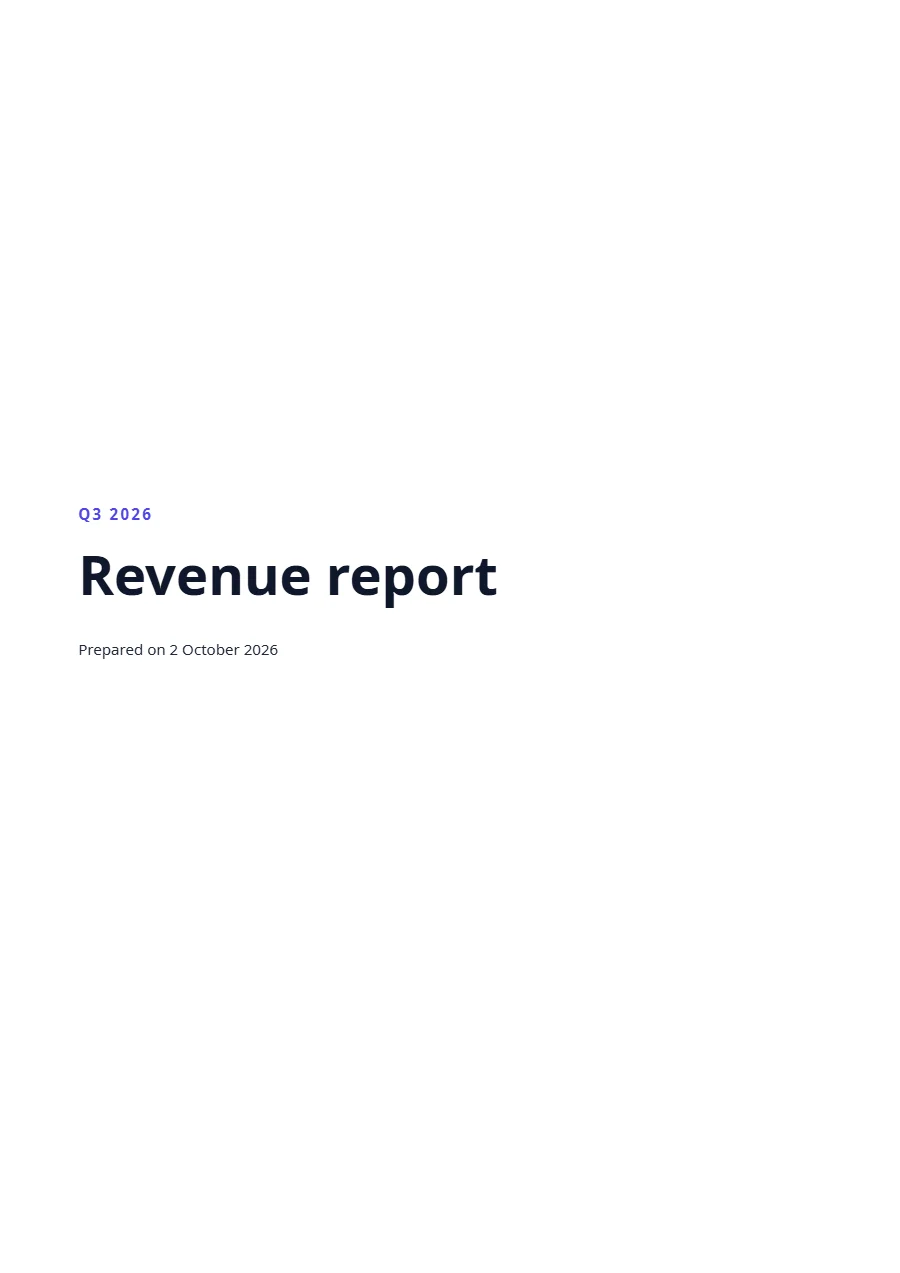
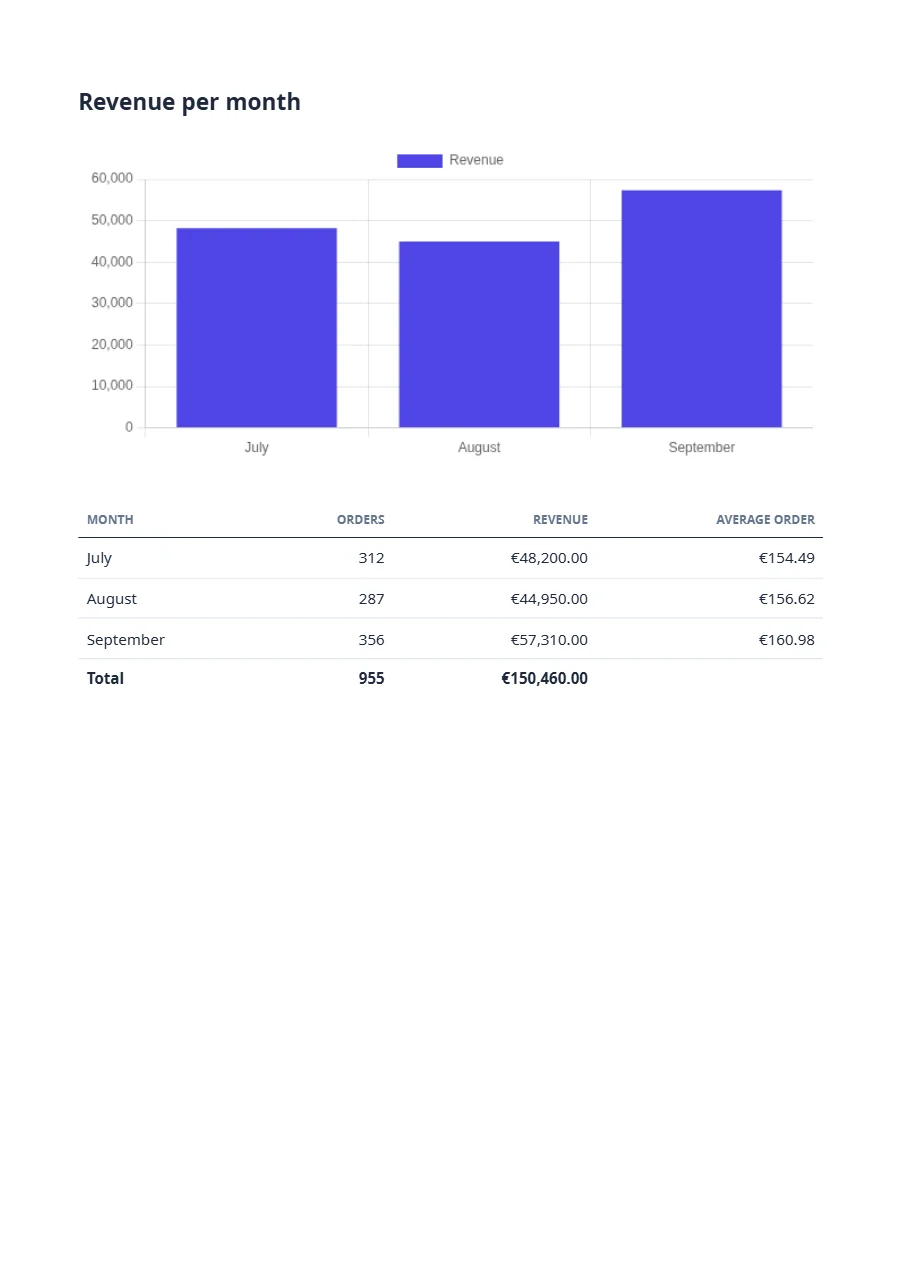
A report is the template plus the figures of one period. Save the data as data.json and send it with the name of the template; the answer carries the link to the PDF. The template draws the chart and works out the average order and the totals itself. TypeScript and Python use the SDKs, every other language sends the same JSON with its standard library. A key that starts with ff_test_ renders without being counted.
{
  "report": {
    "title": "Revenue report",
    "period": "Q3 2026",
    "date": "2026-10-02"
  },
  "months": [
    {
      "month": "July",
      "orders": 312,
      "revenue": 48200
    },
    {
      "month": "August",
      "orders": 287,
      "revenue": 44950
    },
    {
      "month": "September",
      "orders": 356,
      "revenue": 57310
    }
  ]
}jq '{template: "revenue-report", data: .}' data.json \
| curl https://api-eu.formfeed.dev/v1/renders \
-H "Authorization: Bearer ff_test_..." \
-H "Content-Type: application/json" \
--data-binary @-import { Formfeed } from '@formfeed/sdk';
import data from './data.json' with { type: 'json' };
const formfeed = new Formfeed({ apiKey: process.env.FORMFEED_API_KEY! });
const render = await formfeed.renders.create({
template: 'revenue-report',
data,
});
console.log(render.status, render.download_url);import json
import os
from formfeed import Formfeed
formfeed = Formfeed(api_key=os.environ["FORMFEED_API_KEY"])
with open("data.json", encoding="utf-8") as file:
data = json.load(file)
render = formfeed.renders.create(
template="revenue-report",
data=data,
)
print(render.status, render.download_url)<?php
$body = [
'template' => 'revenue-report',
'data' => json_decode(file_get_contents('data.json'), true),
];
$curl = curl_init('https://api-eu.formfeed.dev/v1/renders');
curl_setopt_array($curl, [
CURLOPT_POST => true,
CURLOPT_RETURNTRANSFER => true,
CURLOPT_HTTPHEADER => [
'Authorization: Bearer ' . getenv('FORMFEED_API_KEY'),
'Content-Type: application/json',
],
CURLOPT_POSTFIELDS => json_encode($body),
]);
$render = json_decode(curl_exec($curl), true);
echo $render['status'], ' ', $render['download_url'], PHP_EOL;package main
import (
"bytes"
"encoding/json"
"fmt"
"net/http"
"os"
)
func main() {
data, err := os.ReadFile("data.json")
if err != nil {
panic(err)
}
body, _ := json.Marshal(map[string]any{
"template": "revenue-report",
"data": json.RawMessage(data),
})
request, _ := http.NewRequest("POST", "https://api-eu.formfeed.dev/v1/renders", bytes.NewReader(body))
request.Header.Set("Authorization", "Bearer "+os.Getenv("FORMFEED_API_KEY"))
request.Header.Set("Content-Type", "application/json")
response, err := http.DefaultClient.Do(request)
if err != nil {
panic(err)
}
defer response.Body.Close()
var render struct {
Status string `json:"status"`
DownloadURL string `json:"download_url"`
}
json.NewDecoder(response.Body).Decode(&render)
fmt.Println(render.Status, render.DownloadURL)
}using System.Net.Http.Headers;
using System.Net.Http.Json;
using System.Text.Json;
var body = new
{
template = "revenue-report",
data = JsonDocument.Parse(File.ReadAllText("data.json")).RootElement,
};
using var http = new HttpClient();
http.DefaultRequestHeaders.Authorization =
new AuthenticationHeaderValue("Bearer", Environment.GetEnvironmentVariable("FORMFEED_API_KEY"));
var response = await http.PostAsJsonAsync("https://api-eu.formfeed.dev/v1/renders", body);
var render = await response.Content.ReadFromJsonAsync<JsonElement>();
Console.WriteLine($"{render.GetProperty("status")} {render.GetProperty("download_url")}");import java.net.URI;
import java.net.http.HttpClient;
import java.net.http.HttpRequest;
import java.net.http.HttpResponse;
import java.nio.file.Files;
import java.nio.file.Path;
public class Render {
public static void main(String[] args) throws Exception {
String data = Files.readString(Path.of("data.json"));
String body = """
{
"template": "revenue-report",
"data": %s
}
""".formatted(data);
HttpRequest request = HttpRequest.newBuilder(URI.create("https://api-eu.formfeed.dev/v1/renders"))
.header("Authorization", "Bearer " + System.getenv("FORMFEED_API_KEY"))
.header("Content-Type", "application/json")
.POST(HttpRequest.BodyPublishers.ofString(body))
.build();
HttpResponse<String> response = HttpClient.newHttpClient().send(request, HttpResponse.BodyHandlers.ofString());
System.out.println(response.body()); // status, download_url, page_count, units …
}
}require "json"
require "net/http"
body = {
template: "revenue-report",
data: JSON.parse(File.read("data.json")),
}
response = Net::HTTP.post(
URI("https://api-eu.formfeed.dev/v1/renders"),
JSON.generate(body),
"Authorization" => "Bearer #{ENV.fetch("FORMFEED_API_KEY")}",
"Content-Type" => "application/json"
)
render = JSON.parse(response.body)
puts render["status"], render["download_url"]Full request and response shapes in the Docs. Full template example →
What comes out
A real render of the example template for this use case, straight from the render-worker. Click it for the file.
Free plan, no card. You get your own copy in the editor, published and ready for the API.
Charts drawn from the data
A chart in a report is usually a picture that someone made elsewhere and pasted in. Here it is part of the template: chart takes the type, the labels and the values, and the renderer draws it with Chart.js while it builds the page. pluck pulls one column out of the rows, so the chart and the table under it read the same data and cannot disagree.
{{ chart({
  type: 'bar',
  data: {
    labels: months | pluck('month'),
    datasets: [{ label: 'Revenue', data: months | pluck('revenue'), backgroundColor: '#4f46e5' }]
  },
  width: 640,
  height: 280,
  alt: 'Bar chart of the revenue by month; the table below has the figures'
}) }}
The helper takes plain labels and values, several series, or, as here, a full Chart.js data object, with options beside it when you need them. alt says in words what the chart shows, which is what a screen reader reads in place of the picture. A charting library of your own works as well: JavaScript runs in the page, and waitFor.selector holds the print until your script has added its last element.
Tables that run over pages
A table of four hundred rows needs no code of yours to break well. A row is never split between two pages, unless it is taller than a page, and a thead is printed again at the top of every page the table reaches. Give a group of rows a tbody of its own with break-inside: avoid, and the group stays together.
Two things go wrong in every HTML report, and both have a fix. A tfoot repeats at the foot of every page, like the head row, so a grand total written there appears on each one. The example prints it once, at the end, with the line below. And a table inside a box with inline-block is not paginated at all: the edge of the page cuts through whatever row is there.
.figures tfoot { display: table-row-group; } /* the total once, at the end, not at the foot of every page */Page breaks in tables shows with rendered files what holds across pages and what does not.
Contents, bookmarks and a tagged PDF
A long report needs ways around it. pdf.outline writes the headings into the PDF as bookmarks, nested by their level, and the entries of a table of contents can link to their chapters. Chromium does not fill in the page number of a link’s target, so a contents page lists the chapters without page numbers; bookmarks and links do the navigating. The annual report example has all of it: a cover with linked contents, bookmarks, key figures, a line chart over two years and an appendix grouped by region.
The bookmarks are built from the tags of the PDF, the structure a screen reader reads a document by. With pdf.ua those tags make the report a PDF/UA-1 file that veraPDF checks, before it is delivered, against the rules of that standard a machine can check; a chart then needs its alt and a table its th cells. What the check covers and what it cannot is under accessible PDFs.
A long report in the background
A report of two pages comes back in the answer. One of two hundred should not keep a request of yours open: send it with "mode": "async", and the API answers 202 at once with the render in status queued. meta carries a reference of yours through to the result.
{
  "template": "revenue-report",
  "data": { … },
  "mode": "async",
  "webhook_url": "https://example.com/hooks/formfeed",
  "webhook_secret": "a-long-random-string-you-keep",
  "meta": { "report": "2026-Q3" }
}
When the file is there, render.completed goes to the webhook endpoints of the workspace and to the webhook_url of the request, with the render and its download link; render.failed says why there is none. The webhook_secret signs the deliveries to that address, so your handler can check the Webhook-Signature header before it believes an event. Without a webhook, ask GET /v1/renders/{id} every second or two: reading a render does not count against the rate limit.
A synchronous request does not fail when a report takes long. When it finds no free render slot within 30 seconds, or has no answer after 60 seconds in all, it is answered with 202 as well and finishes in the background, so code that asks synchronously should know what to do with a 202. In the SDKs that is renders.waitFor and renders.wait_for.
How long a report can be
A PDF may have 20 pages on the Free plan, 200 on Starter, 500 on Pro and 1,000 on Business. A report that comes out longer is not cut off: the render fails with page_limit_exceeded, names the number of pages it would have had and costs nothing. The same limit holds for the result when further PDFs are appended to a report.
What a report costs
A PDF of up to five pages is one unit, and every further five pages or part of them add one: a report of 12 pages is three units, one of 200 pages 40. The Free plan has 100 units a month and asks for no credit card. Starter has 3,000 units for €19 a month. Renders with a test key cost nothing while you build, and a render that fails is never counted. Every plan is on the pricing page.
What stays with you
Formfeed prints the report your data describes. It does not query your database, it has no schedule that starts a monthly report, and it does not mail the PDF to its readers: the query, the timer and the delivery are yours. They can be steps of an automation, too. Formfeed is in the app directory of Zapier, where a schedule starts the Zap and a mail step sends the link, and the integrations page says where Make, n8n and Power Automate stand. Files are kept for the retention of your plan, one day on Free, 30 days on Starter and 365 days on Pro, so store the reports you need for longer. From the Pro plan a copy of every file goes into your own S3 or R2 bucket as it is rendered.
From the blog
- Page breaks in tables: what Chromium honours in 2026 →
Twenty-one table layouts rendered to PDF by headless Chromium 153 and measured — which break rules it keeps, and the three mistakes that cut a row in half, hide one under the footer or print the total on every page.
FAQ
- Can a PDF report include charts?
- Yes. The
charthelper draws bar, line, pie, doughnut and radar charts with Chart.js from the data of the request, and a charting library of your own runs in the page as it does in a browser. - Is there a page limit?
- Per document, by plan: 20 pages on Free, 200 on Starter, 500 on Pro and 1,000 on Business. Every started five pages count as one unit.
- Can a table of contents show page numbers?
- Not automatically. Chromium, which prints the report, does not resolve
target-counter(), so the contents can link to the chapters but cannot name their pages. Bookmarks frompdf.outlineand the links cover the navigation; the annual report example shows both. - Can I merge several PDFs into one report?
- Yes, from the Starter plan.
post.merge_afterappends earlier renders or PDFs of the file library to a report as it is rendered, andPOST /v1/pdf/mergejoins renders you already have; each costs half a unit.merge_afterdoes not go withpdf.ua, because a merge drops the tags of the pages it appends. Often one template with every chapter is simpler. - Can reports be scheduled?
- Not by Formfeed. Your scheduler, your backend or an automation calls the API when a report is due; rendering in the background and the webhook are made for jobs that nobody waits for.
- Can the same report be a Word or PowerPoint file?
- From the Starter plan, yes: a Word or PowerPoint template is the file you already have with the same tags in it, and a render returns it filled, as DOCX or PPTX to edit or as PDF. The
charthelper is not available there.