Use case
Certificate generator API
Formfeed is an API that turns a certificate template and a list of names into finished documents: course certificates, certificates of attendance, awards and diplomas, as PDF to print and as PNG to share. One request renders one certificate. A batch renders up to 1,000 as one job and hands back a zip. The template is HTML and CSS, or the Word or PowerPoint file you already have.
Free plan with 100 units a month, no credit card
One request, one certificate
Send the name, the course and the date as JSON and get the PDF back, or the same template as PNG, JPG or WebP with output. The answer carries a signed download link, or the file itself with ?output=binary.
A whole course as one job
The batch endpoint takes up to 1,000 certificates in one request, renders them in the background and bundles them as one zip. A webhook tells your system when the job is done.
From a spreadsheet, without code
Upload a CSV or Excel file in the app, map its columns to the fields of the template and download the zip. Each row becomes one certificate.
A QR code to check it
The qrcode helper prints a link as a QR code on the certificate, for example the address of your page that confirms a certificate number.
Your typefaces
Google Fonts work with the usual link tag in the head of the template. From the Starter plan you upload your own font files once per organisation, script and display faces included, and they are embedded in every certificate.
Every name prints
Rendering is Chromium with the Noto fonts behind your own. Names with accents and names in non-Latin scripts, Chinese, Japanese and Korean among them, come out as they were sent.
Create a PDF certificate from code
A certificate is the template plus the data of one person. Save the data as data.json and send it with the name of the template; the answer carries the link to the PDF. TypeScript and Python use the SDKs, every other language sends the same JSON with its standard library. A key that starts with ff_test_ renders without being counted.
{
  "name": "Jane Doe",
  "course": "Analytical Engines 101",
  "completed_on": "2026-09-10",
  "hours": 16,
  "instructor": "John Doe",
  "id": "cert-8841",
  "verify_url": "https://academy.example/verify/cert-8841"
}jq '{template: "certificate", data: .}' data.json \
| curl https://api-eu.formfeed.dev/v1/renders \
-H "Authorization: Bearer ff_test_..." \
-H "Content-Type: application/json" \
--data-binary @-import { Formfeed } from '@formfeed/sdk';
import data from './data.json' with { type: 'json' };
const formfeed = new Formfeed({ apiKey: process.env.FORMFEED_API_KEY! });
const render = await formfeed.renders.create({
template: 'certificate',
data,
});
console.log(render.status, render.download_url);import json
import os
from formfeed import Formfeed
formfeed = Formfeed(api_key=os.environ["FORMFEED_API_KEY"])
with open("data.json", encoding="utf-8") as file:
data = json.load(file)
render = formfeed.renders.create(
template="certificate",
data=data,
)
print(render.status, render.download_url)<?php
$body = [
'template' => 'certificate',
'data' => json_decode(file_get_contents('data.json'), true),
];
$curl = curl_init('https://api-eu.formfeed.dev/v1/renders');
curl_setopt_array($curl, [
CURLOPT_POST => true,
CURLOPT_RETURNTRANSFER => true,
CURLOPT_HTTPHEADER => [
'Authorization: Bearer ' . getenv('FORMFEED_API_KEY'),
'Content-Type: application/json',
],
CURLOPT_POSTFIELDS => json_encode($body),
]);
$render = json_decode(curl_exec($curl), true);
echo $render['status'], ' ', $render['download_url'], PHP_EOL;package main
import (
"bytes"
"encoding/json"
"fmt"
"net/http"
"os"
)
func main() {
data, err := os.ReadFile("data.json")
if err != nil {
panic(err)
}
body, _ := json.Marshal(map[string]any{
"template": "certificate",
"data": json.RawMessage(data),
})
request, _ := http.NewRequest("POST", "https://api-eu.formfeed.dev/v1/renders", bytes.NewReader(body))
request.Header.Set("Authorization", "Bearer "+os.Getenv("FORMFEED_API_KEY"))
request.Header.Set("Content-Type", "application/json")
response, err := http.DefaultClient.Do(request)
if err != nil {
panic(err)
}
defer response.Body.Close()
var render struct {
Status string `json:"status"`
DownloadURL string `json:"download_url"`
}
json.NewDecoder(response.Body).Decode(&render)
fmt.Println(render.Status, render.DownloadURL)
}using System.Net.Http.Headers;
using System.Net.Http.Json;
using System.Text.Json;
var body = new
{
template = "certificate",
data = JsonDocument.Parse(File.ReadAllText("data.json")).RootElement,
};
using var http = new HttpClient();
http.DefaultRequestHeaders.Authorization =
new AuthenticationHeaderValue("Bearer", Environment.GetEnvironmentVariable("FORMFEED_API_KEY"));
var response = await http.PostAsJsonAsync("https://api-eu.formfeed.dev/v1/renders", body);
var render = await response.Content.ReadFromJsonAsync<JsonElement>();
Console.WriteLine($"{render.GetProperty("status")} {render.GetProperty("download_url")}");import java.net.URI;
import java.net.http.HttpClient;
import java.net.http.HttpRequest;
import java.net.http.HttpResponse;
import java.nio.file.Files;
import java.nio.file.Path;
public class Render {
public static void main(String[] args) throws Exception {
String data = Files.readString(Path.of("data.json"));
String body = """
{
"template": "certificate",
"data": %s
}
""".formatted(data);
HttpRequest request = HttpRequest.newBuilder(URI.create("https://api-eu.formfeed.dev/v1/renders"))
.header("Authorization", "Bearer " + System.getenv("FORMFEED_API_KEY"))
.header("Content-Type", "application/json")
.POST(HttpRequest.BodyPublishers.ofString(body))
.build();
HttpResponse<String> response = HttpClient.newHttpClient().send(request, HttpResponse.BodyHandlers.ofString());
System.out.println(response.body()); // status, download_url, page_count, units …
}
}require "json"
require "net/http"
body = {
template: "certificate",
data: JSON.parse(File.read("data.json")),
}
response = Net::HTTP.post(
URI("https://api-eu.formfeed.dev/v1/renders"),
JSON.generate(body),
"Authorization" => "Bearer #{ENV.fetch("FORMFEED_API_KEY")}",
"Content-Type" => "application/json"
)
render = JSON.parse(response.body)
puts render["status"], render["download_url"]Full request and response shapes in the Docs. Full template example →
What comes out
A real render of the example template for this use case, straight from the render-worker. Click it for the file.
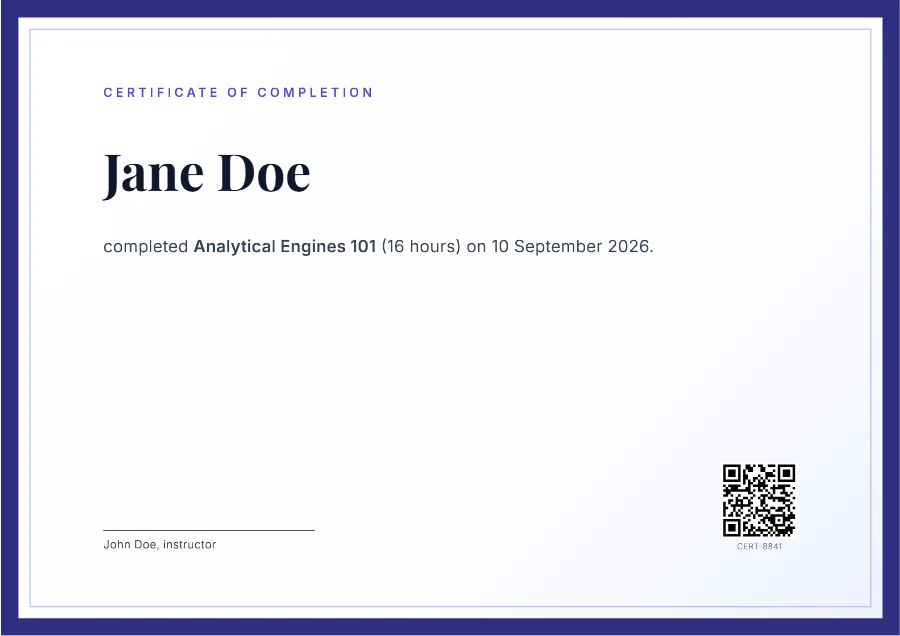
Free plan, no card. You get your own copy in the editor, published and ready for the API.
Certificates in bulk from a CSV file
A course ends and two hundred people are owed a certificate. Instead of two hundred requests you send one: every row of the list becomes an item of a batch, and the batch is one job. Formfeed renders the items in the background, and with zip: true the job ends in one archive with a PDF per person, each under the file name you gave it and numbered in the order of the list: 0001-jane-doe.pdf, 0002-erika-mustermann.pdf.
curl https://api-eu.formfeed.dev/v1/renders/batch \
  -H "Authorization: Bearer $FORMFEED_API_KEY" \
  -H "Idempotency-Key: analytical-engines-101" \
  -H "Content-Type: application/json" \
  -d '{
    "template": "certificate",
    "zip": true,
    "items": [
      {
        "filename": "jane-doe.pdf",
        "data": {
          "name": "Jane Doe",
          "course": "Analytical Engines 101",
          "completed_on": "2026-09-10",
          "hours": 16,
          "instructor": "John Doe",
          "id": "cert-8841",
          "verify_url": "https://academy.example/verify/cert-8841"
        }
      },
      {
        "filename": "erika-mustermann.pdf",
        "data": {
          "name": "Erika Mustermann",
          "course": "Analytical Engines 101",
          "completed_on": "2026-09-10",
          "hours": 16,
          "instructor": "John Doe",
          "id": "cert-8842",
          "verify_url": "https://academy.example/verify/cert-8842"
        }
      }
    ]
  }'
The answer is the job. Ask GET /v1/jobs/{id} until its status is completed, or let the webhook below tell you: zip_url is then the archive, and every certificate has a link of its own as well. An item that fails does not stop the others; the job ends as partially_failed and names the items to send again. A list of more than 1,000 goes out as several batches, and every certificate counts as one unit, in a batch as in a single request.
A webhook when the certificates are ready
A batch takes as long as it takes, and your code does not have to wait for it. Register a webhook endpoint for the workspace, and Formfeed posts job.completed when the batch is done and render.completed for every certificate, each with its download links. A batch request can also name a webhook_url of its own, which gets the events of that job as well. From there your system sends the mail, files the PDF with the learner or stores it.
{
  "id": "evt_5b0c8e6f2d4a4c3e9b1a7f6e5d4c3b2a",
  "type": "job.completed",
  "created_at": "2026-09-11T10:00:00Z",
  "workspace_id": "3a6f…",
  "data": {
    "id": "job_5b2e8c1d9f3a4b6e8c0d2f4a6b8c0e1d",
    "type": "batch",
    "status": "completed",
    "total": 200,
    "succeeded": 200,
    "failed": 0,
    "zip_url": "https://cdn.formfeed.dev/…",
    "items": [ … ]
  }
}
Deliveries to a registered endpoint are signed: the Webhook-Signature header carries an HMAC-SHA256 over the timestamp and the body, which your handler checks before it believes the event; a webhook_url from the request is signed when the request brings a webhook_secret along. A delivery that gets no 2xx answer within ten seconds is sent again up to five times, spread over about 14 hours and 40 minutes.
From a form or a course platform, without code
Not every certificate starts in your own code. A form is submitted, a row is added to a sheet, someone finishes a course in a tool that can start an automation: the Formfeed step turns that event into a certificate, and the next step sends it.
Formfeed is in the app directory of Zapier. Its action lists your published templates and shows the fields of the one you pick by name, so you map name and course instead of writing JSON. The documentation builds exactly this Zap step by step: a form response becomes a certificate that goes out by email. The integrations page says where Make, n8n and Power Automate stand.
The template: HTML, or the Word or PowerPoint file you already have
A certificate template is a page of HTML and CSS with placeholders in Jinja2, Liquid or Handlebars: {{ name }} stands where the name goes. The editor shows the page as it will print while you write, in landscape and to the edge, filled with your sample data. The certificate example is a complete template to copy and change.
Many certificates are drawn in PowerPoint or Word. From the Starter plan that file can be the template: put the same placeholders into its text, upload it, and every render fills a copy and returns it as PDF. More on that under Word and PowerPoint templates. For certificates as images, the visual editor (beta) places the name and a QR code on a canvas.
What a certificate costs
A certificate of up to five pages is one unit, as PDF or as an image. The Free plan has 100 units a month and asks for no credit card. Starter has 3,000 units for €19 a month, about 0.6 cents a certificate. Renders with a test key cost nothing while you build, and a render that fails is never counted. Every plan is on the pricing page.
What stays with you
Formfeed makes the file and hands you its link. It does not email certificates to the people named on them, it does not host the page that confirms one, and it is not a wallet for credentials: the mail goes out from your system or from a step of your automation, and the QR code points at an address of yours. Files are kept for the retention of your plan, one day on Free, 30 days on Starter and 365 days on Pro, so store the ones you need for longer. From the Pro plan a copy of every file goes into your own S3 or R2 bucket as it is rendered.
FAQ
- Is there an SDK to create PDF certificates?
- Yes:
@formfeed/sdkfor TypeScript and JavaScript andformfeedfor Python, both withrenders.createfor one certificate andrenders.batchfor a list. Every other language sends the same JSON over HTTPS; the guides have complete programs for PHP, Go, C#, Java, Ruby and curl. - How many certificates can one batch hold?
- Up to 1,000 per request; a longer list goes out as several batches. Every certificate counts as one unit, and on the Free plan a live batch needs that many units left in the month.
- Can a certificate be created automatically when someone finishes a course?
- Yes, when the course platform can call a webhook or start an automation. Its webhook reaches an endpoint of yours, which calls the API, or it starts a Zap or an n8n workflow with the Formfeed step in it. Where Make and Power Automate stand is on the integrations page.
- How do recipients check that a certificate is genuine?
- Through a page of yours. The
qrcodehelper prints its address with the certificate number as a QR code; Formfeed renders the code and does not host the page behind it. - Do names with accents and non-Latin scripts work?
- Yes. Rendering uses Chromium with Noto fonts for broad script coverage, and your own fonts when you upload them.
- Can we design the certificate visually?
- For certificates as images, yes: the visual editor (beta) places the name, the course and a QR code on a canvas and binds them to your data. Certificates as PDF are written as HTML in the code editor, where their wording can be edited right in the preview, or come from a Word or PowerPoint file.