Use case
Contract and agreement PDFs
Formfeed is an API that turns a contract template and the terms of one deal into the finished PDF: service agreements, NDAs, offers, order forms. A clause appears only where the data asks for it, and the numbering follows by itself. The wording has versions, so every render says which text it was printed from, and the same request can append your general terms and lock the file with a password.
Free plan with 100 units a month, no credit card
Clauses that depend on the deal
An if in the template shows a clause for one customer and leaves it out for the next, a loop prints one signature block per signatory, and a partial holds the paragraph that several contracts share.
Numbering that follows
Clause numbers are CSS counters, not text. Leave a clause out and everything after it renumbers, and numToWords writes a term as contracts do: “two (2) years”.
Wording with versions
Every save is a new version, with a note on what changed if you write one, and the API renders the published version unless a request names another. A render records the version it used and a checksum of it, so you can say later which wording a contract was printed from.
Edited by the people who own the text
With Edit text switched on, a paragraph is changed right in the preview of the page, without reading code. Values from the data stay as they are, and the saved change is a version like any other.
Terms appended, file locked
One request appends your general terms from the file library, stamps DRAFT across every page and encrypts the PDF with AES-256. From the Starter plan.
Your Word file as the template
A contract that exists as a Word file can stay one: type the tags into the document, upload it, and a render returns it filled, as DOCX to negotiate or as PDF to sign. From the Starter plan.
Create a contract PDF from JSON
A contract is the template plus the terms of one deal. Save the data as data.json and send it with the name of the template; the answer carries the link to the PDF. The example is a mutual NDA in Handlebars: the parties, the purpose, the term and the signatories come from the data, the wording from the template. TypeScript and Python use the SDKs, every other language sends the same JSON with its standard library. A key that starts with ff_test_ renders without being counted.
{
  "agreement": {
    "date": "2026-09-28",
    "effective": "2026-10-01",
    "purpose": "a joint catalogue of lighting products for the 2027 season",
    "includes": [
      "product designs and drawings",
      "prices and margins",
      "customer and supplier lists",
      "business plans"
    ],
    "term_years": 2,
    "survival_years": 3,
    "non_solicitation_months": 12,
    "governing_law": "England and Wales"
  },
  "party_a": {
    "name": "Fennlor Studio Ltd",
    "jurisdiction": "England and Wales",
    "number": "00000000",
    "address": "1 Example Street, Exampletown"
  },
  "party_b": {
    "name": "Olvarest Ltd",
    "jurisdiction": "England and Wales",
    "number": "00000000",
    "address": "2 Example Road, Exampleville"
  },
  "signatories": [
    {
      "party": "Fennlor Studio Ltd",
      "name": "Jane Doe",
      "title": "Director"
    },
    {
      "party": "Olvarest Ltd",
      "name": "John Doe",
      "title": "Managing Director"
    }
  ]
}jq '{template: "mutual-nda", data: .}' data.json \
| curl https://api-eu.formfeed.dev/v1/renders \
-H "Authorization: Bearer ff_test_..." \
-H "Content-Type: application/json" \
--data-binary @-import { Formfeed } from '@formfeed/sdk';
import data from './data.json' with { type: 'json' };
const formfeed = new Formfeed({ apiKey: process.env.FORMFEED_API_KEY! });
const render = await formfeed.renders.create({
template: 'mutual-nda',
data,
});
console.log(render.status, render.download_url);import json
import os
from formfeed import Formfeed
formfeed = Formfeed(api_key=os.environ["FORMFEED_API_KEY"])
with open("data.json", encoding="utf-8") as file:
data = json.load(file)
render = formfeed.renders.create(
template="mutual-nda",
data=data,
)
print(render.status, render.download_url)<?php
$body = [
'template' => 'mutual-nda',
'data' => json_decode(file_get_contents('data.json'), true),
];
$curl = curl_init('https://api-eu.formfeed.dev/v1/renders');
curl_setopt_array($curl, [
CURLOPT_POST => true,
CURLOPT_RETURNTRANSFER => true,
CURLOPT_HTTPHEADER => [
'Authorization: Bearer ' . getenv('FORMFEED_API_KEY'),
'Content-Type: application/json',
],
CURLOPT_POSTFIELDS => json_encode($body),
]);
$render = json_decode(curl_exec($curl), true);
echo $render['status'], ' ', $render['download_url'], PHP_EOL;package main
import (
"bytes"
"encoding/json"
"fmt"
"net/http"
"os"
)
func main() {
data, err := os.ReadFile("data.json")
if err != nil {
panic(err)
}
body, _ := json.Marshal(map[string]any{
"template": "mutual-nda",
"data": json.RawMessage(data),
})
request, _ := http.NewRequest("POST", "https://api-eu.formfeed.dev/v1/renders", bytes.NewReader(body))
request.Header.Set("Authorization", "Bearer "+os.Getenv("FORMFEED_API_KEY"))
request.Header.Set("Content-Type", "application/json")
response, err := http.DefaultClient.Do(request)
if err != nil {
panic(err)
}
defer response.Body.Close()
var render struct {
Status string `json:"status"`
DownloadURL string `json:"download_url"`
}
json.NewDecoder(response.Body).Decode(&render)
fmt.Println(render.Status, render.DownloadURL)
}using System.Net.Http.Headers;
using System.Net.Http.Json;
using System.Text.Json;
var body = new
{
template = "mutual-nda",
data = JsonDocument.Parse(File.ReadAllText("data.json")).RootElement,
};
using var http = new HttpClient();
http.DefaultRequestHeaders.Authorization =
new AuthenticationHeaderValue("Bearer", Environment.GetEnvironmentVariable("FORMFEED_API_KEY"));
var response = await http.PostAsJsonAsync("https://api-eu.formfeed.dev/v1/renders", body);
var render = await response.Content.ReadFromJsonAsync<JsonElement>();
Console.WriteLine($"{render.GetProperty("status")} {render.GetProperty("download_url")}");import java.net.URI;
import java.net.http.HttpClient;
import java.net.http.HttpRequest;
import java.net.http.HttpResponse;
import java.nio.file.Files;
import java.nio.file.Path;
public class Render {
public static void main(String[] args) throws Exception {
String data = Files.readString(Path.of("data.json"));
String body = """
{
"template": "mutual-nda",
"data": %s
}
""".formatted(data);
HttpRequest request = HttpRequest.newBuilder(URI.create("https://api-eu.formfeed.dev/v1/renders"))
.header("Authorization", "Bearer " + System.getenv("FORMFEED_API_KEY"))
.header("Content-Type", "application/json")
.POST(HttpRequest.BodyPublishers.ofString(body))
.build();
HttpResponse<String> response = HttpClient.newHttpClient().send(request, HttpResponse.BodyHandlers.ofString());
System.out.println(response.body()); // status, download_url, page_count, units …
}
}require "json"
require "net/http"
body = {
template: "mutual-nda",
data: JSON.parse(File.read("data.json")),
}
response = Net::HTTP.post(
URI("https://api-eu.formfeed.dev/v1/renders"),
JSON.generate(body),
"Authorization" => "Bearer #{ENV.fetch("FORMFEED_API_KEY")}",
"Content-Type" => "application/json"
)
render = JSON.parse(response.body)
puts render["status"], render["download_url"]Full request and response shapes in the Docs. Full template example →
What comes out
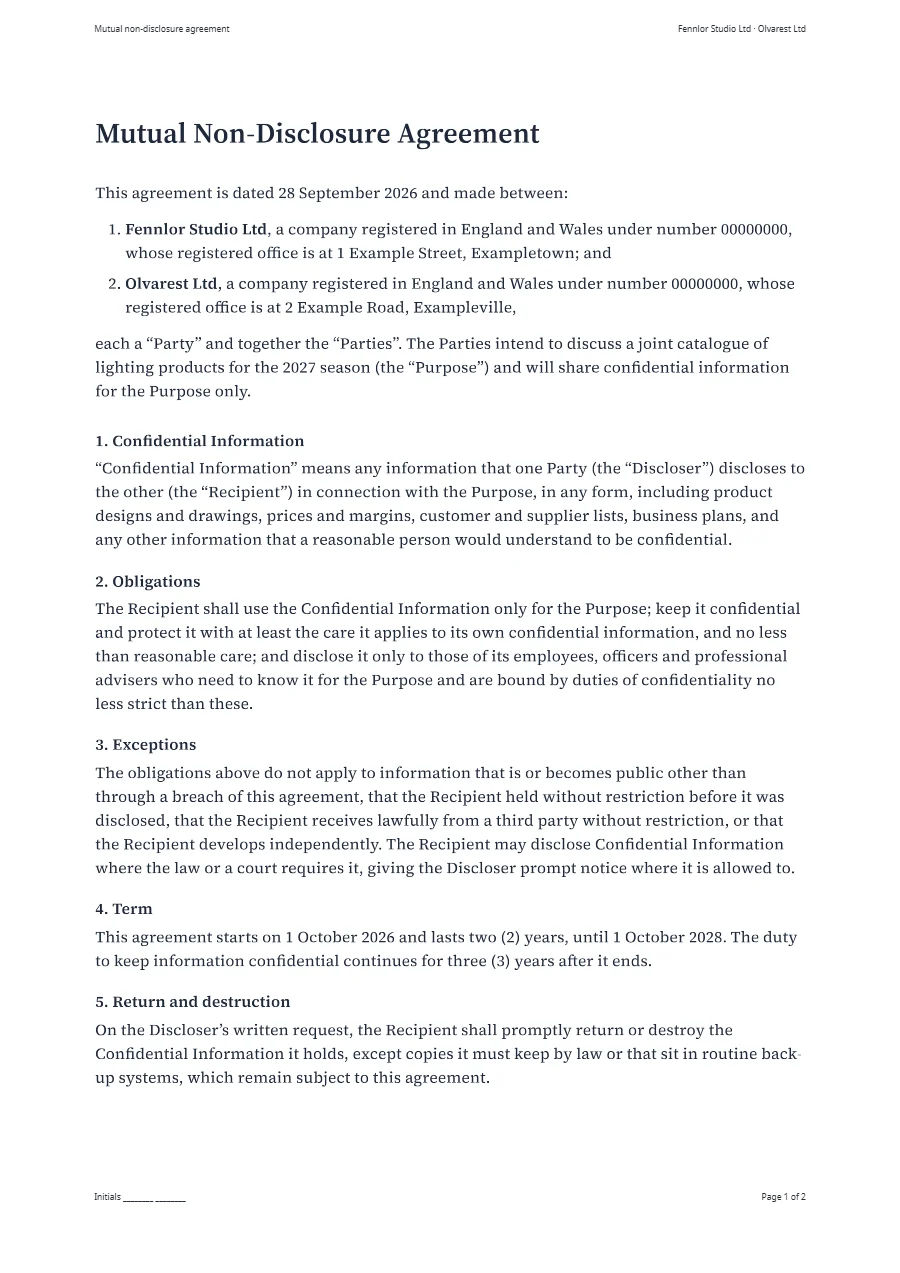
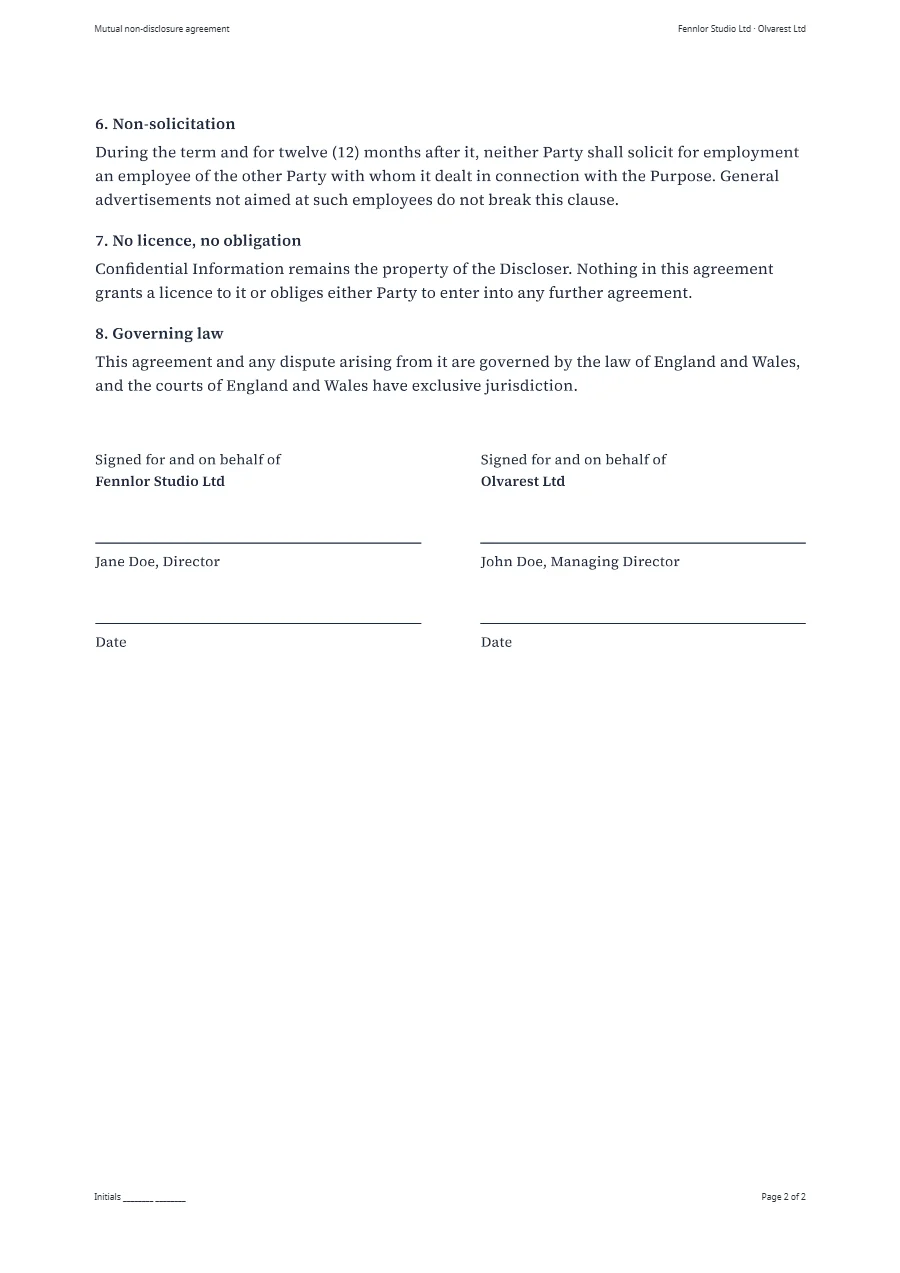
A real render of the example template for this use case, straight from the render-worker. Click it for the file.
Free plan, no card. You get your own copy in the editor, published and ready for the API.
Clauses that appear only when they apply
Most of a contract is the same for everyone. What differs is a handful of values and a few clauses. The values are fields of the data. A clause that only some deals have stands in a condition: the example prints its non-solicitation clause when the data gives it a number of months, {{#if agreement.non_solicitation_months}}, and leaves it out otherwise.
What makes that safe is the numbering. The numbers are written by CSS counters, so the clause after an omitted one moves up by itself, and no contract goes out with clause 7 following clause 5.
ol.clauses { margin: 6mm 0 0; padding: 0; list-style: none; counter-reset: clause; }
ol.clauses > li { counter-increment: clause; margin-bottom: 4mm; }
ol.clauses h2::before { content: counter(clause) ". "; }
Dates and numbers come from helpers: date formats a date for the locale of the template, dateAdd works out the day a term ends, and numToWords spells a number out in English, German, French, Spanish, Italian or Dutch. The signature block has break-inside: avoid, so a signature line never lands on a page without its name. The NDA example is the complete template with its data.
No contract with a gap in it
A field your code forgot is printed as empty text, and a contract with an empty party name is worse than no contract. Store a data schema with the template, mark the fields a contract cannot do without as required, and send "validate_data": true with the render. Data that does not fit is then refused with 422 data_validation_error and a list of every field that is missing or wrong, before anything is rendered or counted.
The same schema works before a request is ever sent. The editor underlines variables that the sample data does not have, formfeed types turns the schema into TypeScript or Python types, so that a missing field is an error in your own editor, and publishing a version whose schema would refuse data the published one accepts is stopped until someone allows it. More in typed template data.
Wording that has a history
A contract template changes when legal changes a sentence, and it matters which contracts went out before that. Every save of a template is a new version, never a change to an old one. The API renders the published version, so a new wording goes live when someone publishes it, not when it is saved. The editor puts any saved version beside the one you are working on and restores an older one as a new draft.
The people who own the wording do not have to read HTML. With Edit text switched on, owners, admins and editors click a paragraph in the preview and type, and the values that come from the data stay values; text with a condition inside it is changed in the code. A paragraph that several contracts share, a liability clause or a signature block, can be a shared partial: changed once, the new text is in every template that includes it within a minute, published ones too. From the Starter plan a template also has release channels, so a staging system renders the wording that was released to it.
Which text did they receive?
Every render records what it was made from: the number of the template version, a checksum of that version (template_checksum), the Chromium build and the template language (engine_version), and a SHA-256 of the file (output_sha256). Keep the two checksums with the contract in your own system: the first says later which version of the wording produced the file, the second that a file is the one that was rendered, byte for byte. meta in the request carries your deal or customer number into the render, the render log and every webhook.
A shared partial is not covered by that checksum, because it changes without a new version of the template. The render keeps the version of every shared partial it used, and its entry in the app shows them. Wording that has to be tied to one version of a contract belongs in the template itself.
Append the terms, mark the draft, lock the file
A contract rarely travels alone. post runs PDF steps on the finished document inside the same render: merge_after appends other PDFs, such as your general terms from the file library or an annex rendered a moment ago, watermark stamps a text or an image across every page, and password encrypts the result with AES-256.
{
  "template": "mutual-nda",
  "data": { … },
  "post": {
    "merge_after": ["terms.pdf"],
    "watermark": { "text": "DRAFT", "opacity": 0.15 },
    "password": { "user": "open-sesame", "permissions": ["print"] }
  }
}
The steps always run in this order, whatever order the request names them in, because an encrypted PDF cannot be changed any more. Each step costs half a unit on top of the render, and post-processing needs the Starter plan. A password to open the file keeps it confidential; the permissions (print, copy, modify, annotate) are honoured by PDF viewers and are no protection against someone who can open the file. Files in the library are public to anyone who knows their address and do not expire: right for general terms, wrong for anything confidential.
The same three tools work on documents you rendered earlier, through POST /v1/pdf/merge, /pdf/watermark and /pdf/protect: see PDF tools. The quote marked as a draft and the confidential payslip are examples with a watermark and a password in their request.
When the contract is a Word file
Many contracts exist as a Word document that legal has signed off, and rebuilding it in HTML would mean signing it off again. From the Starter plan that file can be the template: type the same tags into its text, {{ party_a.name }} where a name goes, a condition alone in a paragraph before and after a clause, and upload the file. A render fills a copy and returns it as DOCX, for a counterparty who wants to mark it up, or as PDF. Paper, margins, headers and footers stay what the document says; a change to the wording is made in Word and uploaded again. More under Word and PowerPoint templates.
What a contract costs
A contract of up to five pages is one unit, and every further five pages add one. Appending the terms, a watermark and a password cost half a unit each. The Free plan has 100 units a month and asks for no credit card; post-processing and Word templates start with Starter, which has 3,000 units for €19 a month. Renders with a test key cost nothing while you build, and a render that fails is never counted. Every plan is on the pricing page.
What stays with you
Formfeed prints the contract your template and your data describe. It does not write the wording and does not check it: the example shows the mechanics, and a lawyer should read your text before it goes out. It does not collect signatures and adds no signature fields; the PDF goes to the signing service you use, or to a printer. And it is not your archive: files are kept for the retention of your plan, one day on Free, 30 days on Starter and 365 days on Pro, so store every contract yourself. From the Pro plan a copy of each file goes into your own S3 or R2 bucket as it is rendered.
FAQ
- Does Formfeed handle e-signatures?
- No. Formfeed produces the document; hand it to the signing service you use.
output_sha256lets you check that the file you pass on is the file that was rendered. A signed PDF is a changed file and has a hash of its own. - Can non-developers edit the wording?
- Yes. With Edit text on, owners, admins and editors change a paragraph right in the preview; values from the data stay as they are, and every saved change is a version a developer can review. Text with a condition inside it is changed in the code, and developers own the data contract.
- Our contract template is a Word file. Do we have to rebuild it?
- No. Type the tags into the Word file and upload it as a Word template; Formfeed fills it and returns DOCX or PDF. Word and PowerPoint templates are on Starter and above.
- Can the PDF be protected with a password?
- Yes, from the Starter plan:
post.passwordencrypts the file with AES-256, with a password to open it and permissions for printing, copying, changing and annotating. It costs half a unit. - How do we prove later which version of the terms a contract used?
- Every render records the version of the template and a checksum of it, and the file has a SHA-256. Store both with the contract; the render log keeps its entry for 13 months, longer only while the file itself is stored.
- Is the wording of the example ready to use?
- No. The NDA example shows how a contract template works: conditions, numbering, dates and signatures. Have a lawyer check any wording before you use it.