Use case
Invoice PDF API
Formfeed is an API that turns invoice data into the finished PDF. The template holds the layout, the arithmetic, the formats and the legal footer; your code sends the customer, the lines and the invoice number as JSON. The same template can return a ZUGFeRD or Factur-X e-invoice, and a changed footer is a new version of the template, not a deployment.
Free plan with 100 units a month, no credit card
Totals, dates and currencies
money, number and date follow the locale, the time zone and the currency of the template, and sum adds the lines. With the locale parameter the same template prints 1.234,56 € for a German customer and €1,234.56 for an Irish one.
GiroCode on the invoice
epcQr draws the SEPA payment code a banking app scans, from the name, the IBAN, the amount and the reference. qrcode and barcode cover payment links and article numbers.
Footers that count the pages
Header and footer repeat on every page with <span class="pageNumber"> of <span class="totalPages">, a long table of lines runs on with its head row repeated, and pageBreak() starts a new page where you want one.
E-invoices from the same template
Switched on, the PDF is a ZUGFeRD or Factur-X invoice: the page your customer reads, with the invoice inside it as XML, checked against the rules of EN 16931 before it is delivered. From the Starter plan.
No invoice twice
An Idempotency-Key makes a retry safe: once the first request has been answered, the same key returns that answer for 24 hours, and nothing is rendered or charged again. An identical request with a live key within 24 hours is answered from the stored file at no cost; an e-invoice is always made anew.
Reproducible
Every render records the template version with a checksum of it, the Chromium build and a SHA-256 of the file: proof later of which template made an invoice and that the file was not changed. The same inputs with the same Chromium build give the same document, though not the same bytes, because the file carries the time it was made.
Create an invoice PDF from JSON
An invoice is the template plus the data of one invoice. Save the data as data.json and send it with the name of the template; the answer carries the link to the PDF. The template adds the lines and works out VAT and the total itself. TypeScript and Python use the SDKs, every other language sends the same JSON with its standard library. A key that starts with ff_test_ renders without being counted.
{
  "company": {
    "name": "Fennlor Studio GmbH",
    "street": "Musterstraße 1",
    "city": "12345 Musterstadt",
    "iban": "DE36000000000000000000",
    "bic": "XXXXDEXXXXX",
    "vat_id": "DE000000000"
  },
  "customer": {
    "name": "Olvarest GmbH",
    "street": "Beispielweg 2",
    "city": "54321 Beispielstadt"
  },
  "invoice": {
    "number": "2026-0042",
    "date": "2026-09-10",
    "vat_rate": 19,
    "lines": [
      {
        "description": "Consulting",
        "qty": 8,
        "price": 120,
        "total": 960
      },
      {
        "description": "Implementation",
        "qty": 20,
        "price": 110,
        "total": 2200
      }
    ]
  }
}jq '{template: "invoice-de", data: .}' data.json \
| curl https://api-eu.formfeed.dev/v1/renders \
-H "Authorization: Bearer ff_test_..." \
-H "Content-Type: application/json" \
--data-binary @-import { Formfeed } from '@formfeed/sdk';
import data from './data.json' with { type: 'json' };
const formfeed = new Formfeed({ apiKey: process.env.FORMFEED_API_KEY! });
const render = await formfeed.renders.create({
template: 'invoice-de',
data,
});
console.log(render.status, render.download_url);import json
import os
from formfeed import Formfeed
formfeed = Formfeed(api_key=os.environ["FORMFEED_API_KEY"])
with open("data.json", encoding="utf-8") as file:
data = json.load(file)
render = formfeed.renders.create(
template="invoice-de",
data=data,
)
print(render.status, render.download_url)<?php
$body = [
'template' => 'invoice-de',
'data' => json_decode(file_get_contents('data.json'), true),
];
$curl = curl_init('https://api-eu.formfeed.dev/v1/renders');
curl_setopt_array($curl, [
CURLOPT_POST => true,
CURLOPT_RETURNTRANSFER => true,
CURLOPT_HTTPHEADER => [
'Authorization: Bearer ' . getenv('FORMFEED_API_KEY'),
'Content-Type: application/json',
],
CURLOPT_POSTFIELDS => json_encode($body),
]);
$render = json_decode(curl_exec($curl), true);
echo $render['status'], ' ', $render['download_url'], PHP_EOL;package main
import (
"bytes"
"encoding/json"
"fmt"
"net/http"
"os"
)
func main() {
data, err := os.ReadFile("data.json")
if err != nil {
panic(err)
}
body, _ := json.Marshal(map[string]any{
"template": "invoice-de",
"data": json.RawMessage(data),
})
request, _ := http.NewRequest("POST", "https://api-eu.formfeed.dev/v1/renders", bytes.NewReader(body))
request.Header.Set("Authorization", "Bearer "+os.Getenv("FORMFEED_API_KEY"))
request.Header.Set("Content-Type", "application/json")
response, err := http.DefaultClient.Do(request)
if err != nil {
panic(err)
}
defer response.Body.Close()
var render struct {
Status string `json:"status"`
DownloadURL string `json:"download_url"`
}
json.NewDecoder(response.Body).Decode(&render)
fmt.Println(render.Status, render.DownloadURL)
}using System.Net.Http.Headers;
using System.Net.Http.Json;
using System.Text.Json;
var body = new
{
template = "invoice-de",
data = JsonDocument.Parse(File.ReadAllText("data.json")).RootElement,
};
using var http = new HttpClient();
http.DefaultRequestHeaders.Authorization =
new AuthenticationHeaderValue("Bearer", Environment.GetEnvironmentVariable("FORMFEED_API_KEY"));
var response = await http.PostAsJsonAsync("https://api-eu.formfeed.dev/v1/renders", body);
var render = await response.Content.ReadFromJsonAsync<JsonElement>();
Console.WriteLine($"{render.GetProperty("status")} {render.GetProperty("download_url")}");import java.net.URI;
import java.net.http.HttpClient;
import java.net.http.HttpRequest;
import java.net.http.HttpResponse;
import java.nio.file.Files;
import java.nio.file.Path;
public class Render {
public static void main(String[] args) throws Exception {
String data = Files.readString(Path.of("data.json"));
String body = """
{
"template": "invoice-de",
"data": %s
}
""".formatted(data);
HttpRequest request = HttpRequest.newBuilder(URI.create("https://api-eu.formfeed.dev/v1/renders"))
.header("Authorization", "Bearer " + System.getenv("FORMFEED_API_KEY"))
.header("Content-Type", "application/json")
.POST(HttpRequest.BodyPublishers.ofString(body))
.build();
HttpResponse<String> response = HttpClient.newHttpClient().send(request, HttpResponse.BodyHandlers.ofString());
System.out.println(response.body()); // status, download_url, page_count, units …
}
}require "json"
require "net/http"
body = {
template: "invoice-de",
data: JSON.parse(File.read("data.json")),
}
response = Net::HTTP.post(
URI("https://api-eu.formfeed.dev/v1/renders"),
JSON.generate(body),
"Authorization" => "Bearer #{ENV.fetch("FORMFEED_API_KEY")}",
"Content-Type" => "application/json"
)
render = JSON.parse(response.body)
puts render["status"], render["download_url"]Full request and response shapes in the Docs. Full template example →
What comes out
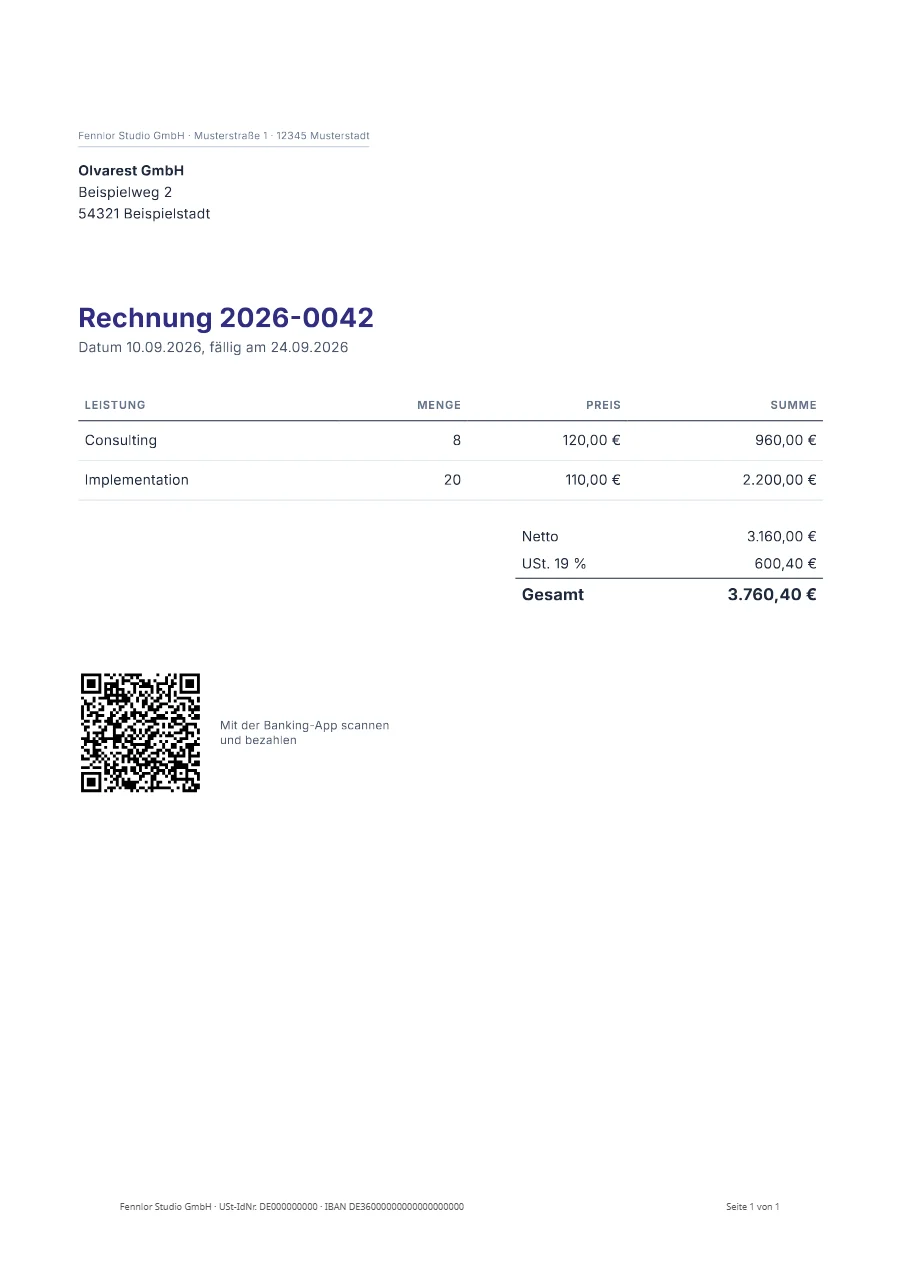
A real render of the example template for this use case, straight from the render-worker. Click it for the file.
Free plan, no card. You get your own copy in the editor, published and ready for the API.
One template for every country you invoice
An invoice for a German customer reads 3.760,40 €, the same invoice for an Irish one €3,760.40. The helpers take their format from the locale, the time zone and the currency of the template, and locale in the request switches them for one document. The wording switches with them when the template takes its texts from a dictionary with t: the multilingual example is one template in two languages.
{
  "template": "invoice-de",
  "data": { … },
  "locale": "en-IE"
}
The payment code your customers scan
A GiroCode is the EPC QR code of a SEPA credit transfer: name, IBAN, amount and reference in one code, which a banking app turns into a filled-in transfer. epcQr builds it from the data of the invoice, so the amount in the code is the amount on the page.
<img src="{{ epcQr({ name: company.name, iban: company.iban, bic: company.bic, amount: net + vat, text: 'Rechnung ' ~ invoice.number }, { size: 110 }) }}" alt="GiroCode">The GiroCode generator makes a single code in the browser, and GiroCode on invoices goes through the standard field by field and says why banking apps refuse a code.
The e-invoice: ZUGFeRD and Factur-X
With the e-invoice setting of the template switched on, every PDF it renders is a ZUGFeRD or Factur-X invoice: a PDF/A-3 that carries the invoice as XML (factur-x.xml), in the profile EN 16931 or Basic. The XML is built from an _invoice block of the data and checked against its schema and the rules of EN 16931 before the file is delivered. A file that does not pass is not delivered, and the report of the check comes with every one that is.
An e-invoice costs one unit on top of its render and needs the Starter plan; on the Free plan, test renders make up to 20 a day. XRechnung and UBL are not available. When an e-invoice is required and what stays with you is on the e-invoicing page, and the e-invoice example is a complete template with its data. The same file can also be a tagged PDF/UA-1 document, checked by veraPDF against the rules of that standard a machine can check: see accessible PDFs.
A month of invoices as one job
A billing run is a batch: up to 1,000 invoices in one request, rendered in the background, with one zip at the end when you ask for it and a job.completed webhook when the job is done. Send the batch with an Idempotency-Key, and a run that is started twice queues its invoices once. Every invoice is a render of its own with its own link, and meta carries your order number through to the webhook.
From a spreadsheet or a CRM, without code
An invoice does not have to start in your code. A row is added to a sheet, a deal is closed, an order is paid: in a tool that can start an automation, the Formfeed step turns that event into the invoice, and the next step files or sends it.
Formfeed is in the app directory of Zapier. Its action lists your published templates and shows the fields of the one you pick by name. The documentation builds one such Zap step by step: a spreadsheet row becomes an invoice in Google Drive. The integrations page says where Make, n8n and Power Automate stand.
What an invoice costs
An invoice of up to five pages is one unit, every further five pages add one, and an e-invoice adds one more. The Free plan has 100 units a month and asks for no credit card. Starter has 3,000 units for €19 a month, about 0.6 cents an invoice. Renders with a test key cost nothing while you build, and a render that fails is never counted. Every plan is on the pricing page.
What stays with you
Formfeed prints the invoice your data describes. It does not assign invoice numbers, it does not decide which VAT rate applies to a sale, it does not send the invoice, and it is not the archive the law asks you to keep: the numbering, the tax treatment, the delivery and the archive are yours. Files are kept for the retention of your plan, one day on Free, 30 days on Starter and 365 days on Pro, so store every invoice yourself. From the Pro plan a copy of each file goes into your own S3 or R2 bucket as it is rendered.
FAQ
- Can I keep my existing HTML invoice template?
- Yes. Paste the HTML and CSS into the editor or push it with the CLI; Jinja2, Liquid and Handlebars syntax are all supported. Templates from another provider import with a report of what to check.
- Does the API calculate totals and VAT?
- The template does, from your data: helpers such as
sum,multiplyandroundadd the lines and apply the rate you send. Which rate applies to a sale is your decision, not the template’s. - Can it create ZUGFeRD, Factur-X or XRechnung?
- ZUGFeRD and Factur-X, in the profiles EN 16931 and Basic, from the Starter plan. XRechnung and UBL are not available.
- How do I avoid creating an invoice twice?
- Send an
Idempotency-Keyheader that is tied to your own record, such as the order number. Once the first request has been answered, a repeat with the same key returns that answer for 24 hours, and nothing is rendered or charged again. A retry sent while the first request is still running is not recognised, and an answer that was the file itself (?output=binary) is not stored: idempotency has the details. - Where are the PDFs stored?
- In the EU: they are rendered in Frankfurt and stored in the EU, for the retention period of your plan or the shorter time you set per request with
expires_in. Download links are signed; you can also fetch the bytes right away and store them yourself. - Is there an SDK?
- Yes:
@formfeed/sdkfor TypeScript and JavaScript andformfeedfor Python. Every other language sends the same JSON over HTTPS; the guides have complete programs for PHP, Go, C#, Java, Ruby and curl.