Jinja2PDF
One template, many languages
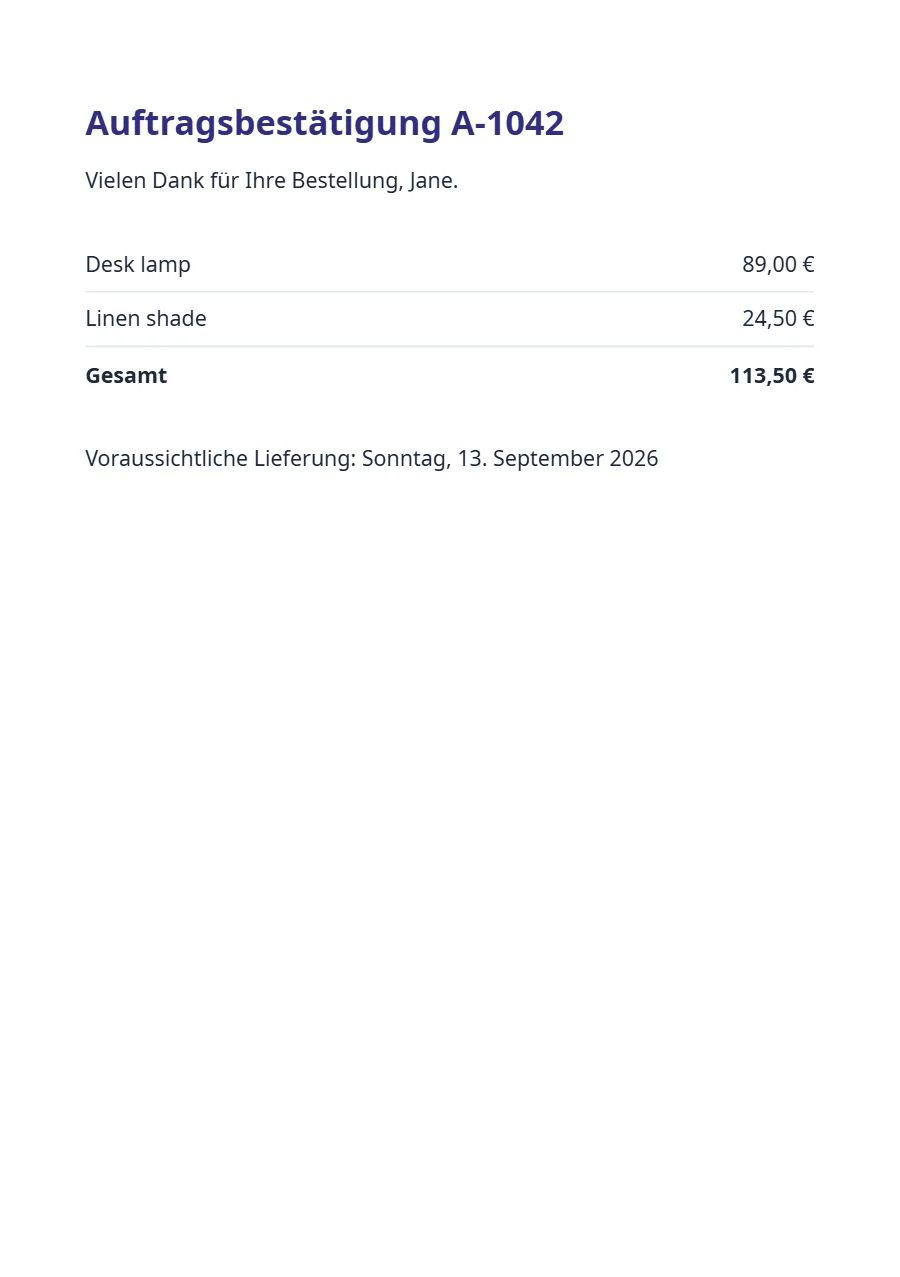
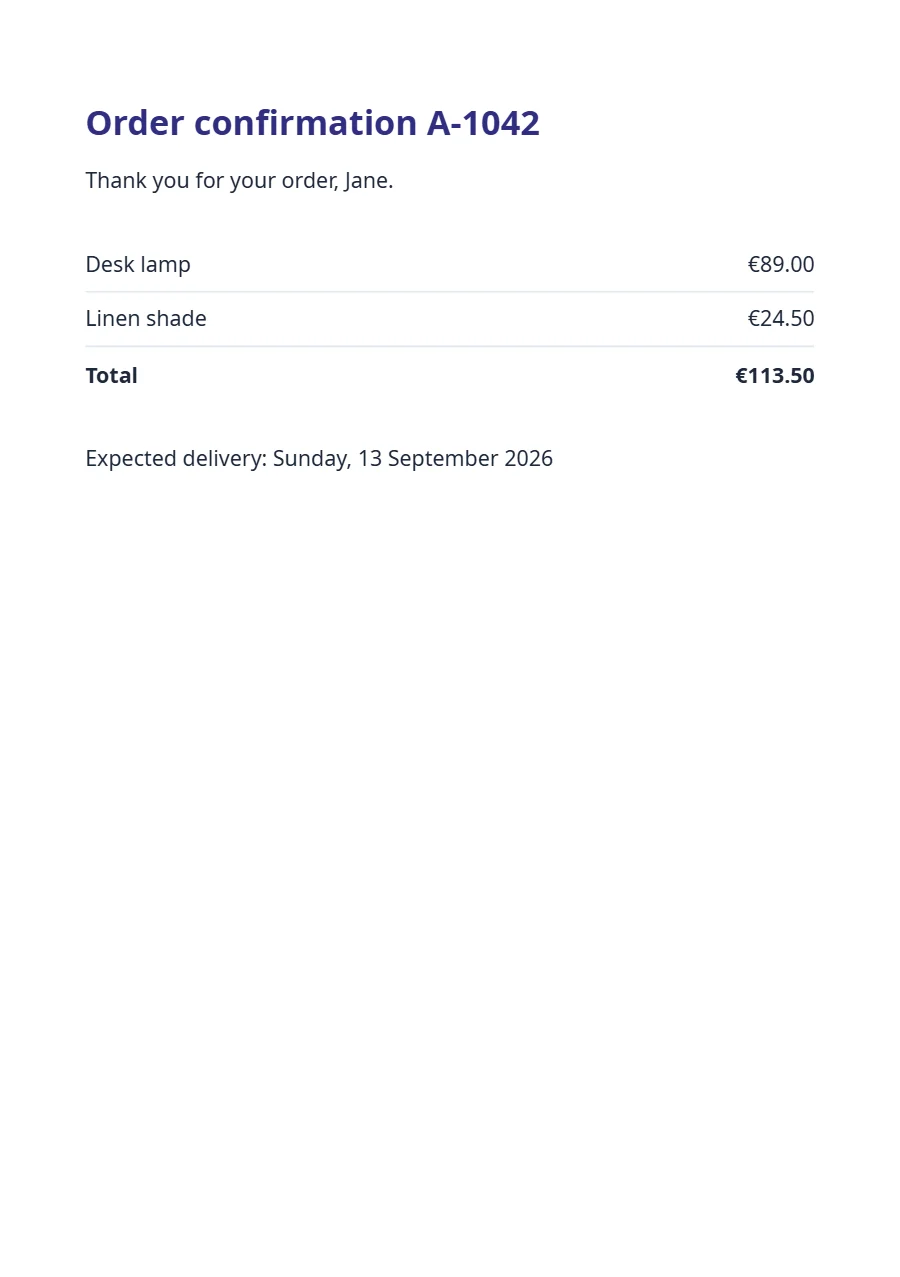
Texts come from the template’s dictionary through t(), and the request’s locale picks the language and the number and date formats. The German render says “Auftragsbestätigung” and “113,50 €”, the English one “Order confirmation” and “€113.50”, from the same data.
Free plan, no card. You get your own copy in the editor, published and ready for the API.
Rendered result
What this example shows
i18n.jsonholds one dictionary per language;t('title', { number: order.number })fills the{number}placeholder of the chosen one.- The request’s
localedecides everything at once: the dictionary,money(113,50 €or€113.50) and the long date thatdate('PPPP')prints. - The data is the same for every language, so the caller never sends translated strings or formatted numbers.
- Without
localein the request, the template’s own setting (en-GB) applies.
Helpers used
Template folder
<h1>{{ t('title', { number: order.number }) }}</h1>
<p>{{ t('thanks', { name: order.customer }) }}</p>

<table>
  {% for item in order.items %}
  <tr><td>{{ item.name }}</td><td class="num">{{ item.total | money }}</td></tr>
  {% endfor %}
  <tr class="grand">
    <td>{{ t('total') }}</td>
    <td class="num">{{ order.items | sum('total') | money }}</td>
  </tr>
</table>

<p>{{ t('delivery') }}: {{ order.date | dateAdd(3, 'days') | date('PPPP') }}</p>body { font-family: 'Noto Sans', sans-serif; font-size: 10pt; color: #1e293b; }
h1 { margin: 0 0 3mm; font-size: 16pt; color: #312e81; }
table { width: 100%; margin: 7mm 0; border-collapse: collapse; }
td { padding: 2mm 0; border-bottom: 1px solid #e2e8f0; }
.num { text-align: right; }
.grand td { border-top: 1.5px solid #1e293b; border-bottom: 0; font-weight: 700; }{
"pdf": {
"metadata": {
"title": "{{ t('title', { number: order.number }) }}"
}
},
"paper": {
"format": "A5"
},
"margin": {
"top": "16mm",
"right": "14mm",
"bottom": "16mm",
"left": "14mm"
},
"locale": "en-GB",
"currency": "EUR"
}{
"en": {
"title": "Order confirmation {number}",
"thanks": "Thank you for your order, {name}.",
"total": "Total",
"delivery": "Expected delivery"
},
"de": {
"title": "Auftragsbestätigung {number}",
"thanks": "Vielen Dank für Ihre Bestellung, {name}.",
"total": "Gesamt",
"delivery": "Voraussichtliche Lieferung"
}
}{
"order": {
"number": "A-1042",
"customer": "Jane",
"date": "2026-09-10",
"items": [
{
"name": "Desk lamp",
"total": 89
},
{
"name": "Linen shade",
"total": 24.5
}
]
}
}Render it through the API
Save the sample data as data.json and send it with the template’s name. TypeScript and Python use the SDKs; every other language posts the same JSON to the REST API with its standard library. Renders with a key that starts with ff_test_ are not metered; on the Free plan they carry a small watermark.
jq '{template: "order-confirmation", data: ., locale: "de-DE"}' data.json \
  | curl https://api-eu.formfeed.dev/v1/renders \
      -H "Authorization: Bearer ff_test_..." \
      -H "Content-Type: application/json" \
--data-binary @-import { Formfeed } from '@formfeed/sdk';
import data from './data.json' with { type: 'json' };
const formfeed = new Formfeed({ apiKey: process.env.FORMFEED_API_KEY! });
const render = await formfeed.renders.create({
template: 'order-confirmation',
data,
locale: 'de-DE',
});
console.log(render.status, render.download_url);import json
import os
from formfeed import Formfeed
formfeed = Formfeed(api_key=os.environ["FORMFEED_API_KEY"])
with open("data.json", encoding="utf-8") as file:
data = json.load(file)
render = formfeed.renders.create(
template="order-confirmation",
data=data,
locale="de-DE",
)
print(render.status, render.download_url)<?php
$body = [
'template' => 'order-confirmation',
'data' => json_decode(file_get_contents('data.json'), true),
'locale' => 'de-DE',
];
$curl = curl_init('https://api-eu.formfeed.dev/v1/renders');
curl_setopt_array($curl, [
CURLOPT_POST => true,
CURLOPT_RETURNTRANSFER => true,
CURLOPT_HTTPHEADER => [
'Authorization: Bearer ' . getenv('FORMFEED_API_KEY'),
'Content-Type: application/json',
],
CURLOPT_POSTFIELDS => json_encode($body),
]);
$render = json_decode(curl_exec($curl), true);
echo $render['status'], ' ', $render['download_url'], PHP_EOL;package main
import (
"bytes"
"encoding/json"
"fmt"
"net/http"
"os"
)
func main() {
data, err := os.ReadFile("data.json")
if err != nil {
panic(err)
}
body, _ := json.Marshal(map[string]any{
"template": "order-confirmation",
"data": json.RawMessage(data),
"locale": "de-DE",
})
request, _ := http.NewRequest("POST", "https://api-eu.formfeed.dev/v1/renders", bytes.NewReader(body))
request.Header.Set("Authorization", "Bearer "+os.Getenv("FORMFEED_API_KEY"))
request.Header.Set("Content-Type", "application/json")
response, err := http.DefaultClient.Do(request)
if err != nil {
panic(err)
}
defer response.Body.Close()
var render struct {
Status string `json:"status"`
DownloadURL string `json:"download_url"`
}
json.NewDecoder(response.Body).Decode(&render)
fmt.Println(render.Status, render.DownloadURL)
}using System.Net.Http.Headers;
using System.Net.Http.Json;
using System.Text.Json;
var body = new
{
template = "order-confirmation",
data = JsonDocument.Parse(File.ReadAllText("data.json")).RootElement,
locale = "de-DE",
};
using var http = new HttpClient();
http.DefaultRequestHeaders.Authorization =
new AuthenticationHeaderValue("Bearer", Environment.GetEnvironmentVariable("FORMFEED_API_KEY"));
var response = await http.PostAsJsonAsync("https://api-eu.formfeed.dev/v1/renders", body);
var render = await response.Content.ReadFromJsonAsync<JsonElement>();
Console.WriteLine($"{render.GetProperty("status")} {render.GetProperty("download_url")}");import java.net.URI;
import java.net.http.HttpClient;
import java.net.http.HttpRequest;
import java.net.http.HttpResponse;
import java.nio.file.Files;
import java.nio.file.Path;
public class Render {
public static void main(String[] args) throws Exception {
String data = Files.readString(Path.of("data.json"));
String body = """
{
"template": "order-confirmation",
"locale": "de-DE",
"data": %s
}
""".formatted(data);
HttpRequest request = HttpRequest.newBuilder(URI.create("https://api-eu.formfeed.dev/v1/renders"))
.header("Authorization", "Bearer " + System.getenv("FORMFEED_API_KEY"))
.header("Content-Type", "application/json")
.POST(HttpRequest.BodyPublishers.ofString(body))
.build();
HttpResponse<String> response = HttpClient.newHttpClient().send(request, HttpResponse.BodyHandlers.ofString());
System.out.println(response.body()); // status, download_url, page_count, units …
}
}require "json"
require "net/http"
body = {
template: "order-confirmation",
data: JSON.parse(File.read("data.json")),
locale: "de-DE",
}
response = Net::HTTP.post(
URI("https://api-eu.formfeed.dev/v1/renders"),
JSON.generate(body),
"Authorization" => "Bearer #{ENV.fetch("FORMFEED_API_KEY")}",
"Content-Type" => "application/json"
)
render = JSON.parse(response.body)
puts render["status"], render["download_url"]Start rendering today
The free plan includes 100 units a month and free test renders. Change plans when you need more.