Use case
Open Graph image API
Formfeed is an API that makes the preview image of a page from its title: one card per article, product or profile, drawn from a template by a real browser in the size you set. Design the card on a canvas or write it in HTML and CSS. Your build or your backend sends the title and the author as JSON when the page is published, and the answer is the address of the image.
Free plan with 100 units a month, no credit card
Canvas or code
Place text, images, shapes and QR codes on a canvas and bind them to your data in the visual editor (beta), or write the HTML and CSS yourself. To the API both are the same kind of template.
Titles that fit
A title of unknown length gets the largest size at which it fits its box, down to a minimum you set: on the canvas, or with data-ff-fit in code. On the canvas, one click checks every data set for text that would still be cut off.
The size you set
An image template renders in the window its settings name, 1200 × 630 unless you change it, and deviceScaleFactor multiplies the pixels of the file for sharp text. PNG, JPG or WebP.
Your fonts, your logo
Google Fonts load from a link tag, your own font files from the Starter plan, and the logo comes from the file library. Noto fonts and colour emoji stand behind them, so a title in another script still prints.
An address without a signature
With "access": "public" the answer is an address on the CDN that needs no signature and works for as long as the file is kept, which your plan decides.
Tailwind
With tailwind switched on, a card is written with utility classes, and exactly the classes it uses are compiled when it is rendered.
Create an Open Graph image from JSON
A card is the template plus the data of one page. Save the data as data.json and send it with the name of the template; the answer carries the address of the image, and access: "public" makes it one that needs no signature. The template is 1200 × 630 pixels, written in Liquid with Tailwind classes. TypeScript and Python use the SDKs, every other language sends the same JSON with its standard library. A key that starts with ff_test_ renders without being counted.
{
  "post": {
    "category": "Engineering",
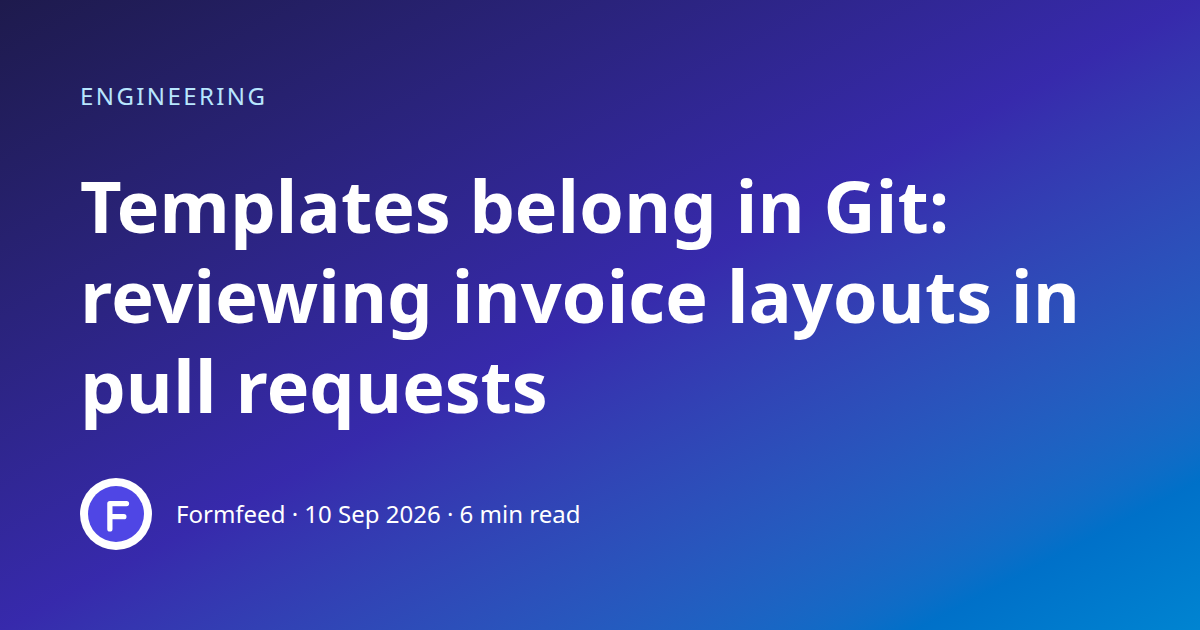
    "title": "Templates belong in Git: reviewing invoice layouts in pull requests",
    "published": "2026-09-10",
    "minutes": 6,
    "author": {
      "name": "Formfeed",
      "avatar": "https://formfeed.dev/favicon.svg"
    }
  }
}jq '{template: "og-image", data: ., access: "public"}' data.json \
| curl https://api-eu.formfeed.dev/v1/renders \
-H "Authorization: Bearer ff_test_..." \
-H "Content-Type: application/json" \
--data-binary @-import { Formfeed } from '@formfeed/sdk';
import data from './data.json' with { type: 'json' };
const formfeed = new Formfeed({ apiKey: process.env.FORMFEED_API_KEY! });
const render = await formfeed.renders.create({
template: 'og-image',
data,
access: 'public',
});
console.log(render.status, render.download_url);import json
import os
from formfeed import Formfeed
formfeed = Formfeed(api_key=os.environ["FORMFEED_API_KEY"])
with open("data.json", encoding="utf-8") as file:
data = json.load(file)
render = formfeed.renders.create(
template="og-image",
data=data,
access="public",
)
print(render.status, render.download_url)<?php
$body = [
'template' => 'og-image',
'data' => json_decode(file_get_contents('data.json'), true),
'access' => 'public',
];
$curl = curl_init('https://api-eu.formfeed.dev/v1/renders');
curl_setopt_array($curl, [
CURLOPT_POST => true,
CURLOPT_RETURNTRANSFER => true,
CURLOPT_HTTPHEADER => [
'Authorization: Bearer ' . getenv('FORMFEED_API_KEY'),
'Content-Type: application/json',
],
CURLOPT_POSTFIELDS => json_encode($body),
]);
$render = json_decode(curl_exec($curl), true);
echo $render['status'], ' ', $render['download_url'], PHP_EOL;package main
import (
"bytes"
"encoding/json"
"fmt"
"net/http"
"os"
)
func main() {
data, err := os.ReadFile("data.json")
if err != nil {
panic(err)
}
body, _ := json.Marshal(map[string]any{
"template": "og-image",
"data": json.RawMessage(data),
"access": "public",
})
request, _ := http.NewRequest("POST", "https://api-eu.formfeed.dev/v1/renders", bytes.NewReader(body))
request.Header.Set("Authorization", "Bearer "+os.Getenv("FORMFEED_API_KEY"))
request.Header.Set("Content-Type", "application/json")
response, err := http.DefaultClient.Do(request)
if err != nil {
panic(err)
}
defer response.Body.Close()
var render struct {
Status string `json:"status"`
DownloadURL string `json:"download_url"`
}
json.NewDecoder(response.Body).Decode(&render)
fmt.Println(render.Status, render.DownloadURL)
}using System.Net.Http.Headers;
using System.Net.Http.Json;
using System.Text.Json;
var body = new
{
template = "og-image",
data = JsonDocument.Parse(File.ReadAllText("data.json")).RootElement,
access = "public",
};
using var http = new HttpClient();
http.DefaultRequestHeaders.Authorization =
new AuthenticationHeaderValue("Bearer", Environment.GetEnvironmentVariable("FORMFEED_API_KEY"));
var response = await http.PostAsJsonAsync("https://api-eu.formfeed.dev/v1/renders", body);
var render = await response.Content.ReadFromJsonAsync<JsonElement>();
Console.WriteLine($"{render.GetProperty("status")} {render.GetProperty("download_url")}");import java.net.URI;
import java.net.http.HttpClient;
import java.net.http.HttpRequest;
import java.net.http.HttpResponse;
import java.nio.file.Files;
import java.nio.file.Path;
public class Render {
public static void main(String[] args) throws Exception {
String data = Files.readString(Path.of("data.json"));
String body = """
{
"template": "og-image",
"access": "public",
"data": %s
}
""".formatted(data);
HttpRequest request = HttpRequest.newBuilder(URI.create("https://api-eu.formfeed.dev/v1/renders"))
.header("Authorization", "Bearer " + System.getenv("FORMFEED_API_KEY"))
.header("Content-Type", "application/json")
.POST(HttpRequest.BodyPublishers.ofString(body))
.build();
HttpResponse<String> response = HttpClient.newHttpClient().send(request, HttpResponse.BodyHandlers.ofString());
System.out.println(response.body()); // status, download_url, page_count, units …
}
}require "json"
require "net/http"
body = {
template: "og-image",
data: JSON.parse(File.read("data.json")),
access: "public",
}
response = Net::HTTP.post(
URI("https://api-eu.formfeed.dev/v1/renders"),
JSON.generate(body),
"Authorization" => "Bearer #{ENV.fetch("FORMFEED_API_KEY")}",
"Content-Type" => "application/json"
)
render = JSON.parse(response.body)
puts render["status"], render["download_url"]Full request and response shapes in the Docs. Full template example →
What comes out
A real render of the example template for this use case, straight from the render-worker. Click it for the file.
Free plan, no card. You get your own copy in the editor, published and ready for the API.
From the answer to the meta tag
The API is a POST with your key, so the image is not made when a social network fetches your page: a scraper has no key and would not wait. The image is made when the page is published. Your build, a hook of your CMS or your backend sends the title, takes download_url from the answer and writes it into the head of the page.
<meta property="og:image" content="https://cdn.formfeed.dev/…">
<meta property="og:image:width" content="1200">
<meta property="og:image:height" content="630">
<meta name="twitter:card" content="summary_large_image">
An identical request with a live key is answered from the stored image for 24 hours and costs nothing, so a build that runs twice in a day renders each card once. After that an unchanged card would be rendered again: keep the address with the page, and ask for a new image when the title changes. An image made with a test key is deleted after a day at the latest, so the one a page keeps comes from a live key.
Size, sharpness and format
The usual size of a link preview is 1200 × 630 pixels, and that is the window an image template has unless its settings say otherwise. deviceScaleFactor multiplies the pixels of the file: at 2, the default, the same card is a file of 2400 × 1260 pixels that stays sharp on dense screens; the example sets 1 for a smaller file. Square and upright formats are the same idea with other numbers, 1080 × 1080 for a quote card and 1080 × 1920 for a story, and a request can set them for one render in settings.image.
{
  "image": {
    "width": 1200,
    "height": 630,
    "deviceScaleFactor": 1,
    "format": "png"
  },
  "tailwind": true,
  "locale": "en-GB"
}
output chooses the format per request: png, jpg or webp, the last two with image.quality. image.transparent leaves out the background of a PNG or a WebP.
A title of any length
What a card cannot know is how long its title will be. There are two answers. truncate cuts the text after a number of characters, as the example does at 70. Or the box keeps its size and the text gives way: mark the box with data-ff-fit="shrink", and its text gets the largest font size at which it fits, between its CSS size and the minimum you name.
<div class="title" data-ff-fit="shrink" data-ff-fit-min="36">
  <h1>{{ post.title }}</h1>
</div>
The box needs a fixed width and height, and the fitting happens after the fonts have loaded and before the picture is taken. On the canvas of the visual editor the same thing is a setting of the text layer, and “Check every data set” there renders each data set of the template and lists every text that still does not fit its box.
Designed on a canvas, without code
A card is layout work, and the person who does it may not write CSS. The visual editor (beta, on every plan) starts from an article card of 1200 × 630, a quote card, an event story or an empty canvas. A text layer holds fields of your data, an image layer takes its picture from the file library, a web address, a field of the data or the brand logo, and a layer can be shown only when a field has a value. What the canvas writes is an ordinary template, so the request above stays the same.
Every page of a site at once
When the design of the card changes, every page needs a new image. A batch takes up to 1,000 renders in one request and works through them in the background. Each item brings its own data, a filename and, in meta, the id of the page it belongs to, which comes back with its result. render.completed reaches your webhook for every image, or your code reads the finished job with GET /v1/jobs/{id}. More in async and batch.
What an image costs
An image is one unit, whatever its size and however it was designed. The Free plan has 100 units a month and asks for no credit card. Starter has 3,000 units for €19 a month, about 0.6 cents an image. Renders with a test key cost nothing while you build; on the Free plan they carry a small watermark. A render that fails is never counted. Every plan is on the pricing page.
What stays with you
Formfeed makes the image and keeps it for the retention of your plan: one day on Free, 30 days on Starter and 365 days on Pro; Business sets no limit. After that the file is deleted and its address answers with an error. A preview image has to answer for as long as the page is shared, so do not leave its only copy with Formfeed: download the file when it is rendered and serve it from your own site. From the Pro plan a copy of every image goes into your own S3 or R2 bucket, and with a public base URL set there, each copy has an address on your own domain.
There is no address that draws an image from the words in its query string, and Formfeed does not read your pages or write their meta tags. An image is made by a request with your key, and from then on it is a file.
FAQ
- Can a designer build the card without code?
- Yes. The visual editor (beta, on every plan) starts from an article card, a quote card, an event story or a blank canvas, and it writes an ordinary template, so the API call stays the same.
- Which size should an Open Graph image have?
- 1200 × 630 pixels is the usual size of a link preview and what an image template renders unless you change it. With
deviceScaleFactorat 2 the file has 2400 × 1260 pixels and stays sharp on dense screens; at 1 it is smaller. - How long does the address of an image work?
- A public address works for as long as the file is kept: one day on Free, 30 days on Starter, 365 days on Pro, without a limit on Business. For a page that is shared for longer, store the image yourself.
- Does an unchanged page cost a unit on every build?
- Not within 24 hours: an identical request with a live key is answered from the stored image at no cost. After that it is rendered again, so keep the address with the page and render when the title changes.
- Can I capture a web page instead of using a template?
- Yes. With
urland"output": "png"a public page is captured in the window you set; URL to PDF says what the page has to be. A template gives you control over the fonts and the layout. - Do emoji and titles in other scripts work?
- Yes. Behind the fonts you name, the renderer has the Noto fonts for a wide range of scripts, Chinese, Japanese and Korean among them, and colour emoji. The preview in your browser may draw an emoji differently; a true render in the editor shows the image as the API makes it.