LiquidImage
Webinar story, 1080×1920
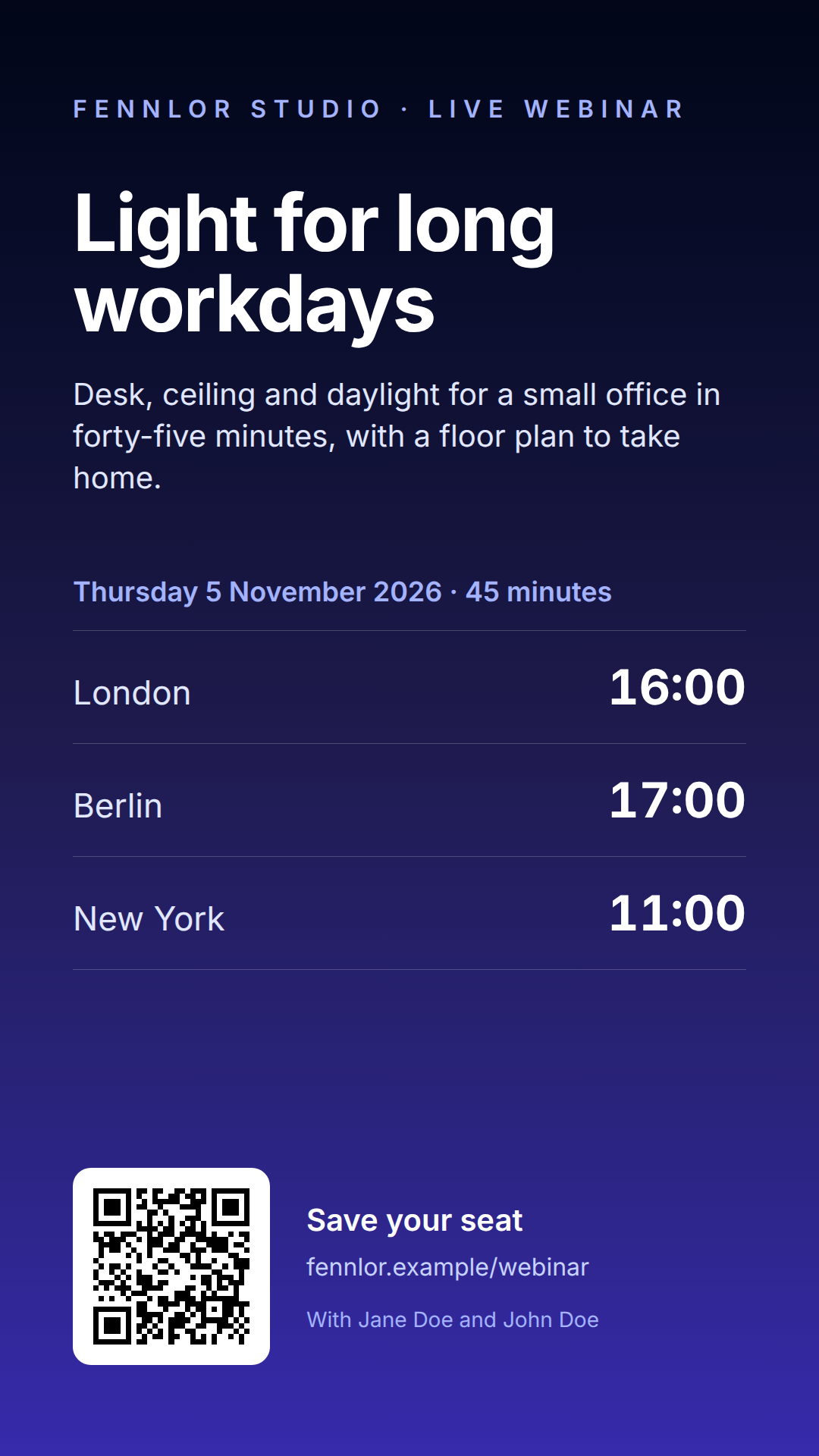
A 9:16 story in Liquid and Tailwind that gives the start time in three cities from one timestamp: date takes a time zone as its second argument, so London, Berlin and New York each read their own clock, winter time included.
Free plan, no card. You get your own copy in the editor, published and ready for the API.
Rendered result
What this example shows
- The canvas is
1080×1920pixels, the 9:16 format of Instagram and LinkedIn stories. - One timestamp, three clocks:
date: 'HH:mm', zone.tzreads2026-11-05T16:00:00Zas16:00in London,17:00in Berlin and11:00in New York, each by its own daylight-saving rules; the time zones come from the data. tailwind: truecompiles the classes of the markup at render time, arbitrary values such astext-[104px]included.- The QR code links to the registration page, and
replace: 'https://', ''prints the same address without its scheme. access: "public"returns a CDN link that a scheduling tool can fetch.
Helpers used
Template folder
<main class="flex h-480 w-270 flex-col bg-linear-to-b from-slate-950 via-indigo-950 to-indigo-800 px-24 py-30 font-['Inter'] text-white">
  <p class="text-[32px] font-semibold uppercase tracking-[0.3em] text-indigo-300">{{ event.host }} · live webinar</p>
  <h1 class="mt-18 text-[104px] font-bold leading-[1.02] tracking-tight">{{ event.title }}</h1>
  <p class="mt-10 text-[40px] leading-snug text-indigo-100">{{ event.teaser }}</p>

  <p class="mt-24 text-[36px] font-semibold text-indigo-300">{{ event.starts | date: 'EEEE d MMMM yyyy' }} · {{ event.minutes }} minutes</p>
  <ul class="mt-6 border-t border-white/20">
    {% for zone in event.zones %}
    <li class="flex items-baseline justify-between border-b border-white/20 py-6.5">
      <span class="text-[44px] text-indigo-100">{{ zone.city }}</span>
      <span class="text-[64px] font-bold tabular-nums">{{ event.starts | date: 'HH:mm', zone.tz }}</span>
    </li>
    {% endfor %}
  </ul>

  <div class="mt-auto flex items-center gap-12">
    <div class="rounded-3xl bg-white p-5">
      <img class="h-55 w-55" src="{{ event.register_url | qrcode: size: 220 }}" alt="Register">
    </div>
    <div>
      <p class="text-[40px] font-semibold">Save your seat</p>
      <p class="mt-2 text-[32px] text-indigo-200">{{ event.register_url | replace: 'https://', '' }}</p>
      <p class="mt-6 text-[28px] text-indigo-300">With {{ event.speakers | join: ' and ' }}</p>
    </div>
  </div>
</main><link rel="stylesheet" href="https://fonts.googleapis.com/css2?family=Inter:wght@400;600;700&display=swap">{
"image": {
"width": 1080,
"height": 1920,
"deviceScaleFactor": 1,
"format": "png"
},
"tailwind": true,
"locale": "en-GB",
"timezone": "Europe/London"
}{
"event": {
"host": "Fennlor Studio",
"title": "Light for long workdays",
"teaser": "Desk, ceiling and daylight for a small office in forty-five minutes, with a floor plan to take home.",
"starts": "2026-11-05T16:00:00Z",
"minutes": 45,
"zones": [
{
"city": "London",
"tz": "Europe/London"
},
{
"city": "Berlin",
"tz": "Europe/Berlin"
},
{
"city": "New York",
"tz": "America/New_York"
}
],
"speakers": [
"Jane Doe",
"John Doe"
],
"register_url": "https://fennlor.example/webinar"
}
}Render it through the API
Save the sample data as data.json and send it with the template’s name. TypeScript and Python use the SDKs; every other language posts the same JSON to the REST API with its standard library. Renders with a key that starts with ff_test_ are not metered; on the Free plan they carry a small watermark.
jq '{template: "event-story", data: ., output: "png", access: "public"}' data.json \
  | curl https://api-eu.formfeed.dev/v1/renders \
      -H "Authorization: Bearer ff_test_..." \
      -H "Content-Type: application/json" \
--data-binary @-import { Formfeed } from '@formfeed/sdk';
import data from './data.json' with { type: 'json' };
const formfeed = new Formfeed({ apiKey: process.env.FORMFEED_API_KEY! });
const render = await formfeed.renders.create({
template: 'event-story',
data,
output: 'png',
access: 'public',
});
console.log(render.status, render.download_url);import json
import os
from formfeed import Formfeed
formfeed = Formfeed(api_key=os.environ["FORMFEED_API_KEY"])
with open("data.json", encoding="utf-8") as file:
data = json.load(file)
render = formfeed.renders.create(
template="event-story",
data=data,
output="png",
access="public",
)
print(render.status, render.download_url)<?php
$body = [
'template' => 'event-story',
'data' => json_decode(file_get_contents('data.json'), true),
'output' => 'png',
'access' => 'public',
];
$curl = curl_init('https://api-eu.formfeed.dev/v1/renders');
curl_setopt_array($curl, [
CURLOPT_POST => true,
CURLOPT_RETURNTRANSFER => true,
CURLOPT_HTTPHEADER => [
'Authorization: Bearer ' . getenv('FORMFEED_API_KEY'),
'Content-Type: application/json',
],
CURLOPT_POSTFIELDS => json_encode($body),
]);
$render = json_decode(curl_exec($curl), true);
echo $render['status'], ' ', $render['download_url'], PHP_EOL;package main
import (
"bytes"
"encoding/json"
"fmt"
"net/http"
"os"
)
func main() {
data, err := os.ReadFile("data.json")
if err != nil {
panic(err)
}
body, _ := json.Marshal(map[string]any{
"template": "event-story",
"data": json.RawMessage(data),
"output": "png",
"access": "public",
})
request, _ := http.NewRequest("POST", "https://api-eu.formfeed.dev/v1/renders", bytes.NewReader(body))
request.Header.Set("Authorization", "Bearer "+os.Getenv("FORMFEED_API_KEY"))
request.Header.Set("Content-Type", "application/json")
response, err := http.DefaultClient.Do(request)
if err != nil {
panic(err)
}
defer response.Body.Close()
var render struct {
Status string `json:"status"`
DownloadURL string `json:"download_url"`
}
json.NewDecoder(response.Body).Decode(&render)
fmt.Println(render.Status, render.DownloadURL)
}using System.Net.Http.Headers;
using System.Net.Http.Json;
using System.Text.Json;
var body = new
{
template = "event-story",
data = JsonDocument.Parse(File.ReadAllText("data.json")).RootElement,
output = "png",
access = "public",
};
using var http = new HttpClient();
http.DefaultRequestHeaders.Authorization =
new AuthenticationHeaderValue("Bearer", Environment.GetEnvironmentVariable("FORMFEED_API_KEY"));
var response = await http.PostAsJsonAsync("https://api-eu.formfeed.dev/v1/renders", body);
var render = await response.Content.ReadFromJsonAsync<JsonElement>();
Console.WriteLine($"{render.GetProperty("status")} {render.GetProperty("download_url")}");import java.net.URI;
import java.net.http.HttpClient;
import java.net.http.HttpRequest;
import java.net.http.HttpResponse;
import java.nio.file.Files;
import java.nio.file.Path;
public class Render {
public static void main(String[] args) throws Exception {
String data = Files.readString(Path.of("data.json"));
String body = """
{
"template": "event-story",
"output": "png",
"access": "public",
"data": %s
}
""".formatted(data);
HttpRequest request = HttpRequest.newBuilder(URI.create("https://api-eu.formfeed.dev/v1/renders"))
.header("Authorization", "Bearer " + System.getenv("FORMFEED_API_KEY"))
.header("Content-Type", "application/json")
.POST(HttpRequest.BodyPublishers.ofString(body))
.build();
HttpResponse<String> response = HttpClient.newHttpClient().send(request, HttpResponse.BodyHandlers.ofString());
System.out.println(response.body()); // status, download_url, page_count, units …
}
}require "json"
require "net/http"
body = {
template: "event-story",
data: JSON.parse(File.read("data.json")),
output: "png",
access: "public",
}
response = Net::HTTP.post(
URI("https://api-eu.formfeed.dev/v1/renders"),
JSON.generate(body),
"Authorization" => "Bearer #{ENV.fetch("FORMFEED_API_KEY")}",
"Content-Type" => "application/json"
)
render = JSON.parse(response.body)
puts render["status"], render["download_url"]Start rendering today
The free plan includes 100 units a month and free test renders. Change plans when you need more.