Jinja2Image
Metrics card with a chart, 1200×675
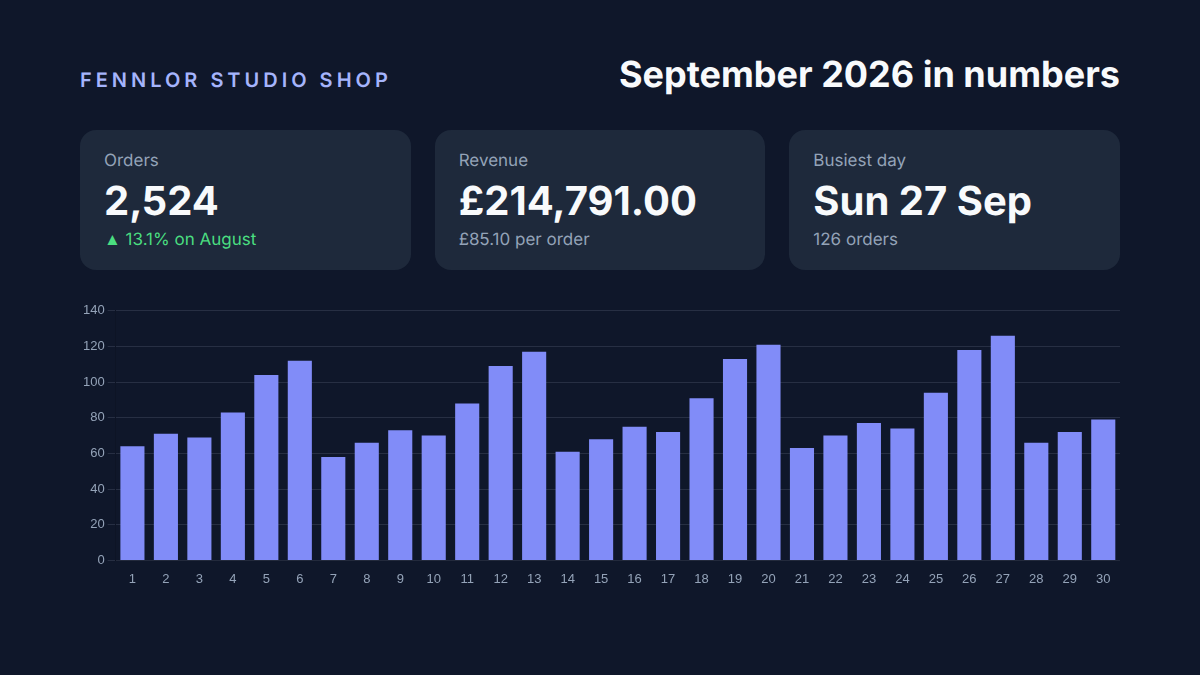
A 16:9 card for Slack, LinkedIn or X from thirty days of orders: totals, the change on the month before, the busiest day found with sortBy and first, and a Chart.js bar chart styled for a dark background, all computed in the template.
Free plan, no card. You get your own copy in the editor, published and ready for the API.
Rendered result
What this example shows
- Thirty rows of daily orders go in; the template sums them to
2,524orders and£214,791.00and divides for the average order,£85.10. - The change on August is computed and rounded in the template,
▲ 13.1%, and turns red with a downward arrow when the month was weaker. days | sortBy('orders', 'desc') | firstfinds the busiest day,Sun 27 Sepwith 126 orders.- The chart is Chart.js with its
optionspassed through, tick and grid colours for the dark card, andrange(1, (days | length) + 1)numbers the days. access: "public"gives a link Slack can fetch for an image block in the team channel.
Helpers used
Template folder
{% set orders = days | sum('orders') %}
{% set revenue = days | sum('revenue') %}
{% set change = ((orders - previous.orders) / previous.orders * 100) | round(1) %}
{% set busiest = days | sortBy('orders', 'desc') | first %}
<main class="card">
  <header>
    <p class="brand">{{ shop.name }}</p>
    <h1>{{ period | date('MMMM yyyy') }} in numbers</h1>
  </header>

  <section class="kpis">
    <div>
      <span>Orders</span>
      <strong>{{ orders | number(0) }}</strong>
      <em class="{{ 'up' if change >= 0 else 'down' }}">{{ '▲' if change >= 0 else '▼' }} {{ change if change >= 0 else -change }}% on {{ previous.label }}</em>
    </div>
    <div>
      <span>Revenue</span>
      <strong>{{ revenue | money }}</strong>
      <em>{{ (revenue / orders) | money }} per order</em>
    </div>
    <div>
      <span>Busiest day</span>
      <strong>{{ busiest.date | date('EEE d MMM') }}</strong>
      <em>{{ busiest.orders }} orders</em>
    </div>
  </section>

  {{ chart({
    type: 'bar',
    labels: range(1, (days | length) + 1),
    values: days | pluck('orders'),
    color: '#818cf8',
    options: {
      scales: {
        x: { ticks: { color: '#94a3b8', font: { size: 13 } }, grid: { display: false } },
        y: { ticks: { color: '#94a3b8', font: { size: 13 } }, grid: { color: 'rgba(148, 163, 184, 0.18)' } }
      }
    }
  }, { width: 1040, height: 290 }) }}
</main>body { margin: 0; }
.card {
box-sizing: border-box;
width: 1200px;
height: 675px;
padding: 52px 80px 40px;
background: #0f172a;
font-family: 'Inter', sans-serif;
color: #f8fafc;
}
header { display: flex; justify-content: space-between; align-items: baseline; }
.brand { margin: 0; font-size: 20px; font-weight: 600; letter-spacing: 0.2em; text-transform: uppercase; color: #a5b4fc; }
h1 { margin: 0; font-size: 36px; font-weight: 700; }
.kpis { display: grid; grid-template-columns: repeat(3, 1fr); gap: 24px; margin: 34px 0 30px; }
.kpis div { padding: 20px 24px; border-radius: 16px; background: #1e293b; }
.kpis span { display: block; font-size: 17px; color: #94a3b8; }
.kpis strong { display: block; margin: 6px 0 4px; font-size: 40px; font-weight: 700; }
.kpis em { font-size: 17px; font-style: normal; color: #94a3b8; }
.kpis em.up { color: #4ade80; }
.kpis em.down { color: #f87171; }
.ff-chart { display: block; }<link rel="stylesheet" href="https://fonts.googleapis.com/css2?family=Inter:wght@400;600;700&display=swap">{
"image": {
"width": 1200,
"height": 675,
"deviceScaleFactor": 1,
"format": "png"
},
"locale": "en-GB",
"timezone": "Europe/London",
"currency": "GBP"
}{
"shop": {
"name": "Fennlor Studio shop"
},
"period": "2026-09-01",
"previous": {
"label": "August",
"orders": 2231
},
"days": [
{
"date": "2026-09-01",
"orders": 64,
"revenue": 5376
},
{
"date": "2026-09-02",
"orders": 71,
"revenue": 5989
},
{
"date": "2026-09-03",
"orders": 69,
"revenue": 5846
},
{
"date": "2026-09-04",
"orders": 83,
"revenue": 7047
},
{
"date": "2026-09-05",
"orders": 104,
"revenue": 8836
},
{
"date": "2026-09-06",
"orders": 112,
"revenue": 9533
},
{
"date": "2026-09-07",
"orders": 58,
"revenue": 5022
},
{
"date": "2026-09-08",
"orders": 66,
"revenue": 5719
},
{
"date": "2026-09-09",
"orders": 73,
"revenue": 6332
},
{
"date": "2026-09-10",
"orders": 70,
"revenue": 5880
},
{
"date": "2026-09-11",
"orders": 88,
"revenue": 7417
},
{
"date": "2026-09-12",
"orders": 109,
"revenue": 9206
},
{
"date": "2026-09-13",
"orders": 117,
"revenue": 9903
},
{
"date": "2026-09-14",
"orders": 61,
"revenue": 5224
},
{
"date": "2026-09-15",
"orders": 68,
"revenue": 5837
},
{
"date": "2026-09-16",
"orders": 75,
"revenue": 6450
},
{
"date": "2026-09-17",
"orders": 72,
"revenue": 6223
},
{
"date": "2026-09-18",
"orders": 91,
"revenue": 7844
},
{
"date": "2026-09-19",
"orders": 113,
"revenue": 9492
},
{
"date": "2026-09-20",
"orders": 121,
"revenue": 10189
},
{
"date": "2026-09-21",
"orders": 63,
"revenue": 5342
},
{
"date": "2026-09-22",
"orders": 70,
"revenue": 5955
},
{
"date": "2026-09-23",
"orders": 77,
"revenue": 6568
},
{
"date": "2026-09-24",
"orders": 74,
"revenue": 6341
},
{
"date": "2026-09-25",
"orders": 94,
"revenue": 8046
},
{
"date": "2026-09-26",
"orders": 118,
"revenue": 10087
},
{
"date": "2026-09-27",
"orders": 126,
"revenue": 10784
},
{
"date": "2026-09-28",
"orders": 66,
"revenue": 5544
},
{
"date": "2026-09-29",
"orders": 72,
"revenue": 6073
},
{
"date": "2026-09-30",
"orders": 79,
"revenue": 6686
}
]
}Render it through the API
Save the sample data as data.json and send it with the template’s name. TypeScript and Python use the SDKs; every other language posts the same JSON to the REST API with its standard library. Renders with a key that starts with ff_test_ are not metered; on the Free plan they carry a small watermark.
jq '{template: "metrics-card", data: ., output: "png", access: "public"}' data.json \
  | curl https://api-eu.formfeed.dev/v1/renders \
      -H "Authorization: Bearer ff_test_..." \
      -H "Content-Type: application/json" \
--data-binary @-import { Formfeed } from '@formfeed/sdk';
import data from './data.json' with { type: 'json' };
const formfeed = new Formfeed({ apiKey: process.env.FORMFEED_API_KEY! });
const render = await formfeed.renders.create({
template: 'metrics-card',
data,
output: 'png',
access: 'public',
});
console.log(render.status, render.download_url);import json
import os
from formfeed import Formfeed
formfeed = Formfeed(api_key=os.environ["FORMFEED_API_KEY"])
with open("data.json", encoding="utf-8") as file:
data = json.load(file)
render = formfeed.renders.create(
template="metrics-card",
data=data,
output="png",
access="public",
)
print(render.status, render.download_url)<?php
$body = [
'template' => 'metrics-card',
'data' => json_decode(file_get_contents('data.json'), true),
'output' => 'png',
'access' => 'public',
];
$curl = curl_init('https://api-eu.formfeed.dev/v1/renders');
curl_setopt_array($curl, [
CURLOPT_POST => true,
CURLOPT_RETURNTRANSFER => true,
CURLOPT_HTTPHEADER => [
'Authorization: Bearer ' . getenv('FORMFEED_API_KEY'),
'Content-Type: application/json',
],
CURLOPT_POSTFIELDS => json_encode($body),
]);
$render = json_decode(curl_exec($curl), true);
echo $render['status'], ' ', $render['download_url'], PHP_EOL;package main
import (
"bytes"
"encoding/json"
"fmt"
"net/http"
"os"
)
func main() {
data, err := os.ReadFile("data.json")
if err != nil {
panic(err)
}
body, _ := json.Marshal(map[string]any{
"template": "metrics-card",
"data": json.RawMessage(data),
"output": "png",
"access": "public",
})
request, _ := http.NewRequest("POST", "https://api-eu.formfeed.dev/v1/renders", bytes.NewReader(body))
request.Header.Set("Authorization", "Bearer "+os.Getenv("FORMFEED_API_KEY"))
request.Header.Set("Content-Type", "application/json")
response, err := http.DefaultClient.Do(request)
if err != nil {
panic(err)
}
defer response.Body.Close()
var render struct {
Status string `json:"status"`
DownloadURL string `json:"download_url"`
}
json.NewDecoder(response.Body).Decode(&render)
fmt.Println(render.Status, render.DownloadURL)
}using System.Net.Http.Headers;
using System.Net.Http.Json;
using System.Text.Json;
var body = new
{
template = "metrics-card",
data = JsonDocument.Parse(File.ReadAllText("data.json")).RootElement,
output = "png",
access = "public",
};
using var http = new HttpClient();
http.DefaultRequestHeaders.Authorization =
new AuthenticationHeaderValue("Bearer", Environment.GetEnvironmentVariable("FORMFEED_API_KEY"));
var response = await http.PostAsJsonAsync("https://api-eu.formfeed.dev/v1/renders", body);
var render = await response.Content.ReadFromJsonAsync<JsonElement>();
Console.WriteLine($"{render.GetProperty("status")} {render.GetProperty("download_url")}");import java.net.URI;
import java.net.http.HttpClient;
import java.net.http.HttpRequest;
import java.net.http.HttpResponse;
import java.nio.file.Files;
import java.nio.file.Path;
public class Render {
public static void main(String[] args) throws Exception {
String data = Files.readString(Path.of("data.json"));
String body = """
{
"template": "metrics-card",
"output": "png",
"access": "public",
"data": %s
}
""".formatted(data);
HttpRequest request = HttpRequest.newBuilder(URI.create("https://api-eu.formfeed.dev/v1/renders"))
.header("Authorization", "Bearer " + System.getenv("FORMFEED_API_KEY"))
.header("Content-Type", "application/json")
.POST(HttpRequest.BodyPublishers.ofString(body))
.build();
HttpResponse<String> response = HttpClient.newHttpClient().send(request, HttpResponse.BodyHandlers.ofString());
System.out.println(response.body()); // status, download_url, page_count, units …
}
}require "json"
require "net/http"
body = {
template: "metrics-card",
data: JSON.parse(File.read("data.json")),
output: "png",
access: "public",
}
response = Net::HTTP.post(
URI("https://api-eu.formfeed.dev/v1/renders"),
JSON.generate(body),
"Authorization" => "Bearer #{ENV.fetch("FORMFEED_API_KEY")}",
"Content-Type" => "application/json"
)
render = JSON.parse(response.body)
puts render["status"], render["download_url"]Start rendering today
The free plan includes 100 units a month and free test renders. Change plans when you need more.