Most of what a model writes is Markdown: the report at the end of an agent’s run, the summary of a
support thread, release notes drafted from commits. So is much of what people type into a notes
field. Turning it into a PDF looks like three steps: parse it, wrap it in HTML, print it with
headless Chromium. Since 10 November, Formfeed’s API takes it as a source of its own:
POST /v1/renders with markdown in place of a template, html or a url.
Before writing those three steps we measured them, because the text comes from someone else: a model, a customer, anyone who holds an API key. Three findings decided what we built: the HTML that Markdown is allowed to carry, the time a parser takes on text made to be slow, and what PDF/UA-1 says about the way models write headings.
Markdown may carry HTML
CommonMark passes HTML on as it stands, a block of it or a tag inside a sentence. In your own README
that is a feature: a styled box, a picture with a width. In a model’s answer or a customer’s notes,
it means that a <script>, an <img onerror>, an <iframe> or a <style> reaches the browser that
prints the document. Passed on as it stands, <style>body{display:none}</style> alone left a page
with nothing on it to tag, and the PDF/UA-1 check failed it.
There are two usual answers. One is to pass the HTML on and trust the text, which is right for text you wrote yourself. The other is a sanitiser: parse the HTML a second time and keep what an allow-list names. That works, but it is a second parser whose reading of HTML has to agree with the browser’s, and what it removes disappears without a word.
We took a third: show it. By default (settings.markdown.html: "safe") the converter writes raw
HTML as text, a block of it in a small grey monospace face, a tag inside a sentence in the
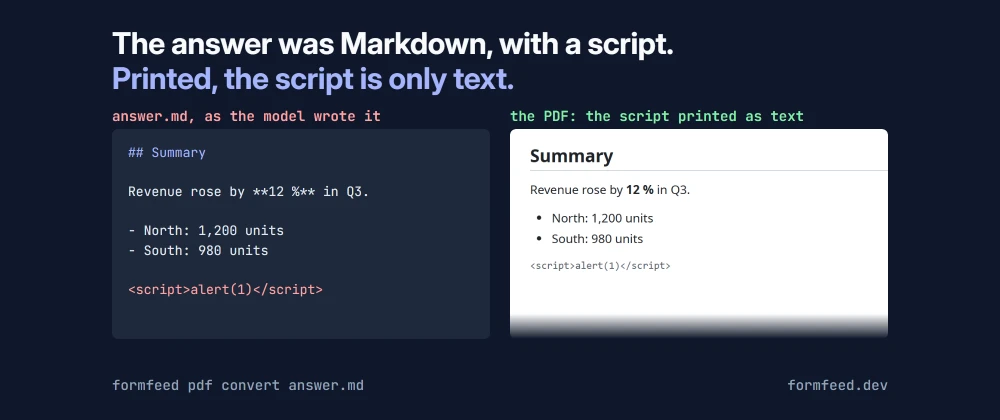
sentence’s own type. The cover of this post is that case: the model’s <script>alert(1)</script>
is printed as those characters, and nothing ran. What stays a tag is a short list, without any
attribute: <br>, because a table cell needs it for a second line and models write it, and <sup>,
<sub>, <kbd>, <mark>, <u>, <ins>, <del>, <s> and <small>. Links keep http,
https, mailto, tel, relative addresses and #anchors; a javascript: link stays the text that
was written. Pictures keep http, https, names from the workspace’s file library and data:image/
in PNG, JPEG, GIF, WebP and SVG.
So the question is never whether a sanitiser read a tag the way Chromium would: the converter writes
no tag outside that list. A property test holds it to that over generated Markdown mixed with HTML:
what safe writes never holds another tag, an on… attribute or a link scheme outside the lists.
For Markdown you wrote yourself, "html": "allow" writes raw HTML as it stands, as an html render
does.
The parser was the slow part
For prose, every parser is fast: 1 MB of it, which prints 735 pages, took 0.2 to 0.4 seconds in each one we tried, on one CPU of the kind our render-worker runs on. Text made to be slow is another matter, and whoever holds an API key can send it on purpose. We timed each input in a process of its own and gave it 20 seconds:
| Input | marked 18.0.11 | marked 18.1.3 | markdown-it 15.0.3 |
|---|---|---|---|
unclosed *a , repeated |
4.7 to 6.7 s at 20 kB | 0.33 to 0.42 s at 1 MB | 0.9 to 1.1 s at 1 MB |
*a**b***c _d__e___f, repeated |
5.1 s at 100 kB, over 20 s at 1 MB | 4.2 to 4.5 s at 100 kB, over 20 s at 1 MB | 1.25 to 1.4 s at 1 MB |
| 10,000 nested quotes (20 kB) | stack overflow | stack overflow | 2 to 29 ms |
| 1,500 nested list levels | the Node process aborted | over 20 s | 11 to 31 ms |
marked 18.0.11 was the parser of our own markdown helper until this release, so the first row was
ours too: a template value of 20 kB of unclosed emphasis would have held a render for seconds. The
next releases of marked mended the unclosed delimiters, but not mixed emphasis or deep nesting.
markdown-it grew linearly on every input we gave it, and it nests at most 100 levels deep, so it
never overflowed the stack. It reads the Markdown source, and since this release the helper too, so
the engine has one parser.
Linear is not the same as fast. markdown-it’s slowest inputs at 1 MB still took up to 1.9 seconds on
that one CPU, and a render-worker serves other renders on the same event loop. So the text is
converted in a worker thread, one per render slot, and the worker terminates the thread when the
engine’s time limit of 5 seconds has passed; the render then answers 504 render_timeout, as a
template that runs too long does. The test for it converts a megabyte of [, one of the slowest,
with a short limit while a 10 ms timer of the main thread keeps firing on time, and the slot converts
the next document as if nothing had happened. In the engine’s own tests, each of 36 slow inputs at
1 MB has to convert within 5 seconds of CPU time.
The text itself is limited to 1 MB of UTF-8. That much prose took 5.5 seconds from text to PDF on that CPU; 2 MB took 26 seconds for 1,469 pages, and Chromium gives up by itself somewhere around 1,700.
What PDF/UA-1 says about Markdown
We held a corpus of twelve documents to veraPDF: a model’s report, a README with pictures and raw HTML, a German letter, a table of 200 rows, task lists, footnotes, Japanese, Chinese and Korean text, page breaks, the HTML payloads from above and content wider than the page. As PDF/A-2b and PDF/A-3b, all twelve were valid as first converted, colour emoji, CJK, SVG and transparency included. Held to PDF/UA-1, three of the twelve failed, and the reasons were two habits of Markdown rather than of the converter.
Models start at ##. An answer rarely opens with a # title. It starts at ## and goes down to
#### where a list needs a heading. PDF/UA-1 wants the first heading to be an h1 and no level
skipped on the way down (veraPDF’s rule 7.4.2-1); the letter, with its single ##, and the answer
that skipped from ## to #### failed it. The converter now closes up the levels in the document’s
structure, so the first heading is an h1 and none is more than one level below the heading it
stands under, and it keeps the size the author wrote through a class. The ## Summary on the cover
is an h1 in the PDF’s structure and still looks like a second-level heading.
Empty table cells. Chromium writes no cell into the PDF’s structure for an empty td, so its row
comes out shorter than the others, which fails rule 7.2-43; the table of 200 rows, 172 of them with
an empty cell, did. The converter puts a no-break space into an empty cell, and the row keeps its
cell.
Both rules apply to every Markdown render, whether or not it asks for PDF/UA-1, so a document does
not change its look the day the check is switched on. With them, the twelve documents pass in all
four variants, 48 of 48: PDF/UA-1 strict, PDF/A-2b, PDF/A-3b, and PDF/UA-1 together with PDF/A-3b in
one file. In production, a Markdown render with both passed 106 of veraPDF’s PDF/UA-1 rules, failed
none, and is a PDF/A-3b. That says which machine-checkable rules the file passed; it does not
make a document accessible. Alternative texts are still the author’s to write, in ![…].
Sending it
curl -X POST https://api.formfeed.dev/v1/renders \
  -H "Authorization: Bearer $FORMFEED_API_KEY" \
  -H "Content-Type: application/json" \
  -d '{
    "markdown": "## Summary\n\nRevenue rose by **12 %** in Q3.",
    "settings": { "pdf": { "outline": true, "ua": true } }
  }'
The document theme sets the text without a line of CSS and takes the brand kit’s fonts and colour
where the organisation has one. Front matter fills the PDF’s title and author, a line that is
\newpage breaks the page, footnotes are numbered at the end. With an engine, the text is a
template over data first. From a terminal, formfeed pdf convert notes.md sends the pictures in
the file’s folder along; an agent has the MCP tool markdown_to_pdf. Every plan renders Markdown, at
the units of any PDF.
The Markdown guide has every setting and limit, the use case shows a report rendered from Markdown with the command that made it, and the guides hold the call as a complete program in eight languages.