Use case
Markdown to PDF API
Send the Markdown, get a PDF that looks like a document: no template, no CSS. A report your code writes, release notes or an answer from a model go in as markdown; the document theme sets them with tables, quotes and code, in your brand kit’s fonts and colour where you have one, and HTML the text holds stays visible as text instead of running.
Free plan with 100 units a month, no credit card
GitHub Flavored Markdown
Tables with their alignment, task lists, strikethrough, footnotes, and links between headings that work inside the PDF.
Raw HTML stays text
A <script> or an onerror in the text is printed as characters, so text from your users or a model cannot run anything. settings.markdown.html: "allow" lets your own HTML through.
A document without CSS
The document theme styles headings, tables, quotes and code; theme: "none" and css give it a look of your own.
Title and bookmarks
The title comes from the front matter or the first heading, a line \newpage breaks the page, and pdf.outline writes bookmarks from the headings.
PDF/UA-1 and PDF/A
Headings closed up, empty cells filled and the title set, so pdf.ua holds the file to the rules of PDF/UA-1 with veraPDF; pdf.pdfa makes it a PDF/A file for archiving.
From the CLI and agents
formfeed pdf convert notes.md converts a file with the pictures beside it, and AI agents have the MCP tool markdown_to_pdf.
Turn a Markdown file into a PDF
---
title: Quarterly report Q3 2026
author: Fennlor Studio GmbH
---

# Quarterly report Q3 2026

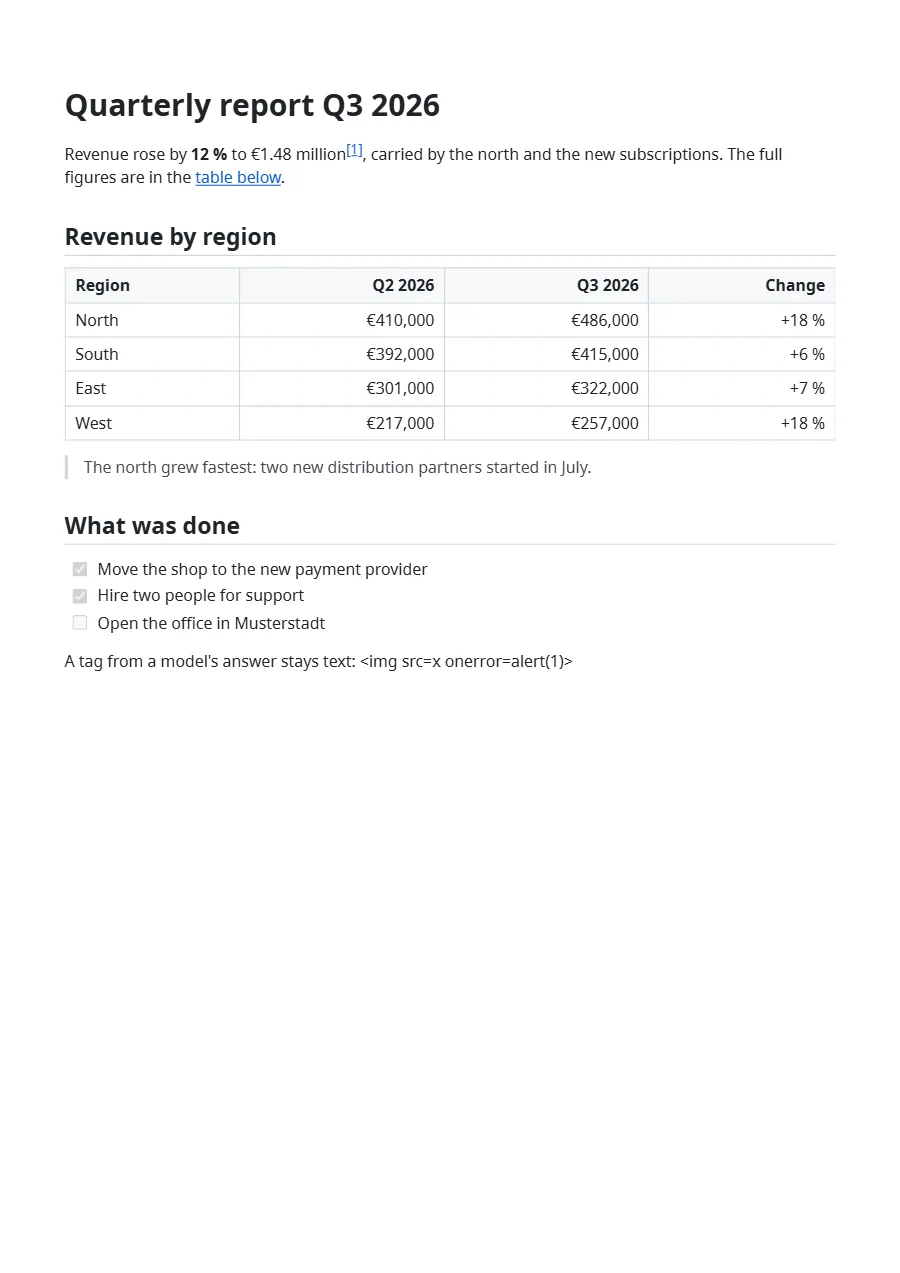
Revenue rose by **12 %** to €1.48 million[^1], carried by the north and the
new subscriptions. The full figures are in the [table below](#revenue-by-region).

## Revenue by region

| Region | Q2 2026   | Q3 2026   | Change |
| :----- | --------: | --------: | -----: |
| North  | €410,000  | €486,000  | +18 %  |
| South  | €392,000  | €415,000  | +6 %   |
| East   | €301,000  | €322,000  | +7 %   |
| West   | €217,000  | €257,000  | +18 %  |

> The north grew fastest: two new distribution partners started in July.

## What was done

- [x] Move the shop to the new payment provider
- [x] Hire two people for support
- [ ] Open the office in Musterstadt

A tag from a model's answer stays text: <img src=x onerror=alert(1)>

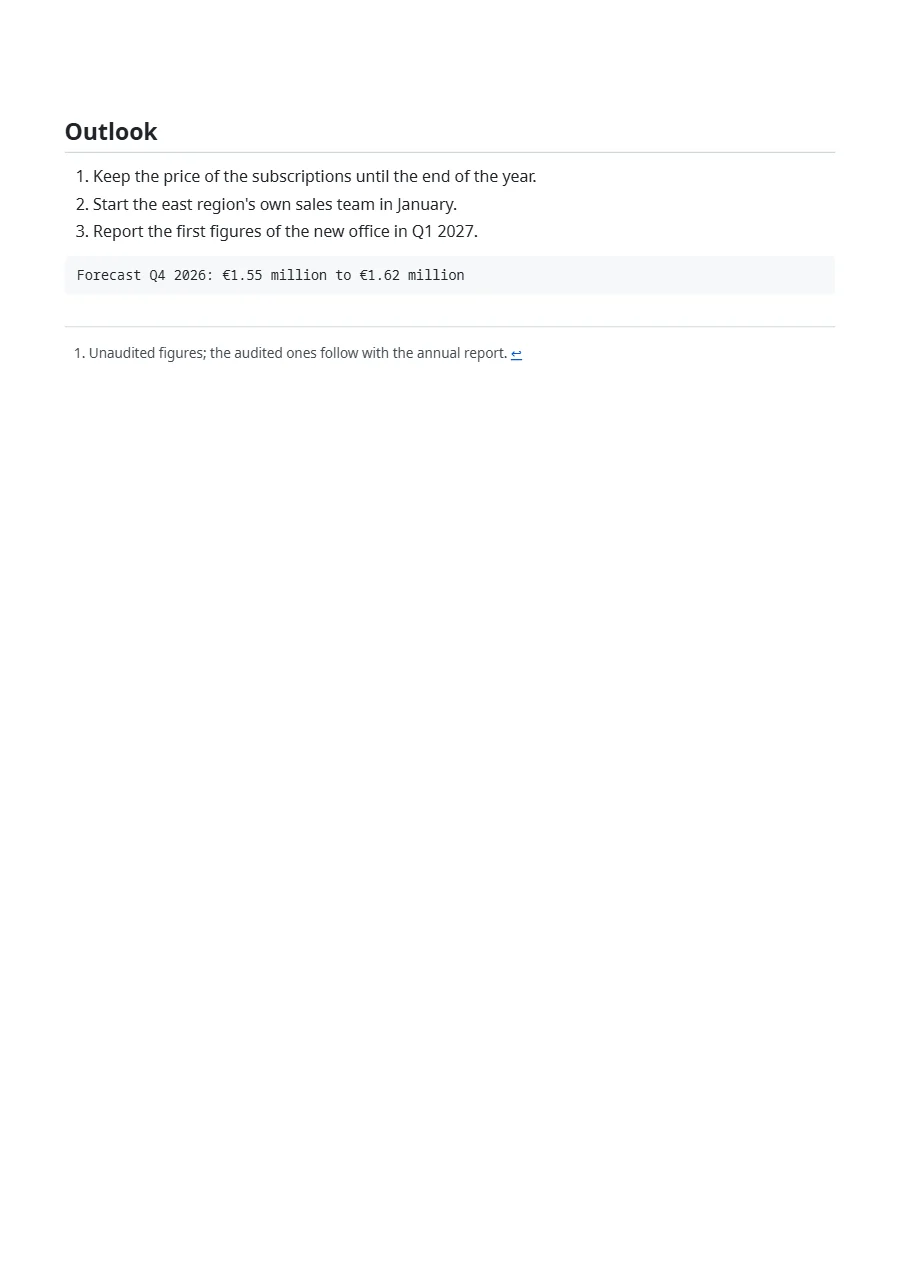
\newpage

## Outlook

1. Keep the price of the subscriptions until the end of the year.
2. Start the east region's own sales team in January.
3. Report the first figures of the new office in Q1 2027.

```text
Forecast Q4 2026: €1.55 million to €1.62 million
```

[^1]: Unaudited figures; the audited ones follow with the annual report.jq -Rs '{markdown: ., settings: {pdf: {outline: true}}}' report.md \
| curl -X POST "https://api-eu.formfeed.dev/v1/renders?output=binary" \
-H "Authorization: Bearer $FORMFEED_API_KEY" \
-H "Content-Type: application/json" \
--data-binary @- -o report.pdfFull request and response shapes in the Docs.
What comes out
A real render of the example template for this use case, straight from the render-worker. Click it for the file.
What you can send
The text goes in as markdown, up to 1 MB of UTF-8, which is several hundred pages of prose. A YAML front matter block at the top gives the PDF its title, author, subject and keywords; without one, the first heading is the title. A line \newpage starts a new page, [^1] makes a footnote, and a link to #revenue-by-region jumps to that heading inside the PDF.
A picture named by a bare file name, such as logo.png, is a file of the workspace’s file library; public https addresses and data:image/ addresses work as well. The command above asks for the file itself with ?output=binary; without it the answer is JSON with a signed download link, the page count and the units.
Text from your users and from models
By default raw HTML in the text is shown as text, and only <br> and a few formatting tags such as <sup> and <mark> stay tags, without attributes. Links keep to http, https, mailto and tel, pictures to https, data:image/ and the library, so an answer from a model can neither run a script nor point a link at javascript:.
For Markdown you wrote yourself, with a styled box or an embedded widget, settings.markdown.html: "allow" writes the HTML as it stands, as an HTML render does:
{
  "markdown": "# Release notes\n\n<div class=\"note\">Version 2.4 is out.</div>",
  "settings": { "markdown": { "html": "allow" } }
}
Its look: the theme, your CSS, your brand
The document theme sets the text in Noto Sans and code in a monospace face, keeps headings with what follows them and wraps whatever would be wider than the page. Where your organisation has a brand kit, headings and text take its fonts and links its primary colour. theme: "none" leaves only the print reset, and css, up to 256 kB, comes after either:
{
  "markdown": "# Release notes\n\n…",
  "settings": {
    "markdown": {
      "theme": "none",
      "css": ".ff-markdown { font-family: Georgia, serif; } .ff-markdown h1 { color: #0f766e; }"
    }
  }
}
Markdown with data
With engine set to jinja2, liquid or handlebars, the text is a template for the data you send along and is read as Markdown afterwards, with every helper for money, dates and codes. Values are escaped, so a value can bring Markdown but no HTML.
{
  "markdown": "# Report for {{ customer.name }}\n\n{% for item in items %}- {{ item.name }}: {{ item.total | money }}\n{% endfor %}",
  "engine": "jinja2",
  "data": {
    "customer": { "name": "Olvarest GmbH" },
    "items": [{ "name": "Consulting", "total": 960 }]
  }
}Bookmarks, PDF/UA-1 and PDF/A
The converter closes up the heading levels and fills empty table cells, and the title comes from the front matter or the first heading. With settings.pdf.ua, veraPDF holds the file to the machine-checkable rules of PDF/UA-1 before it is delivered, and the render carries its verdict; the alternative texts are yours to write. settings.pdf.pdfa makes the file a PDF/A-2b or PDF/A-3b for archiving, and settings.pdf.outline writes bookmarks from the headings at no cost.
What a PDF costs
Every plan renders Markdown. A PDF of up to five pages is one unit, and every further five pages add one. The Free plan has 100 units a month and asks for no credit card; Starter has 3,000 units for €19 a month. Renders with a test key cost nothing, and a render that fails is never counted. Every plan is on the pricing page.
From the blog
- Printing Markdown you did not write →
Formfeed's API now turns Markdown into a PDF. When the text comes from a model or a customer, it can carry HTML, input made to be slow and headings that start at
FAQ
- Which Markdown does it read?
- GitHub Flavored Markdown: tables, task lists, strikethrough and autolinks, plus footnotes and a YAML front matter block. Heading ids follow GitHub’s rule, so links between headings written for a README work inside the PDF.
- What happens to HTML inside the Markdown?
- It is shown as text unless the request says
settings.markdown.html: "allow". A few formatting tags without attributes, such as<br>,<sup>,<sub>and<mark>, stay tags. - Can I convert a README with its pictures?
- Yes:
formfeed pdf convert README.mdsends the pictures inside its folder along and refuses a path that leads out of it. Through the API, a picture named by a bare file name comes from the file library. - How large can a document be?
- Up to 1 MB of UTF-8 per request, with a stylesheet of up to 256 kB. A longer text is refused with
400 invalid_requestbefore anything is counted. - Does it work on the Free plan?
- Yes, on every plan, at the units of any PDF: one unit per started five pages. Test keys cost nothing.