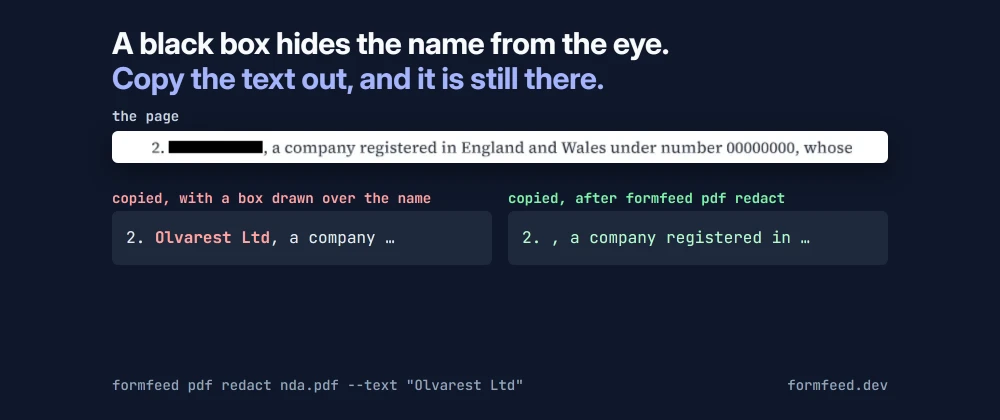
A black box over a name looks final. In a PDF it is often nothing more than a rectangle drawn on top of the text. The text is still in the file, in the order a viewer reads it, and anyone who selects the line and pastes it into an editor gets it back.
That is not a beginner’s mistake from the early days of PDF. It keeps happening to people whose job is to get it right.
Three times the text came back
December 2025. Among the documents the US Justice Department released in December were some from a civil suit against the executors of Jeffrey Epstein’s estate, filed in the US Virgin Islands in 2021. According to The New York Times, some of them were “not properly redacted digitally”: blacked-out text could be read by copying it into another file. A Justice Department spokesperson said the failed redactions had been applied by the parties in the civil case and that the department had reproduced the materials (The New York Times, republished by GV Wire).
January 2019. Paul Manafort’s lawyers filed a response to the special counsel’s allegations that he had lied after agreeing to plead guilty. The Associated Press could read passages of it “because it wasn’t properly blacked out”. They said prosecutors accused Manafort of lying about sharing polling data from the 2016 campaign with Konstantin Kilimnik, an associate accused of ties to Russian intelligence. The lawyers later filed a corrected version (AP, republished by GBH).
May 2005. The US military published its report on the shooting of the Italian intelligence officer Nicola Calipari in Iraq as a PDF with large parts blacked out. A copy and paste of the document into a word processor “revealed the report in full”, the names of the soldiers involved included (The Register).
Twenty years apart, the same thing happened each time: a box was drawn, and the text under it stayed.
What a redaction has to remove
Taking the words off the page is the first part. A PDF keeps text in more places than the page, and a redaction that misses one of them has not removed anything:
- The page itself. The characters under the box have to leave the content of the page, not just disappear from view. The same goes for a picture: its pixels under the box have to change.
- Copies elsewhere in the file. The document’s title and other metadata, its bookmarks, the values of its form fields, comments and their pop-ups, the address of a link, and files attached to it. A tagged PDF can also carry the words a screen reader speaks instead of the page’s text, an ActualText, which is a second copy of the same words.
- Earlier versions. A PDF can be saved by appending the changes to the end of the file, and the version before the change stays inside it, readable with the right tool.
- Text that is a picture. A scanned page holds a photograph of the words, often with an invisible text layer from the scanner’s recognition over it. Both have to go.
How Formfeed redacts
Formfeed’s PDF tools redact a PDF by rectangles of the page or by the texts to remove, through the API, the command line and the MCP server for AI agents. The removing is done by litho, the PDF engine of Gotenberg 9, which takes out every character a region touches. Two things we measured shaped the rest:
- litho takes a character by a box that reaches up to the font’s ascent, so a region the height of a line also took the line below. A found text is therefore cut by a thin band through the middle of its characters, and the black box is drawn over it separately.
- On the day the tools went live in production, a box over a region that held nothing to remove came back as an update appended to the untouched file: two versions in one PDF. Production refused that file, and since then such a result is written anew before anything else reads it.
Then the result is read again, and nothing is delivered while text lies under a rectangle, while a
named text, or a single letter of it, still stands on a page, while a named text stands in the
metadata, bookmarks, attachments, form or annotations, while a copy survives that cannot be cleared
(such as an ActualText), or while the file keeps an earlier version. The answer is then
422 redaction_incomplete: no file, nothing
charged, and the problem names the regions and texts by their number, never by their words. The texts
themselves are never stored or logged.
The letter we left behind
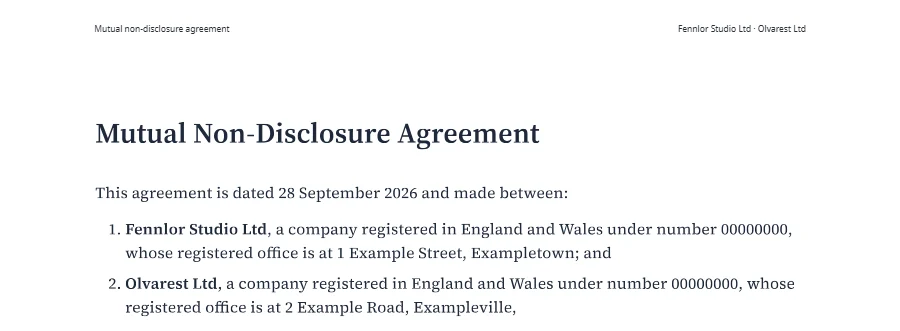
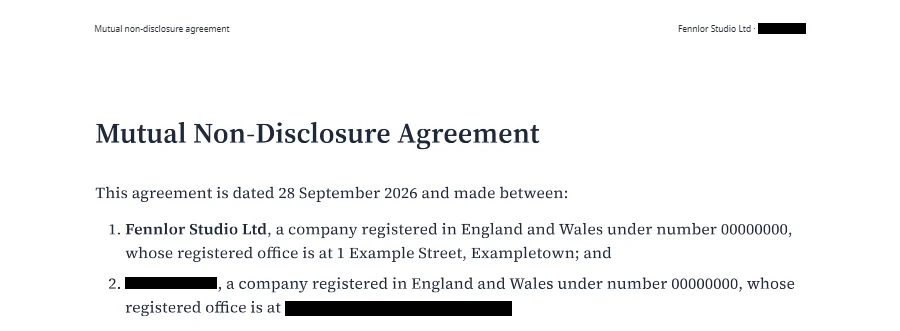
“A single letter” was not in that list until this week. While we checked every claim of this post against our own files, we copied the text out of the redacted sample agreement on our PDF tools page. It read:
2. O a company registered in England and Wales under number 00000000, whose“Olvarest Ltd” was gone, except its first letter, which stood under the black box. Nothing on the page showed it.
The cause was a measurement we had generalised. Chrome wrote the agreement’s fonts into the PDF as Type3 fonts, and litho takes a character of a Type3 font not by its own width but by the font’s bounding box placed at the character. We had measured that on another document, whose boxes reached about an em, and written down 0.85 em for every such font. In the agreement, the regular font’s box reaches from −0.074 to 0.995 em, so the space before the name reaches into the “O”; the bold font’s box ends at 0.698 em, before the “O” itself does. To leave the space alone, the cut started just past it, three quarters of a point after the box of the “O” ended.
The check did not catch it because it asked two questions: can the whole text still be found, and does a letter still stand under the cut? “Olvarest Ltd” could not be found, and the “O” stood beside the cut, not under it. Neither question was whether every letter of the text was gone.
Both are fixed. Each character is now cut by its own font’s box, read from the PDF: the prediction for
the “O” was 82.93 to 90.17 points, litho took it between 83.0 and 90.0 when we moved a thin region
across it a quarter point at a time. Where a letter cannot be cut without touching the character
beside it, that character goes along, which is mostly a space or a punctuation mark. And the check
holds every letter of every place a text was found to being gone, wherever the cut went. The same
line now reads 2. , a company registered …. No customer’s file was affected: the only redactions
in production had been our own tests.
The lesson is the one the three cases teach: look at what the file holds, not at what it shows.
Check a redacted PDF yourself
You do not need our tools for this. With poppler’s command-line tools and a text editor:
# the page text: nothing of the removed words may come back
pdftotext -layout redacted.pdf - | grep -i "olvarest"

# title, author, subject and keywords
pdfinfo redacted.pdf

# attached files
pdfdetach -list redacted.pdf

# more than one %%EOF hints at an earlier version kept in the file
# (a file saved for fast web view has two as well)
grep -ac '%%EOF' redacted.pdf
Bookmarks, form fields and comments are best looked at in a viewer’s side panels. And copy the blacked-out line itself: if a word comes back, so will it for everyone else.
Try it
Redaction is on the Starter plan and above, half a unit a call:
formfeed pdf redact contract.pdf --text "Olvarest Ltd" --text "2 Example Road"It writes contract-redacted.pdf beside the source. If anything of the texts is left, the command
exits with code 1 and writes no file. The documentation
describes the API, the rectangles and every check.