Moving document templates is the part of a migration people put off. The API call is easy to change; the templates are years of small decisions in HTML and CSS, and nobody wants to find out in front of a customer which of them did not survive the move.
So instead of a demo template, we took a real account: a customer’s 19 apitemplate.io templates, the documents behind a solar installer’s offers — an overview with the customer’s system, cost statements, material lists, string plans, an economics section with charts, two brands with their own letterheads. We imported all of them with Formfeed’s importer, rendered each one with its own sample data on both services, and compared the PDFs page by page. The documents are the customer’s, so this post shows numbers, not pages.
What an apitemplate.io template is
An apitemplate.io PDF template written in its HTML editor has four parts, and the importer reads all four through apitemplate.io’s API:
- the body, HTML with Jinja2 tags;
- the CSS field, which in practice also carries
<link>and<script>tags — web fonts, a chart library; - the settings: paper, margins as bare numbers (pixels), and a header and footer as either custom
HTML or three text slots (left, center, right) with
{{pageNumber}}and{{totalPages}}; - the sample JSON the template was designed against.
Templates edited in apitemplate.io’s visual editor are HTML too and come over the same way; the wrappers that editor puts around loop tags are hidden (the 12 in the table below). Image templates are the exception: they are layer designs without HTML, which apitemplate.io’s API does not return, so the importer lists them as not importable instead of guessing. An image template can be rebuilt on the canvas instead. This account had none.
What the importer changed by itself
All 19 came in without an error. Each template got a short list of what the importer did to it:
| Change | Templates |
|---|---|
| Header and footer moved to their own tabs | 19 |
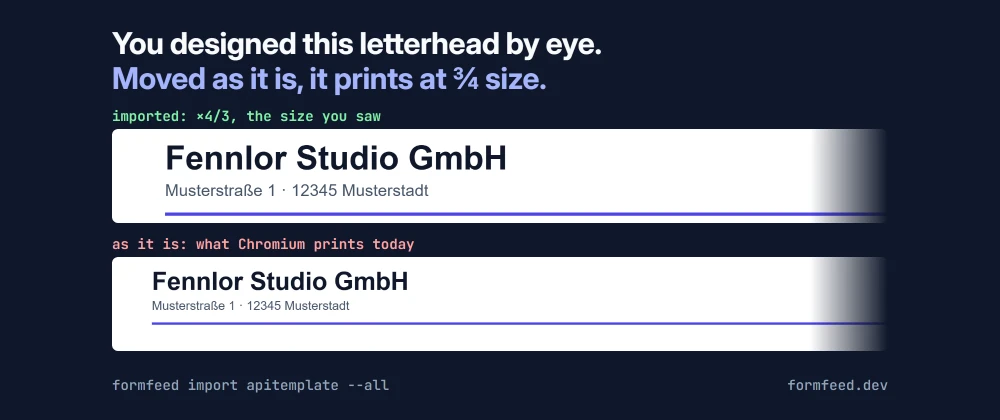
| Header and footer scaled by 4/3, the size apitemplate.io draws them in | 19 |
<link> and <script> tags moved from the CSS field to the Head tab |
19 |
| Header or footer runs edge to edge (padding 0), as it did there | 18 |
| Body keeps the 8px margin browsers give it, as it had there (since November, below) | 18 |
| apitemplate.io’s editor-only elements hidden by a CSS rule | 12 |
| Script blocks with template tags moved to the end of the body, where they are filled | 2 |
| A three-slot text header rebuilt as HTML, page numbers kept | 1 |
The 4/3 is worth a sentence: apitemplate.io draws header and footer templates the way older Chromium versions did, laid out at 75 % of the page width and scaled up by 4/3, so a length in pixels comes out a third larger there than in current Chromium. A letterhead is designed by eye for what the author saw. Left alone, every one of them would have come out at three quarters of its size.
What it reported
32 warnings, of two kinds.
16 × Jinja2 macros run with Nunjucks semantics. The templates define their own formatting macro
(format_de, German numbers with a currency) and call it throughout. Our Jinja2 is Nunjucks, which
runs macros the same way for everything these templates do, but not for every corner of Python’s
Jinja2 — so the importer asks you to look at the output once. The output was right.
16 × a field the template reads is not in the sample data, in three templates. A loop over the
strings of an inverter’s MPPT input read string.voltages.at25C and friends, and the sample data had
no strings at all; the two cost statements, one per brand, asked offer.is_indication, which their
samples never set. None of that is an import problem: the sample data never exercised that part of
the template, on apitemplate.io either. The analyzer just says it out loud.
Side by side
We rendered every template with its sample data through apitemplate.io’s API and through our render worker, then compared each pair of PDFs.
Page count: 17 of 19 equal at first. The two economics templates — the ones with charts — came out at 4 pages there and 5 here.
Pixels: we rasterised every page and counted pixels that differ visibly: between 1 % and 16 % per page, with the two fixes below in place. Looking at the worst pages, margins, letterhead, footer, tables, charts and icons matched. What differed was fonts.
Fonts: the template got what it asked for
The templates set most of their text in Chivo from Google Fonts, their headings in a brand typeface from a second web font service, and some text in Arial, header and footer among it. The fonts embedded in the two PDFs:
| apitemplate.io | Formfeed | |
|---|---|---|
| Text in Chivo | Chivo | Chivo |
| Headings | Arial | the brand typeface the CSS names |
| Text in Arial | Arial | Liberation Sans |
apitemplate.io’s PDFs never carried the brand face, so their headings fell back to Arial; ours load it, because the render worker waits for every web font before it prints. That is the template doing what its CSS says, but it is a visible change: headings in a different typeface, and a line box a few pixels taller. In one material list that was enough to move the third component card onto page 2; on apitemplate.io it had fitted on page 1 with almost nothing to spare. Same page count, different break. Text that asks for Arial is Liberation Sans here because our Linux servers have no Arial; it has Arial’s widths, so it takes the same room. Why that happens and how to check it is its own post: fonts in headless Chromium.
The extra page: ours to fix
The charts are drawn by a JavaScript library that sizes each chart from the width of its container when the page loads. Our render worker loaded every PDF in a window 1240 pixels wide — wider than an A4 page, which is 794 — and printing then laid the page out again at the paper’s width. The charts had been sized for the wide window, took more room than they should, and the last one moved to a fifth page.
That was a bug on our side, not in the template, and the import found it. The worker now lays out a PDF in a window as wide and as tall as its paper, so scripts measure the page they are printed on. Both economics templates now come out at 4 pages, like on apitemplate.io, and all 19 page counts match.
The width: ours to fix as well
When we checked this post again in November, before publishing it, the same pictures showed one more difference: in 18 of the 19 templates the text ran 4 mm wider here. The browser gives a page’s body a margin of 8 pixels unless the CSS says otherwise. apitemplate.io keeps it; Formfeed’s print reset set it to 0, so the paper’s margin alone decided where the text started. Only the circuit diagram sets a margin on its body; in the other 18 the text started 2 mm further left and ended 2 mm further right, and in a material list a product name finished its line one word later.
The importer now adds body { margin: 8px; } to a template whose CSS gives the body no margin of its
own, and lists it with its other changes; the compatibility endpoint does the same for the HTML sent
to it. The text now starts and ends where it did on apitemplate.io, and the product name breaks where
it broke there.
What is left for a person
- Decide on the fonts. Keep the brand typeface the templates always named, or match the look customers got until now by naming Arial for the headings. Either is one line of CSS; it should be a decision, not an accident.
- Look once at anything that uses macros, as the warning says.
- Fill the sample data where the analyzer found gaps, so the preview, the completion and the inferred schema see the whole template — and consider storing a schema for the documents that go to customers.
- Replace placeholder image URLs in the sample data. The long overview showed three project photos
from
example.comaddresses in its sample; both services print a broken image for them.
Then publish, and point the integration at the
compatibility endpoint: templates imported in the
app keep answering to their apitemplate.io template_id, so the request can stay as it is.
The import is Templates → Import → apitemplate.io in the app, or
formfeed import apitemplate --key … for a template project; the
migration guide lists every setting and filter the
importer maps.